| Windows 7: Printer Connection |
11 Jul 2011
|
#1 | | Windows 7 Home Premium 32 bit |
Printer Connection Hi
I need help. Similar problems have come up before - in this or similar forums - I'm sure but in every case there are slight differences.
I have an XP desktop computer with laser printer attached via USB. This computer has files shared with my laptop which runs Windows 7 Home Premium. I can see and use the shared files/directories from the desktop. I can even 'see' the printer icon I want to connect to (ie after clicking on Computer -> Networks -> name of Computer-> etc
However, I cannot access this printer.
I have tried connecting it up directly to Win 7 laptop and it has no troubles so the driver is not a problem, however, I want to use this printer on the home network. But I'm sure I don't know what is.
I hope someone out there has a solution they can direct me through.
Kind Regards Matt | My System Specs |
| OS Windows 7 Home Premium 32 bit |
12 Jul 2011
|
#2 | | Windows 7 Pro x64 (1), Win7 Pro X64 / WinXP Pro x86 on (2) |
Please provide just a few details:
I assume your WinXP is 32-bit. Is your Windows 7 a 64-bit or 32-bit Windows 7?
Also, what is the printer brand/model?
Also, are both the XP and Windows 7 machines on the same "workgroup"?
The key is to specify the printer on XP as "shared", and then the Windows 7 machine should see it as part of its "Add Printer" dialog and have no problem connecting. But if there's a 32-bit/64-bit issue that's a wrinkle that needs just a bit of work to resolve. | My System Specs | | System Manufacturer/Model Number Home-built, two systems (1) and (2) OS Windows 7 Pro x64 (1), Win7 Pro X64 / WinXP Pro x86 on (2) CPU i5-3350p 3.1Ghz/6MB-cache (1); E8400 3.0Ghz/6MB-cache (2) Motherboard ASUS P8Z77-V Pro (1); ASUS P5Q3 (2) Memory 8GB PC3-12800 DDR3 (1); 4GB PC3-10600 DDR3 (2) Graphics Card ATI HD5770 dual-DVI (1), (see TV cards); ATI HD4850 (2) Sound Card Realtek ALC892 HD Audio (1); Realtek ALC1200 HD Audio (2) Monitor(s) Displays Eizo HD2441W LCD, Eizo S2433W (1); Eizo 24" S2433W (2) Screen Resolution 1920x1200, 1920x1200 (1); 1920x1200 (2) Keyboard IBM PS/2 (1) and (2) Mouse Logitech MX Revolution wireless (1); Microsoft wired (2) PSU Nesteq ECS-6001 600W (1); Nesteq ECS-5001 500W (2) Case Acousti-Case 360 (1) and (2) Cooling Noctua NH-U12P SE2 for CPU, 2x120mm case fans (1) and (2) Hard Drives (1) 1TB SATA-II (7200RPM), 2TB SATA-II (7200RPM), 2TB SATA-III (7200RPM), 250GB SATA-III (10000RPM) for OS;
(2) 320GB SATA-II (7200RPM), 750GB SATA-II (7200RPM), 150GB SATA-II (10000RPM) for OS Internet Speed 15mbps down / 2mbps up Other Info Ceton InfiniTV 4-tuner cablecard-enabled TV card as well as Hauppauge HVR-2250 OTA/ATSC 2-tuner TV card in (1), running under Win7 WMC |
12 Jul 2011
|
#3 | | Windows 7 Home Premium 32 bit |
Thanks for your reply. Both machines are 32 and both belong to the same workgroup named WORKGROUP. As I said already, the icon of the printer appears on my network on he laptop. I just don't have access to it. | My System Specs | | OS Windows 7 Home Premium 32 bit |
12 Jul 2011
|
#4 | | Windows 7 64 Bit Home Premium SP1 In The Woods |
Check your printer's manual. I have a printer here that has one driver for USB connection and a different driver for a Network connection. | My System Specs | | Computer type PC/Desktop System Manufacturer/Model Number Home Built - Jan 2013 OS Windows 7 64 Bit Home Premium SP1 CPU i7-3820 Motherboard Asus P9X79-PRO - Bios 3305 Memory GSkill F3-14900CL9Q - 16GB Graphics Card EVGA GeForce GTX660 - Driver 310.90 Sound Card On board Realtek ALC898 Monitor(s) Displays Acer S271HL Screen Resolution 1920 x 1080 Keyboard MS KC-0405 Mouse Intellimouse 5-button PSU Corsair CMPSU-850TX-V2 - 850 watt (by Seasonic) Case Corsair Obsidian 550D Cooling Standard 3 120mm case fans, Cooler Master Hyper 212 EVO Hard Drives #1- Samsung 840 Pro Series
#2- Western Digital WD1002FAEX Sata3 Black
#3- Western Digital WD1002FAEX Sata3 Black Internet Speed 25Mbits/Sec (on a good day) Antivirus Avast & Malwarebytes Browser Firefox Other Info Asus DVD - DRW-24B1ST 24X |
12 Jul 2011
|
#5 | | Windows 7 64 Bit Home Premium SP1 In The Woods |
Also, to manually install this printer (this assumes that the printer does not already show in the Devices & Printers window): - On the laptop go to Devices and Printers > click "Add A Printer"
- Choose: Add a Network Printer
- It will search on the network for a printer > Choose the Laser. > Next
- It should find and load the drivers and make the connection.
If that does not work then try this: - On the laptop go to Devices and Printers > click "Add A Printer"
- Choose: Local Printer
- Choose: "Create New Port" > "Local Port" > Next
- Enter the port name - which will be the physical address of the XP desktop (ie: \\XPDESK\Laser Printer)
- Drivers: if asked, browse to the folder that contains the drivers > OK > OK
- Type a name for this printer > Next
- Share this Printer? > Probably "No"
That should do it.
If the printer exists in the Devices & Printers window you could remove it and then do the above steps. Or you could open the printer's properties window and manually change the port to direct Windows 7 to the XP computer and the shared printer.
Hope that helps. | My System Specs | | Computer type PC/Desktop System Manufacturer/Model Number Home Built - Jan 2013 OS Windows 7 64 Bit Home Premium SP1 CPU i7-3820 Motherboard Asus P9X79-PRO - Bios 3305 Memory GSkill F3-14900CL9Q - 16GB Graphics Card EVGA GeForce GTX660 - Driver 310.90 Sound Card On board Realtek ALC898 Monitor(s) Displays Acer S271HL Screen Resolution 1920 x 1080 Keyboard MS KC-0405 Mouse Intellimouse 5-button PSU Corsair CMPSU-850TX-V2 - 850 watt (by Seasonic) Case Corsair Obsidian 550D Cooling Standard 3 120mm case fans, Cooler Master Hyper 212 EVO Hard Drives #1- Samsung 840 Pro Series
#2- Western Digital WD1002FAEX Sata3 Black
#3- Western Digital WD1002FAEX Sata3 Black Internet Speed 25Mbits/Sec (on a good day) Antivirus Avast & Malwarebytes Browser Firefox Other Info Asus DVD - DRW-24B1ST 24X |
12 Jul 2011
|
#6 | | Windows 7 Home Premium 32 bit |
Thank you all for your help. I have gone through your suggestions and the MS tutorial I found on another thread with similar problem all to no avail. I give up. I think I'll buy a new printer. | My System Specs | | OS Windows 7 Home Premium 32 bit |
12 Jul 2011
|
#7 | | Windows 7 Pro x64 (1), Win7 Pro X64 / WinXP Pro x86 on (2) |

Quote: Originally Posted by mattbastin Thank you all for your help. I have gone through your suggestions and the MS tutorial I found on another thread with similar problem all to no avail. I give up. I think I'll buy a new printer. Don't give up so easily. The problem is not the printer. It's some kind of a network or authority issue that can easily be resolved, if only we know what error message you were getting.
Please provide a bit more detail than "However, I cannot access this printer". What error message are you getting... perhaps a screenshot posted here to keep it visual would be worth 1000 words.
How about a series of screenshots of what your "Add Printer" dialog from the Windows 7 laptop produces, at each step of the process you're following, which ultimately ends with "I cannot access this printer", whatever that really means in terms of an error message from Windows 7.
And please, what is the printer make/model?
Sharing network USB printers from a "host" to network "clients" (where a "connect" or similar is done to select the "shared" printer on the host machine) is one of the most basic things that everybody does, especially with home networks, and this really does work perfectly on both WinXP and Windows 7. I share two USB printers locally attached to two network machines, and they're available to either desktop machine no matter whether either machine is booted to WinXP or Windows 7! You and I both know you should be able to do the same thing.
I'm fully sympathetic to your current problem and current failure to make that happen, but we need to see more detail (either in specific words or screenshots), to better suggest possible steps to resolve the underlying cause. | My System Specs | | System Manufacturer/Model Number Home-built, two systems (1) and (2) OS Windows 7 Pro x64 (1), Win7 Pro X64 / WinXP Pro x86 on (2) CPU i5-3350p 3.1Ghz/6MB-cache (1); E8400 3.0Ghz/6MB-cache (2) Motherboard ASUS P8Z77-V Pro (1); ASUS P5Q3 (2) Memory 8GB PC3-12800 DDR3 (1); 4GB PC3-10600 DDR3 (2) Graphics Card ATI HD5770 dual-DVI (1), (see TV cards); ATI HD4850 (2) Sound Card Realtek ALC892 HD Audio (1); Realtek ALC1200 HD Audio (2) Monitor(s) Displays Eizo HD2441W LCD, Eizo S2433W (1); Eizo 24" S2433W (2) Screen Resolution 1920x1200, 1920x1200 (1); 1920x1200 (2) Keyboard IBM PS/2 (1) and (2) Mouse Logitech MX Revolution wireless (1); Microsoft wired (2) PSU Nesteq ECS-6001 600W (1); Nesteq ECS-5001 500W (2) Case Acousti-Case 360 (1) and (2) Cooling Noctua NH-U12P SE2 for CPU, 2x120mm case fans (1) and (2) Hard Drives (1) 1TB SATA-II (7200RPM), 2TB SATA-II (7200RPM), 2TB SATA-III (7200RPM), 250GB SATA-III (10000RPM) for OS;
(2) 320GB SATA-II (7200RPM), 750GB SATA-II (7200RPM), 150GB SATA-II (10000RPM) for OS Internet Speed 15mbps down / 2mbps up Other Info Ceton InfiniTV 4-tuner cablecard-enabled TV card as well as Hauppauge HVR-2250 OTA/ATSC 2-tuner TV card in (1), running under Win7 WMC |
16 Jul 2011
|
#8 | | Windows 7 Home Premium 32 bit |
Hi have I left it too late?
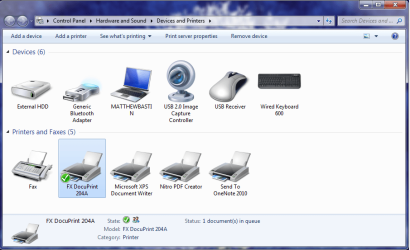
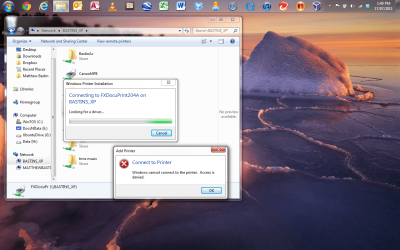
Thanks for your support and encouragement. I have made a couple of screen shots which hopefully will explain a bit more of the problem.
These shots are all from the WIn 7 laptop.
The printer is a simple fuiji xerox docuprint204a | My System Specs | | OS Windows 7 Home Premium 32 bit |
17 Jul 2011
|
#9 | | Windows 7 Pro x64 (1), Win7 Pro X64 / WinXP Pro x86 on (2) |
I'm assuming that the printer shown already installed on your laptop was the result of plugging the printer directly into the laptop, and not the network version of that printer which is USB-attached to the XP desktop and that you're trying to install on the laptop.
Ok. It's the "access denied" error that we need to overcome. Some kind of a network password issue perhaps.
Do you have a user/password defined for both laptop and desktop?
Are the drives of the XP desktop accessible directly as drive letters? In other words, can you "map network drive" for a partition on the desktop, from the laptop? Or, if you try to "map network drive" for an XP drive to a Windows 7 letter, do you also get "access denied"?
Can you even see into the drives of your XP desktop from Windows 7, other than those specific "share" folders?
Your screenshot shows a bunch of "share" items on the network, along with the printer, but these may be folders on the desktop machine that you specifically "shared".
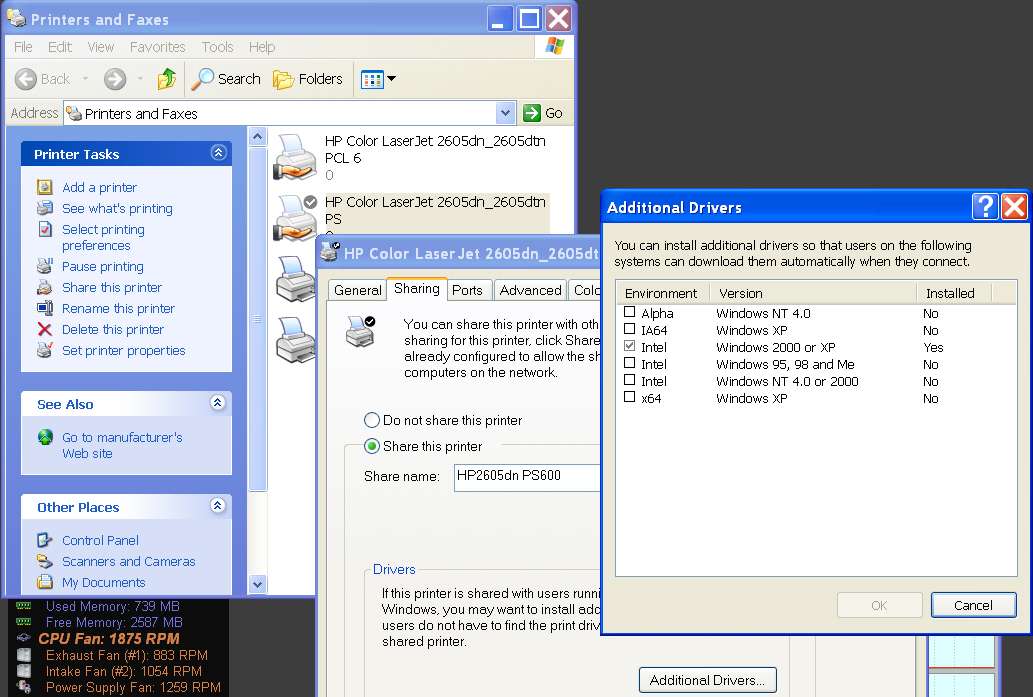
Can you post screenshots from the XP machine, of what your printer definition looks like on that machine?
For example, on my own XP partition here is what my USB-connected printer looks like, if you right-click and select Properties, and then select the "sharing" tab, and then push the "additional drivers" button to show what's installed. | My System Specs | | System Manufacturer/Model Number Home-built, two systems (1) and (2) OS Windows 7 Pro x64 (1), Win7 Pro X64 / WinXP Pro x86 on (2) CPU i5-3350p 3.1Ghz/6MB-cache (1); E8400 3.0Ghz/6MB-cache (2) Motherboard ASUS P8Z77-V Pro (1); ASUS P5Q3 (2) Memory 8GB PC3-12800 DDR3 (1); 4GB PC3-10600 DDR3 (2) Graphics Card ATI HD5770 dual-DVI (1), (see TV cards); ATI HD4850 (2) Sound Card Realtek ALC892 HD Audio (1); Realtek ALC1200 HD Audio (2) Monitor(s) Displays Eizo HD2441W LCD, Eizo S2433W (1); Eizo 24" S2433W (2) Screen Resolution 1920x1200, 1920x1200 (1); 1920x1200 (2) Keyboard IBM PS/2 (1) and (2) Mouse Logitech MX Revolution wireless (1); Microsoft wired (2) PSU Nesteq ECS-6001 600W (1); Nesteq ECS-5001 500W (2) Case Acousti-Case 360 (1) and (2) Cooling Noctua NH-U12P SE2 for CPU, 2x120mm case fans (1) and (2) Hard Drives (1) 1TB SATA-II (7200RPM), 2TB SATA-II (7200RPM), 2TB SATA-III (7200RPM), 250GB SATA-III (10000RPM) for OS;
(2) 320GB SATA-II (7200RPM), 750GB SATA-II (7200RPM), 150GB SATA-II (10000RPM) for OS Internet Speed 15mbps down / 2mbps up Other Info Ceton InfiniTV 4-tuner cablecard-enabled TV card as well as Hauppauge HVR-2250 OTA/ATSC 2-tuner TV card in (1), running under Win7 WMC Printer Connection problems? All times are GMT -5. The time now is 01:07 PM. | |