
You are using an out of date browser. It may not display this or other websites correctly.
You should upgrade or use an alternative browser.
You should upgrade or use an alternative browser.
My Laptop Screen Isn't working
- Thread starter Amirsad
- Start date
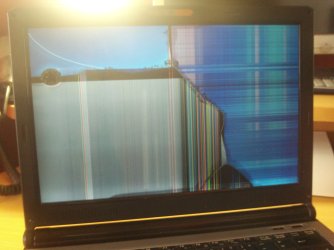
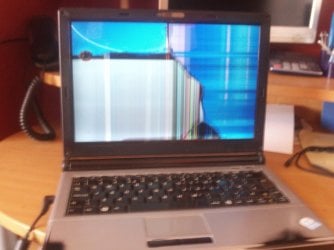

The display itself seems to have gone bad, you should replace it
My Computer
At a glance
Windows 10 Pro x64, Arch LinuxIntel Core 2 Quad Q8200 OC'd 3.08GHz8GB DDR2 900MhzMSI GT730 2GB GDDR5 (Kepler)
- Computer type
- PC/Desktop
- Computer Manufacturer/Model Number
- Custom Build
- OS
- Windows 10 Pro x64, Arch Linux
- CPU
- Intel Core 2 Quad Q8200 OC'd 3.08GHz
- Motherboard
- Asus Rampage formula LGA775
- Memory
- 8GB DDR2 900Mhz
- Graphics Card(s)
- MSI GT730 2GB GDDR5 (Kepler)
- Sound Card
- Supreme FX2
- Monitor(s) Displays
- Samsung LS22F350 LED
- Screen Resolution
- 1080P
- Hard Drives
- Kingston SSDNow UV400 120GB, 500GB Hitachi, 2TB Samsung, 500GB Seagate FreeAgent, 640GB Samsung, 160GB Toshiba (Arch)
- PSU
- AeroCool 500W Bronze
- Cooling
- Cooler Master V6 + 3X fans
- Keyboard
- Prolink keyboard
- Mouse
- Logitech M705
- Internet Speed
- 1MiB/s
- Browser
- Chrome Beta
but i dont understand i was simply cleaning the laptop from dust etc. before was working fine then i put the screws back in then this happen. it used to be just half of the screen but if you press on it with your hand it spreads it across. So are you sure if so could you find me a cheap 12" screen to buy.
My Computer
At a glance
Windows 7
- OS
- Windows 7
Did you properly connect the screen cable to the board?but i dont understand i was simply cleaning the laptop from dust etc. before was working fine then i put the screws back in then this happen. it used to be just half of the screen but if you press on it with your hand it spreads it across. So are you sure if so could you find me a cheap 12" screen to buy.
You probably wrongly re-connected some internal components
My Computer
At a glance
Windows 10 Pro x64, Arch LinuxIntel Core 2 Quad Q8200 OC'd 3.08GHz8GB DDR2 900MhzMSI GT730 2GB GDDR5 (Kepler)
- Computer type
- PC/Desktop
- Computer Manufacturer/Model Number
- Custom Build
- OS
- Windows 10 Pro x64, Arch Linux
- CPU
- Intel Core 2 Quad Q8200 OC'd 3.08GHz
- Motherboard
- Asus Rampage formula LGA775
- Memory
- 8GB DDR2 900Mhz
- Graphics Card(s)
- MSI GT730 2GB GDDR5 (Kepler)
- Sound Card
- Supreme FX2
- Monitor(s) Displays
- Samsung LS22F350 LED
- Screen Resolution
- 1080P
- Hard Drives
- Kingston SSDNow UV400 120GB, 500GB Hitachi, 2TB Samsung, 500GB Seagate FreeAgent, 640GB Samsung, 160GB Toshiba (Arch)
- PSU
- AeroCool 500W Bronze
- Cooling
- Cooler Master V6 + 3X fans
- Keyboard
- Prolink keyboard
- Mouse
- Logitech M705
- Internet Speed
- 1MiB/s
- Browser
- Chrome Beta
I never touched the screen cable i was cleaning the motherboard which something wrong could of happend. If there is something to do from the motherboard to the screen cable then maybe but could you send me a picture if what it looks like thanks
My Computer
At a glance
Windows 7
- OS
- Windows 7

There is a connection that runs from the screen and connects to the motherboard, it differs from make and model of laptop, but if you examine the connections that are on the motherboard you should be able to find it. There could be some sort of documentation from the manufacturer of your laptop, they usually have a section in the manual called "Repairs and replacing parts" or something to that effect.
My Computer
At a glance
Windows 7 Home Premium 64bitIntel Core i3 380M(2.53GHz)4GB DDR3 1066Intel HD Graphics 128MB VRAM
- Computer Manufacturer/Model Number
- Acer Aspire TimelineX AS4820T-6645
- OS
- Windows 7 Home Premium 64bit
- CPU
- Intel Core i3 380M(2.53GHz)
- Memory
- 4GB DDR3 1066
- Graphics Card(s)
- Intel HD Graphics 128MB VRAM
- Screen Resolution
- 1366x768
- Hard Drives
- 640GB 5400RPM SATA

Hi Amirsad, have a look at this link Laptop Repair Help » Notebook display assembly diagram. How an image appears on the screen. It will give you a greater understanding of how a picture is displayed on a laptop  Browse the site for more info on repairing laptops
Browse the site for more info on repairing laptopsMy Computer
At a glance
win 7 ultimate32bit, Win8.1pro wmc 32bitamd phenom x4 9600corsair twinxs 2x2gb2x nvidia 1gb 8500gt
- Computer type
- PC/Desktop
- Computer Manufacturer/Model Number
- self build
- OS
- win 7 ultimate32bit, Win8.1pro wmc 32bit
- CPU
- amd phenom x4 9600
- Motherboard
- asus m2n32-sli deluxe
- Memory
- corsair twinxs 2x2gb
- Graphics Card(s)
- 2x nvidia 1gb 8500gt
- Sound Card
- onboard
- Monitor(s) Displays
- 23" PB Viseo 233d
- Screen Resolution
- 1920x1080
- Hard Drives
- maxtor sata 500gb
maxtor sata 320gb
fujitsu sata200gb
- PSU
- oryxx tornado 750w
- Case
- thermaltake xaser lll
- Cooling
- artic freezer64 pro + 7 case fans

Did the motherboard need cleaning
My Computer
At a glance
windows 7 home prem 64 biti3 5304 gig ddr 3onboard i only play game using onlive cloud g...
- Computer Manufacturer/Model Number
- acer aspire x3950
- OS
- windows 7 home prem 64 bit
- CPU
- i3 530
- Memory
- 4 gig ddr 3
- Graphics Card(s)
- onboard i only play game using onlive cloud gaming
- Sound Card
- onboard
- Monitor(s) Displays
- i-inc 19 wide screen
- Hard Drives
- 640 gig
- PSU
- 250
- Case
- small form
- Cooling
- fan
- Keyboard
- logitech
- Mouse
- motor mouse
- Internet Speed
- 50 meg
- Other Info
- Firefox nightly 64bit

It's definitely a hardware issue, whether it's your screen having gone bad, (unlikely if it JUST happened and was working immediately before the cleaning, but still a possibility) or a connection that came loose, or screws being too tight and pressing on the display, etc... Take it apart, check the connections, and put it back together and see what happens.
My Computer
At a glance
W7 Professional x64AMD Athlon II X3 445 Rana 3.10 GHzPNY XLR DDR3 1600 4x2GBNVIDIA GeForce GTS 450 (fermi) 1GB GDDR5
- Computer Manufacturer/Model Number
- Pugh Technologies
- OS
- W7 Professional x64
- CPU
- AMD Athlon II X3 445 Rana 3.10 GHz
- Motherboard
- MSI 870A-G54
- Memory
- PNY XLR DDR3 1600 4x2GB
- Graphics Card(s)
- NVIDIA GeForce GTS 450 (fermi) 1GB GDDR5
- Sound Card
- Realtek ALC892 onboard
- Monitor(s) Displays
- ASUS VE205t, Viewsonic VX2035WM
- Screen Resolution
- 1600x900, 1600x1050
- Hard Drives
- 977GB Hitachi Hitachi HDS721010CLA332
244GB Western Digital WDC WD2500AAJS-65B4A0
488GB Western Digital WDC WD5000AAJS-00A8B0
488GB Western Digital WDC WD5000AAKS-00UU3A0
- PSU
- Antec EarthWatts EA650 650W
- Case
- ThermalTake Armor A90 Mid Tower
- Cooling
- 3x 120mm in, 1x 120mm & 200mm out, self built hydro-cooler
- Keyboard
- Logitec 55
- Mouse
- Razer Deathadder
- Internet Speed
- 20 Mbps D/L, 9 Mbps U/L
Similar threads
- Replies
- 5
- Views
- 2K

- Replies
- 9
- Views
- 2K

