|
Welcome to Windows 7 Forums. Our forum is dedicated to helping you find solutions with any problems, errors or issues you are experiencing with Windows 7. The Windows 7 forum also covers news and updates and has an extensive Windows 7 tutorial section that covers a wide range of tips and tricks.
Windows 7 - HP Deskjet 1050 - Scanner |
07-15-2011
|
#1 | | Windows 7 Home Premium 64 bt |
HP Deskjet 1050 - Scanner OS: Win 7 Home Premium x64
Printer: HP Deskjet 1050 J410a
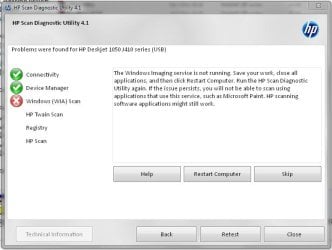
Hello! I bought this printer few months ago, installed, connected etc. Everything worked fine until today. I wanted scan some photos, so i clicked on shortcut for HPscan and...nothing happend. And when I say nothing I mean nothing. Soft utillity didn't loaded, no error window...like doubleclick in empty space. I tried to run directly HPscan.exe. Nothing. With admin rights. Nothing. In compatibilty mode. Nothing. Reinstaled drivers & soft. Still nothing. Then I found HP Scan Diagnostic Utility. It fails at the Windows (WIA) scan. Tried everything they mention, but still nothing. Printing and copying works fine...just scanning is immposible (even in other progrmas like Paint etc.) .
Has anybody such problem? Or solution | My System Specs | | OS Windows 7 Home Premium 64 bt CPU AMD Phenom II x4 955 /3.20 GHz Motherboard MB Asus M4A87TD EVO - AMD 870, DDR3, s. AM3, ATX Memory 4 GB Graphics Card ATI Sapphire Radeon HD 5770, 1GB GDDR5, DVI, HDMI, PCI-E Monitor(s) Displays Acer AL2206W Screen Resolution 1680 x 1050 @ 60Hz Case Thermaltake Element T Cooling CoolerMaster Hyper TX3 + On case (x2) Hard Drives HDD Samsung SpinPoint F3, HD502HJ, SATA II, 16MB - 500GB |
07-15-2011
|
#2 | | Windows 7 Ultimate 64 bit |
Did you uninstall before you reinstalled? Have you checked your system for any malware, spyware or adware? Sometimes these little buggers can get into an app and render it null and void of certain operations. Also they can corrupt your registry. Make sure your system is clean and then do a complete uninstall, sometimes a reboot is required if not reboot, then re-install and see if problem persists. | My System Specs | | System Manufacturer/Model Number Custom built OS Windows 7 Ultimate 64 bit CPU AMD Phenom II X4 940 Black Edition Motherboard Asus M4N78 Pro Memory GSkill 4 X 2 GB PC 8500 Graphics Card PowerColor Radeon HD 4870 512mb GDDR5 Sound Card On board VIA High Definition Audio Monitor(s) Displays Dual monitors: HP W1907 LCD 19" and Gateway HD Display 19" L Screen Resolution 1440x900 Keyboard Logitech G510 Mouse Razor DeathAdder PSU Ultra X4 750 watt fully modular Case Ultra E-Torque mid tower ATX Cooling Core-Contact 92 mm CPU Cooler Hard Drives Seagate Barracuda 1TB (primary)
Seagate Barracuda 2 X 320 GB Internet Speed 50/5 Mbps UL/DL Other Info Optical: Super Muliti DVD burner w/lightscribe, Hauppauge WinTV HVR-1800 |
07-15-2011
|
#3 | | Windows 7 Ultimate SP1 64-Bit |
Did you download the basic drivers or the full software package? Software & Driver Downloads HP Deskjet 1050 All-in-One Printer - J410a - HP technical support (United Kingdom - English)
You might also want to check with HP's Driver Install & Fix Center: Driver Install & Fix Center
If you were trying to use WIA you may be missing a an HP TWAIN driver. | My System Specs | | System Manufacturer/Model Number HP Pavilion Elite 495UK OS Windows 7 Ultimate SP1 64-Bit CPU Intel Core i7 870 @ 2.93GHz Motherboard MSI 2A9C (CPU1) Memory 8Gb Dual-Channel DDR3 @ 664MHz Graphics Card nVidia GeForce GTX 460 1024MB dedicated RAM Sound Card Realtek HD Audio Monitor(s) Displays HP2310i Screen Resolution 1920 x 1080 Keyboard Logitech K750 solar-powered keyboard Mouse Logitech Wireless M180 mouse PSU 460W Case HP Elite Cooling Air cooled Hard Drives 1x1954GB Hitachi HDS22020ALA 330 (RAID), 1x1954GB Hitachi External for backup and storage Internet Speed 2Mb Other Info Pure Avanti Flow Internet Radio with iPod Dock, 64Gb iPod, HP USB Speakers, Sony MDR-V500 Headphones, Sony Vaio F-Series Laptop |
07-16-2011
|
#4 | | Windows 7 Home Premium 64 bt |

Quote: Originally Posted by bassfisher6522 Did you uninstall before you reinstalled? Have you checked your system for any malware, spyware or adware? Sometimes these little buggers can get into an app and render it null and void of certain operations. Also they can corrupt your registry. Make sure your system is clean and then do a complete uninstall, sometimes a reboot is required if not reboot, then re-install and see if problem persists. All of above checked & done... I tried both versions, still the same problem. I also downloaded the Driver Detective and it founds corupted drivers for my scanner, but well...paying 49$ for fix is little bit to much. I also tried few other driver check programs (DriverMax, Driver Checker &SlimDrivers), but none of them found such problem. | My System Specs | | OS Windows 7 Home Premium 64 bt CPU AMD Phenom II x4 955 /3.20 GHz Motherboard MB Asus M4A87TD EVO - AMD 870, DDR3, s. AM3, ATX Memory 4 GB Graphics Card ATI Sapphire Radeon HD 5770, 1GB GDDR5, DVI, HDMI, PCI-E Monitor(s) Displays Acer AL2206W Screen Resolution 1680 x 1050 @ 60Hz Case Thermaltake Element T Cooling CoolerMaster Hyper TX3 + On case (x2) Hard Drives HDD Samsung SpinPoint F3, HD502HJ, SATA II, 16MB - 500GB |
07-16-2011
|
#5 | | Windows 7 Ultimate SP1 64-Bit |
The only other thing I can suggest is to uninstall the scanner drivers, and then re-install them in compatibility mode for Windows Vista or XP.
Just a thought, do you make sure your scanner is disconnected until AFTER you've installed any drivers? | My System Specs | | System Manufacturer/Model Number HP Pavilion Elite 495UK OS Windows 7 Ultimate SP1 64-Bit CPU Intel Core i7 870 @ 2.93GHz Motherboard MSI 2A9C (CPU1) Memory 8Gb Dual-Channel DDR3 @ 664MHz Graphics Card nVidia GeForce GTX 460 1024MB dedicated RAM Sound Card Realtek HD Audio Monitor(s) Displays HP2310i Screen Resolution 1920 x 1080 Keyboard Logitech K750 solar-powered keyboard Mouse Logitech Wireless M180 mouse PSU 460W Case HP Elite Cooling Air cooled Hard Drives 1x1954GB Hitachi HDS22020ALA 330 (RAID), 1x1954GB Hitachi External for backup and storage Internet Speed 2Mb Other Info Pure Avanti Flow Internet Radio with iPod Dock, 64Gb iPod, HP USB Speakers, Sony MDR-V500 Headphones, Sony Vaio F-Series Laptop |
07-16-2011
|
#6 | | Windows 7 Home Premium 64 bt |

Quote: Originally Posted by seavixen32 The only other thing I can suggest is to uninstall the scanner drivers, and then re-install them in compatibility mode for Windows Vista or XP.
Just a thought, do you make sure your scanner is disconnected until AFTER you've installed any drivers? Yop. So I will try install it with compatibillity.
Edit: Nope. Tried every option (Service packs), doesn't help. Well I guess I will wait for some fix from Microsoft...hope they make some. Still thanks for your advices! | My System Specs | | OS Windows 7 Home Premium 64 bt CPU AMD Phenom II x4 955 /3.20 GHz Motherboard MB Asus M4A87TD EVO - AMD 870, DDR3, s. AM3, ATX Memory 4 GB Graphics Card ATI Sapphire Radeon HD 5770, 1GB GDDR5, DVI, HDMI, PCI-E Monitor(s) Displays Acer AL2206W Screen Resolution 1680 x 1050 @ 60Hz Case Thermaltake Element T Cooling CoolerMaster Hyper TX3 + On case (x2) Hard Drives HDD Samsung SpinPoint F3, HD502HJ, SATA II, 16MB - 500GB |
07-16-2011
|
#7 | | Windows 7 Ultimate SP1 64-Bit |
You're welcome. I guess if all else fails you'll be faced with buying a scanner that is compatible with Windows 7.
The all-in-one printer, copier and scanner is getting very popular now. | My System Specs | | System Manufacturer/Model Number HP Pavilion Elite 495UK OS Windows 7 Ultimate SP1 64-Bit CPU Intel Core i7 870 @ 2.93GHz Motherboard MSI 2A9C (CPU1) Memory 8Gb Dual-Channel DDR3 @ 664MHz Graphics Card nVidia GeForce GTX 460 1024MB dedicated RAM Sound Card Realtek HD Audio Monitor(s) Displays HP2310i Screen Resolution 1920 x 1080 Keyboard Logitech K750 solar-powered keyboard Mouse Logitech Wireless M180 mouse PSU 460W Case HP Elite Cooling Air cooled Hard Drives 1x1954GB Hitachi HDS22020ALA 330 (RAID), 1x1954GB Hitachi External for backup and storage Internet Speed 2Mb Other Info Pure Avanti Flow Internet Radio with iPod Dock, 64Gb iPod, HP USB Speakers, Sony MDR-V500 Headphones, Sony Vaio F-Series Laptop |
01-27-2012
|
#8 | | Windows 7 Home Premium 64 bit |
Umm, I know this post was ages ago, I'm just wandering if your problem was solved maybe at a later date, as I have the same problem. I have bought a new laptop and installed the HP Deskjet 1050 on this one. Prints fine, just unable to scan!!! Printer and scanner still works on old laptop. | My System Specs | | OS Windows 7 Home Premium 64 bit |
02-02-2012
|
#9 | | |
Win 7 64 bit HP Deskjet 1050 Successful Install Hi,
I have succeeded in scanning to the HP Deskjet 1050, from a 64bit Win 7 laptop.
I obtained the XP Complete driver package from the HP website, opened up the "Compatibility Troubleshooter" service in Win 7, and ran the Deskjet installer from there.
The installer ran, asked for the device to be connected, then proceeded to communicate with the device . . . . i.e. : the scan head started moving.
After exiting from the installer, I ran the HP scan s/w. It worked, and I then successfully scanned and saved a doc.
Some notes:
1. I had never installed the s/w prior to this point. It may be necessary for others to carry out an uninstall to remove traces of previous install attempts.
2. I did not connect the 1050 until the installer s/w requested me to.
Good luck. | My System Specs | | |
03-03-2012
|
#10 | | Windows 7 Home Premium 32bit. |
NEED HELP MA SCANNER 1050A deskjet NOT WORKING Hey i have been reading all the above but to no avail on how i should make ma scanner work i have tried all the links some of you gave but still ma scanner is not working it keeps giving error or cannot reach to your scanner and all is connected well......i cannot scan work for people and maself tooo............please help asap coz am desperatly inneed of help..... | My System Specs | | OS Windows 7 Home Premium 32bit. Memory 4 GB HP Deskjet 1050 - Scanner problems? All times are GMT -5. The time now is 10:21 AM. |  |