
 |
Welcome to Windows 7 Forums. Our forum is dedicated to helping you find solutions with any problems, errors or issues you are experiencing with Windows 7. The Windows 7 forum also covers news and updates and has an extensive Windows 7 tutorial section that covers a wide range of tips and tricks.
Windows 7 - PC not recognizing External Drive |
07-15-2011
|
#1 | | |
PC not recognizing External Drive Hey guys! So i have a 1Tb external Drive (USB) and its never had any problems until now. I just recently reinstalled windows and when I try plugging in my external drive and then powering it on. My PC doesn't recognize it. I know that it knows its plugged in because it is showing up in Device manager and it is showing up as the "Safely remove usb" in the task bar.
Any help is appreciated
Thanks
Regards,
ZiiC
| My System Specs | | OS Windows 7 Ultimate x64 |
07-15-2011
|
#2 | | Vista and Windows7, sometimes Ubuntu and Fedora |
Check in device manager whether it has a partition with a letter. If it shows in device manager, it is being recognized. But it could be a hidden drive/partition without an assigned letter. Then it will not show in Computer or Explorer.
If in doubt, post a picture of device manager. | My System Specs | | System Manufacturer/Model Number HP, Dell, Gateway - 2 laptops and 2 desktops OS Vista and Windows7, sometimes Ubuntu and Fedora CPU from 1.6GHz Duo to 2.5GHz Quad Monitor(s) Displays 2x HP w2207 Keyboard with trackball - no mices Mouse terrible devices, who wants them Hard Drives 5x HDD, 2x SSD, 6x Externals Internet Speed DSL 6000 |
07-15-2011
|
#3 | | Windows 7 Ultimate SP1 64-Bit |
You say you plugged it in to a USB port and then powered it on.
Try powering it on first, and then plugging it in to a USB port.
If that doesn't do the trick, leave the drive switched on and plugged in then restart your computer.
You might also want to check in device manager that there isn't a problem with your chipset drivers or USB controller drivers. | My System Specs | | System Manufacturer/Model Number HP Pavilion Elite 495UK OS Windows 7 Ultimate SP1 64-Bit CPU Intel Core i7 870 @ 2.93GHz Motherboard MSI 2A9C (CPU1) Memory 8Gb Dual-Channel DDR3 @ 664MHz Graphics Card nVidia GeForce GTX 460 1024MB dedicated RAM Sound Card Realtek HD Audio Monitor(s) Displays HP2310i Screen Resolution 1920 x 1080 Keyboard Logitech K750 solar-powered keyboard Mouse Logitech Wireless M180 mouse PSU 460W Case HP Elite Cooling Air cooled Hard Drives 1x1954GB Hitachi HDS22020ALA 330 (RAID), 1x1954GB Hitachi External for backup and storage Internet Speed 2Mb Other Info Pure Avanti Flow Internet Radio with iPod Dock, 64Gb iPod, HP USB Speakers, Sony MDR-V500 Headphones, Sony Vaio F-Series Laptop |
07-15-2011
|
#4 | | |
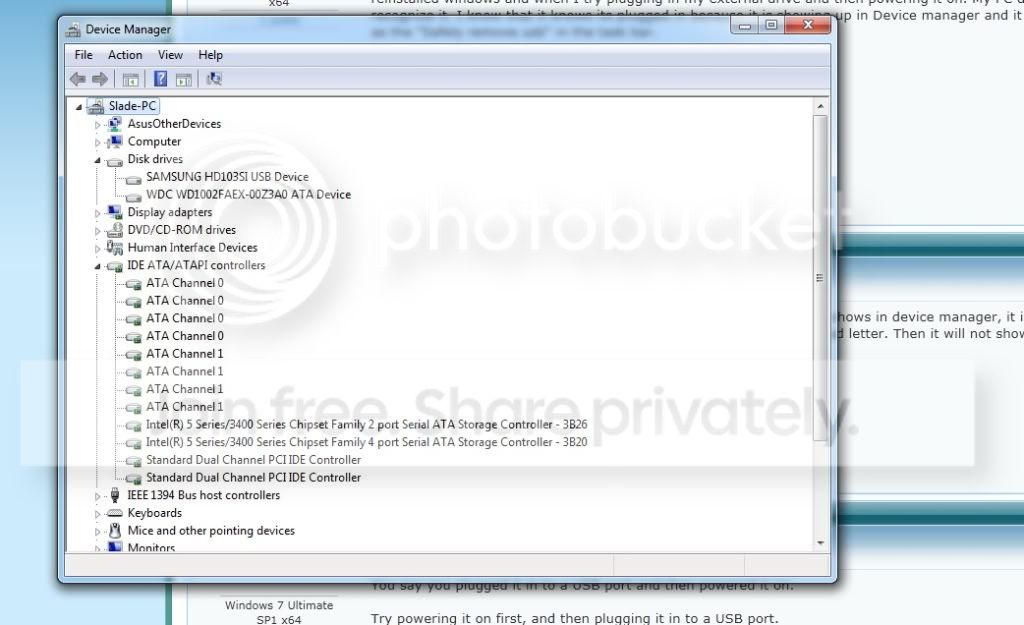
Alright well I really don't know how to do some of this stuff. Im not the biggest computer techy :P Also I just tried it in my other PC and its doing the same thing, and that PC I didn't do anything to. Well here is a picture of my device manager: | My System Specs | | OS Windows 7 Ultimate x64 |
07-15-2011
|
#5 | | Vista and Windows7, sometimes Ubuntu and Fedora |
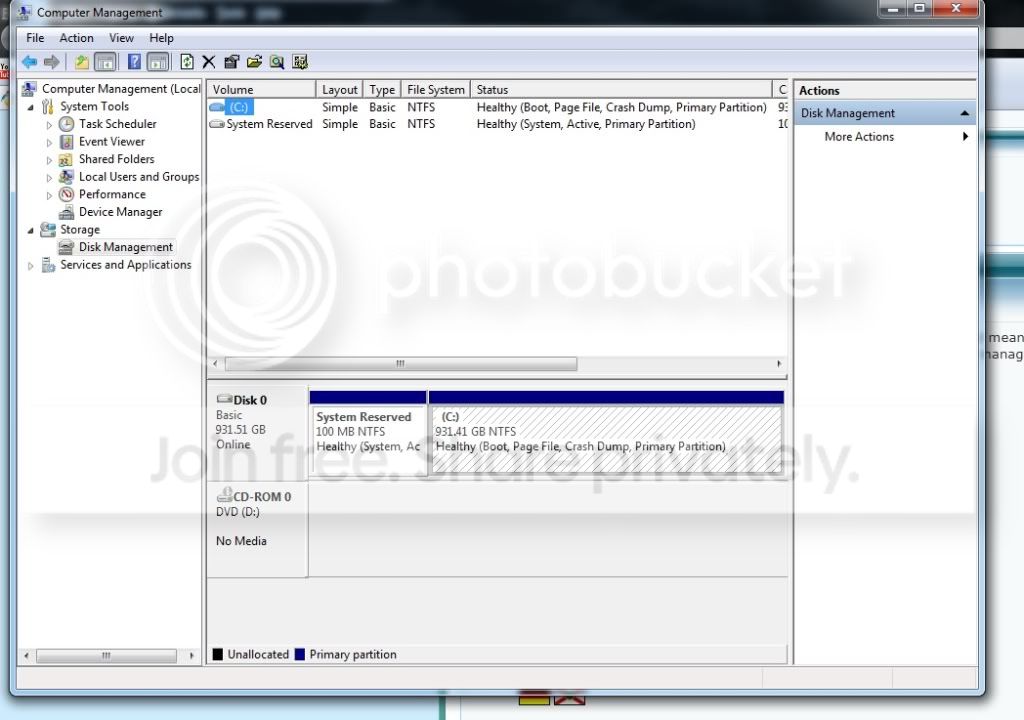
Sorry, I made a mistake. I said device manager but meant disk management. Can you post a picture of disk management too. At least in device manager I see that you have an external Samsung. Is that the one we are talking about? | My System Specs | | System Manufacturer/Model Number HP, Dell, Gateway - 2 laptops and 2 desktops OS Vista and Windows7, sometimes Ubuntu and Fedora CPU from 1.6GHz Duo to 2.5GHz Quad Monitor(s) Displays 2x HP w2207 Keyboard with trackball - no mices Mouse terrible devices, who wants them Hard Drives 5x HDD, 2x SSD, 6x Externals Internet Speed DSL 6000 |
07-15-2011
|
#6 | | |
Alright well here it is. yes that is the drive we are talking about. | My System Specs | | OS Windows 7 Ultimate x64 |
07-15-2011
|
#7 | | Vista and Windows7, sometimes Ubuntu and Fedora |
Hmm, that is strange. The drive does not show up in disk management although it is in device manager. That could be a driver problem.
Go back to device manager, right click on the drive, go to Properties and click the Driver tab. Then "Update Driver". See whether that yields anything. | My System Specs | | System Manufacturer/Model Number HP, Dell, Gateway - 2 laptops and 2 desktops OS Vista and Windows7, sometimes Ubuntu and Fedora CPU from 1.6GHz Duo to 2.5GHz Quad Monitor(s) Displays 2x HP w2207 Keyboard with trackball - no mices Mouse terrible devices, who wants them Hard Drives 5x HDD, 2x SSD, 6x Externals Internet Speed DSL 6000 |
07-16-2011
|
#8 | | |
Alright well i tried that and after its done it just says that i doesn't need an update to the driver. Could you just possibly team view me? | My System Specs | | OS Windows 7 Ultimate x64 PC not recognizing External Drive problems? All times are GMT -5. The time now is 10:21 AM. |  |