
I feel like I have been had. Please tell me i am not.

bizejim

New member
I would like everyone’s/ anyone’s help with my situation. I have two dual core Intel computers one is a Dell Vostro 200 and the other is a Gateway GT5549e and I did all of the research and downloaded the Win 7 advisor, ran it on both of the computers one Had Win XP pro 32 bit and the other had Vista Business 32 bit.
My intended goal was to install Win 7 64-Bit home Premium on both computers so that I could utilize 8 gig of Ram on each of the computers. I researched both mother boards and both reported that they would except 2 gig of DDR2 Ram in each of the four slots. I purchased a great deal (the Family pack for 3 installs). Inorder to install the 64 bit Win 7 you have to do a custom install and I think you may know how time consuming that is.
After all of that; Windows 7 64 bit shows in the system control panel that I have 8 gig of ram but all that it can use is 3.25 gig ….. the same amount of ram that I could use way back before all of this cost and effort.
From the form I learned that in the BIOS the memory needs to be remapped…… only thing is that the BIOS will let me into advanced memory config section but I seem to be locked out of changing anything other than the frequency and the latencies……. So in conclusion the very reason that anyone would want to go through all of this cost and headache for a 64 bit system……… to utilize more Ram memory and the supported and available DIMM slots is handicapped by the manufacture with their BIOS.
But is that not what Windows 7 advisor is all about? The question on hand for Win 7 Advisor to answer was can I run a 64 bit operating system on my computer-setup…..and if not for the reason of utilizing more memory then I ask them for what reason? The website further validates this one and only reason by posing the question do you need a 64 bit system and states if you need to utilize more system RAM when running multiple applications at the same time then you could benefit from a 64 Bit Windows 7 operating system.
I feel so very cheated. I like building systems and have built four super nasty workstations including one Intel i7 960 and a Intel i7 980X 6 core system but for all of the cost and effort I could of purchased two factory built towers for less than $400 each and all I would have had to do was set them up and plug them in.
After all of my ramblings can you tell me if I am wrong or if there is anything more that I can do to make this 64 bit system utilize the 8 gig of memory? Since I like doing these kinds of things the time spent was not an issue but to have the outcome right back where I started is depressing. The two systems were working very stable as they were but I wanted to move forward since Win XP will no longer be supported in the near future
 

My Computer

Computer Manufacturer/Model Number
Gatway Gt5449e
OS
Windows 7 Home Premium 64 bit
CPU
Intel E4300 Dual core
Motherboard
intel D945GCFG1
Memory
ddr2 5300 __ 4 dimms __8 gig
Graphics Card(s)
BFG Nvidia 9600 GT
Sound Card
not sure on the board
Monitor(s) Displays
Gateway FPD2275W
Hard Drives
Sata 11 160 gig
PSU
550 w
Case
mid tower
Cooling
cpu stock cooler 80 mm rear case fan
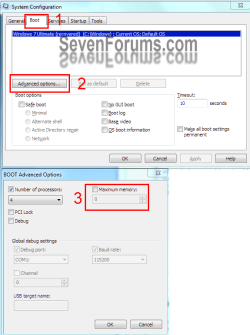
Sorry for the silly suggestion but did you uncheck the max ram option in system configuration? I had a problem that I think was like yours (?) and that fixed it for me.....
 

My Computer

Computer Manufacturer/Model Number
HB
OS
W7x64 Ult.
CPU
i7 975
Motherboard
P6T7 SC
Memory
12GB Corsair Dom
Graphics Card(s)
Evga GTX285
Sound Card
OB
Monitor(s) Displays
HP LP2475
Screen Resolution
1920x1200
Hard Drives
Velociraptors Raid0 BU
Crucial M4 OS
WD RE4 Data
PSU
PC Power & Cooling 950
Case
Chieftec Bravo
Cooling
Air 6 GentleTyphoon
Keyboard
Logitech Illuminated
Mouse
Logitech MX518
Have you looked for a BIOS update? both machines might be older out of date and as such didnt have the options in the BIOS at the time
 

My Computer

Computer type
Laptop
Computer Manufacturer/Model Number
ASUS G60-RBBX05
OS
Win7 Home Premium 64x
CPU
Intel Core 2 Duo P7450 / 2.13 GHz (2.29 with Extreme Turbo)
Memory
4 GB PC-6400 Hyundai (2X2) at 800Mhz
Graphics Card(s)
NVIDIA GeForce GTX 260M 1GB DDR3 VRAM
Monitor(s) Displays
16" LED Backlit
Screen Resolution
1366 x 768 on laptop 1600x1050 max res on 22" external mon
Hard Drives
OCZ Agility 3 60GB SSD / 320 GB - Serial ATA-150 - 7200 rpm
PSU
6-cell Lithium ion { lasts 1.5 hours }
Case
ASUS G60 Laptop
Keyboard
Chicklet type back-lit (white light) keyboard
Mouse
Logitech G9 Laser Mouse 3200dpi and 1000 reports per minute
Internet Speed
Comcast 8.60mb/s up - 3.11mb/s down
Antivirus
MSE
Browser
Firefox
Other Info
General mid-budget gaming Comp. Low batterylife - High FrameRates - currently overheating problems :(

2nd Rig: Case: Rosewill BLACKHAWK Gaming ATX Mid Tower Computer Case

Mobo: GIGABYTE GA-990FXA-UD3
CPU: AMD FX-6200 Zambezi 3.8GHz (4.1GHz Turbo)
Heatsink: COOLER MASTER V8 CPU Cooler
RAM: Patriot Viper 3 8GB (2 x 4GB) 240-Pin DDR3 SDRAM 1866 (PC3 15000)
GPU: SAPPHIRE Radeon HD 6850 1GB 2
Yes this is a hardware issue. Do the support site of Dell and Gateway offer any solutions? Nothing should have to be changed, normally, but the makers may have thrown in a hassle to overcome.
Try Outlander's suggestion too. In Start, Search type msconfig and enter. In the window that opens go to the Boot tab and click Advanced options...
Then uncheck Maximum Memory, OK, OK, and reboot. See the snip.
msconfig.PNG

Where are you seeing you have 3.25 GB of RAM and where did you get the info on your motherboards?
Check this page out too. It looks like Dell has their own Win 7 Upgrade tool.
 

My Computer

Computer type
PC/Desktop
Computer Manufacturer/Model Number
Home Built Desktop By DataTech
OS
Windows 7 Ultimate X64 SP1
CPU
Intel i5-2550K, Differing ~4.4-4.8GHz No built in GPU
Motherboard
ASUS P8Z68-V PRO/GEN3
Memory
16GB G.Skill Sniper 1866MHz @ 2133MHz 2x8GB
Graphics Card(s)
ASUS GTX650TIB-DC2OC-2GD5, (650TI Boost)
Sound Card
Onboard Realtek 5-1
Monitor(s) Displays
Samsung P2570HD
Screen Resolution
1920x1080
Hard Drives
Samsung 840 Pro 256GB SSD for OS, 500GB Seagate Constellation (Enterprise drive) for Data
PSU
Corsair HX650W
Case
Inwin Dragon Rider
Cooling
Hyper 212 EVO w/two Noctua fans, push-pull, @1300 RPM
Keyboard
E-Z Eyes, bright yellow keys with large characters
Mouse
steelseries SENSEI Laser Pro Gaming
Internet Speed
48-51Mbs Mbs down, 11 Mbs up Xfinity Cable
Antivirus
Norton Internet Security 2013
Browser
IE 10, Opera, Pale Moon if needed
Other Info
4 case fans, LG BluRay-RE, ASUS DVD-RW, Mr. Fusion power supply, 1.21 gigawatts.

My Computer

Computer type
Laptop
Computer Manufacturer/Model Number
ASUS G60-RBBX05
OS
Win7 Home Premium 64x
CPU
Intel Core 2 Duo P7450 / 2.13 GHz (2.29 with Extreme Turbo)
Memory
4 GB PC-6400 Hyundai (2X2) at 800Mhz
Graphics Card(s)
NVIDIA GeForce GTX 260M 1GB DDR3 VRAM
Monitor(s) Displays
16" LED Backlit
Screen Resolution
1366 x 768 on laptop 1600x1050 max res on 22" external mon
Hard Drives
OCZ Agility 3 60GB SSD / 320 GB - Serial ATA-150 - 7200 rpm
PSU
6-cell Lithium ion { lasts 1.5 hours }
Case
ASUS G60 Laptop
Keyboard
Chicklet type back-lit (white light) keyboard
Mouse
Logitech G9 Laser Mouse 3200dpi and 1000 reports per minute
Internet Speed
Comcast 8.60mb/s up - 3.11mb/s down
Antivirus
MSE
Browser
Firefox
Other Info
General mid-budget gaming Comp. Low batterylife - High FrameRates - currently overheating problems :(

2nd Rig: Case: Rosewill BLACKHAWK Gaming ATX Mid Tower Computer Case

Mobo: GIGABYTE GA-990FXA-UD3
CPU: AMD FX-6200 Zambezi 3.8GHz (4.1GHz Turbo)
Heatsink: COOLER MASTER V8 CPU Cooler
RAM: Patriot Viper 3 8GB (2 x 4GB) 240-Pin DDR3 SDRAM 1866 (PC3 15000)
GPU: SAPPHIRE Radeon HD 6850 1GB 2
That Vostro only takes up to 4 GB according to Dell,

Refurbished Vostro 200 Mini Tower | Dell

despite the chipset in it (Intel G33) supporting up to 8 GB,

Intel® G33 Express Chipset - Overview

You would have to take it up with Dell as to why they limited it to only 5 GB, and whether they ever released a bios update for it to increase it to 8 GB.

As far as the gateway goes I'll assume that model number is a typo and should actually be GT5449e, as GT5549e brings up absolutely nothing in a Google search other than this thread,

GT5549e - Google Search

If it is a GT5449e then it does in fact only support up to 4 GB,

Gateway Support - Specifications

due to its Intel 945G chipset, which falls under what is described here,

The system memory that is reported in the System Information dialog box in Windows Vista is less than you expect if 4 GB of RAM is installed
 

My Computer

Computer type
PC/Desktop
Computer Manufacturer/Model Number
Me
OS
Win 7 Ultimate x64
CPU
FX-8350 @ 4.6 GHz so far
Motherboard
Asus M5A97 EVO
Memory
ADATA XPG V1 Series Black 8GB DDR3 1600
Graphics Card(s)
Sapphire R9 270x Dual-X
Sound Card
Xonar DGX w/ Corsair Vengence 1300
Monitor(s) Displays
Acer S232HL Abid
Screen Resolution
1920x1080
Hard Drives
120 GB OCZ Vertex 3
500 GB Seagate 7200.12
PSU
Antec Earthwatts 650W Green
Case
Antec Three Hundred
Cooling
Cooler Master 212 EVO
Keyboard
Logitech G510
Mouse
Logitech G500s
Internet Speed
35000/3000
There are a number of good ideas here

I thank Outlander, Thorsen, Stormy13 and Britton30 for responding First Stormy 13 you are correct it is a Gateway GT5449e.
Thorsen there is a BIOS up date that was released 7/29/2010 the version is CP94510J I downloaded it and extracted all the files as directed but a pop up window said that a program was blocking it so I rebooted the computer and with only the file itself open I tried again and it gave me the same message. Even though I have built a number of systems I have never had to flash or update the BIOS so maybe I am doing something wrong but I don’t know. Even with the ASUS P6X58De and The P6X58D Premium boards that are reported to have super easy BIOS flash capabilities tell you not to change the BIOS if you don’t need to but additionally they tell you the issues that the new version of the latest BIOS update is supposed to address and explain that if you are not having any of the reported issues you should not change the BIOS so I never had any problems so I thought leave well enough alone…….Having said that it looks like I need to at least try to update the BIOS on this one but how is the next question. The link to the support page for the gateway is http://support.gateway.com/us/en/product/default.aspx?tab=1&modelId=2934from this link you can see the stock configuration but I have added a 550 W PS a BFG Nvidia 9600GT Graphics card and 8 Gig of memory even when it was running on the Win Vista 32 bit it reported all of the 8 gig of Ram but just as it shows now it stated it could only utilize 3.25 gig of ram one other thing or note, the onboard Graphics was disabled and the latest Nvidia drivers for the 9600GT card for Win 7 64 BIT are installed.
Thank you Outlander and Britton30 for you suggestion, I can’t be sure but I do believe that it was Outlander that posted that suggestion on another thread and I gave it a go the first look at the advanced window had the max memory checked and had the correct 8192 listed as the max memory but I unchecked the box and selected okay and okay rebooted and then went to the control panel/system window and it still reported 8 gig of ram and only able to utilize 3.25 of ram……… I still thank you for your time and effort but for me this may need to be done after maybe a BIOS update but for now it did not work for me.
Thorsen I did find a Bios update labeled critical with a date of release 4/27/2010 and I also found instructions on how to install from the desktop so I will try that but I did not have much luck with that approach on the Gateway computer but one never knows until they try it, wish me luck that we do not have a power outage if it will launch I have been told this is the biggest risk when Flashing or updating a BIOS thank you for the link.
Stormy13 I do believe that your information about the Intel 945G chipset, which falls under what is described here, may be what makes any further attempts useless for I do believe that I also read on Intel’s website that 955 chipsets and above were the ones that supported more than 4 gig
I will try the helpful advise and thank you again.

But I still feel like I was done in by Windows 7 Adviser they must know that these issues are numerous on many many older computers that people may want to upgrade and not a warning or mention or clue about checking with anyone or a notice about the possible uselessness of installing Win 7 64-bit operating system on older computers. Even if we report to you that you’re okay to run a 64 bit operating system.
 

My Computer

Computer Manufacturer/Model Number
Gatway Gt5449e
OS
Windows 7 Home Premium 64 bit
CPU
Intel E4300 Dual core
Motherboard
intel D945GCFG1
Memory
ddr2 5300 __ 4 dimms __8 gig
Graphics Card(s)
BFG Nvidia 9600 GT
Sound Card
not sure on the board
Monitor(s) Displays
Gateway FPD2275W
Hard Drives
Sata 11 160 gig
PSU
550 w
Case
mid tower
Cooling
cpu stock cooler 80 mm rear case fan
If you are going to do the BIOS update be sure your MB will allow you to do a flashback. I have an older Asus P5 something or other that will not let me do a rollback. It works but has a couple of hiccups at startup that were not there before I messed around. Also if the computer is a must be ready machine you may want to see if you can get a spare BIOS chip just in case. I fried one some years ago and was down for a week waiting on the mail. Actually I wonder if it isn't easier to just get a preflashed chip and bang it in there? I was wondering if your task manager performance tab shows the same memory info as the control panel/system window?
 

My Computer

Computer Manufacturer/Model Number
HB
OS
W7x64 Ult.
CPU
i7 975
Motherboard
P6T7 SC
Memory
12GB Corsair Dom
Graphics Card(s)
Evga GTX285
Sound Card
OB
Monitor(s) Displays
HP LP2475
Screen Resolution
1920x1200
Hard Drives
Velociraptors Raid0 BU
Crucial M4 OS
WD RE4 Data
PSU
PC Power & Cooling 950
Case
Chieftec Bravo
Cooling
Air 6 GentleTyphoon
Keyboard
Logitech Illuminated
Mouse
Logitech MX518
Here is a little utility that will give some basic info about either PC. GRC*|*SecurAble: Determine Processor Security Features*|**
The Upgrade Advisor can't tale the infinite number of configurations into account and give 100% accurate info. In my case it told me 1 program was definitely not compatible with Win 7 32 or 64 bit. It said my aging printer were, but to check the manufacturer's website for info, and provided a link to it. Did the Avisor give you the A-OK on everything in each PC?
 

My Computer

Computer type
PC/Desktop
Computer Manufacturer/Model Number
Home Built Desktop By DataTech
OS
Windows 7 Ultimate X64 SP1
CPU
Intel i5-2550K, Differing ~4.4-4.8GHz No built in GPU
Motherboard
ASUS P8Z68-V PRO/GEN3
Memory
16GB G.Skill Sniper 1866MHz @ 2133MHz 2x8GB
Graphics Card(s)
ASUS GTX650TIB-DC2OC-2GD5, (650TI Boost)
Sound Card
Onboard Realtek 5-1
Monitor(s) Displays
Samsung P2570HD
Screen Resolution
1920x1080
Hard Drives
Samsung 840 Pro 256GB SSD for OS, 500GB Seagate Constellation (Enterprise drive) for Data
PSU
Corsair HX650W
Case
Inwin Dragon Rider
Cooling
Hyper 212 EVO w/two Noctua fans, push-pull, @1300 RPM
Keyboard
E-Z Eyes, bright yellow keys with large characters
Mouse
steelseries SENSEI Laser Pro Gaming
Internet Speed
48-51Mbs Mbs down, 11 Mbs up Xfinity Cable
Antivirus
Norton Internet Security 2013
Browser
IE 10, Opera, Pale Moon if needed
Other Info
4 case fans, LG BluRay-RE, ASUS DVD-RW, Mr. Fusion power supply, 1.21 gigawatts.
Having said that it looks like I need to at least try to update the BIOS on this one but how is the next question.
If you haven't yet download and unzip the update, there is a readme included that has detailed instructions on how to flash it.

Performing the update

1. After you have downloaded and double-clicked the BIOS update file (9537564.exe), the needed files self-extract and
copy into the C:\Cabs\9537564 folder on the hard drive.

2. From the Start menu, click Run.

3. In the Run dialog box, type: C:\Cabs\9537564\CF94510J[1].15A.0038.EB.EXE. Click OK.

4. In the Intel(r) Express BIOS Update Setup Welcome dialog box, click Next.

5. In the Software License Agreement dialog box, click Yes.

6. In the Finish and Reboot dialog box, perform the following steps.

a. Read the information, and then ensure that there is a check mark for the option Yes I want to complete the BIOS update.
b. Note the WARNING message: FOR THE NEXT 3 MINUTES DO NOT POWER OFF YOUR SYSTEM. Your system will perform an automatic shutdown and reboot process. Powering down before completion of this reboot process may cause your system to require service by the system manufacturer.
c. Click Finish.

7. Wait for the process to complete the reboot sequence.

Note: The computer may appear to take a longer period of time to restart and it may beep 10 times during the restart process. This is considered normal and is part of the BIOS update process.

8. The Intel(r) Express BIOS Update dialog box states that the Express BIOS update has completed successfully. Click OK.

9. On the first boot after the BIOS update has completed, it is possible to receive a Checksum error message. This is caused by some BIOS parameters not being set at the default values. Enter the BIOS Setup Utility, reset BIOS options to default values (press the F9 key), and then save and exit (press F10) the BIOS Setup Utility.
 

My Computer

Computer type
PC/Desktop
Computer Manufacturer/Model Number
Me
OS
Win 7 Ultimate x64
CPU
FX-8350 @ 4.6 GHz so far
Motherboard
Asus M5A97 EVO
Memory
ADATA XPG V1 Series Black 8GB DDR3 1600
Graphics Card(s)
Sapphire R9 270x Dual-X
Sound Card
Xonar DGX w/ Corsair Vengence 1300
Monitor(s) Displays
Acer S232HL Abid
Screen Resolution
1920x1080
Hard Drives
120 GB OCZ Vertex 3
500 GB Seagate 7200.12
PSU
Antec Earthwatts 650W Green
Case
Antec Three Hundred
Cooling
Cooler Master 212 EVO
Keyboard
Logitech G510
Mouse
Logitech G500s
Internet Speed
35000/3000
I have never had so much help,You guys are great

I haven’t been able to try everything yet but I do need to wait now for the Windows update to Explorer 9 to finish before I can do anything.
Thank you Stormy13 for the detailed instructions for the BIOS update; they should help tremendously. One brief question should the instructions work for both the dell and the Gateway?
I will be starting with the Gateway. I have two repair bays or maybe I should call them work decks in my work area that I can hook up at the same time and I prefer to have one of them occupied with a stable computer for correspondence and research during the build and upgrade process on the ailing computer-patient
Btitton30, do you think that there may be a program that is preventing the BIOS update because I did a fresh install; only things on the computer now is Adobe reader, and whatever was installed by Win 7. And its upgrades. I have to take that back I also installed Office 2010 professional and all of its updates. I also had to install the drivers for the add-in Graphics card but they Came straight from the NVIDIA homesite and the were specific for the Win 7 64-Bit version.
As to your question did win advisor say everything would work? Oh no a lot of different programs I think I had Office 2000 professional and it did not like any of that…… some printers and a number of other things but none of that stuff is on the computer. that is one of the reasons I put out the cash for Office 2010 and the new HP Officejet Pro 8500 printer.
 

My Computer

Computer Manufacturer/Model Number
Gatway Gt5449e
OS
Windows 7 Home Premium 64 bit
CPU
Intel E4300 Dual core
Motherboard
intel D945GCFG1
Memory
ddr2 5300 __ 4 dimms __8 gig
Graphics Card(s)
BFG Nvidia 9600 GT
Sound Card
not sure on the board
Monitor(s) Displays
Gateway FPD2275W
Hard Drives
Sata 11 160 gig
PSU
550 w
Case
mid tower
Cooling
cpu stock cooler 80 mm rear case fan
Well I followed the directions for the BIOS update for the Gateway.

I followed the directions for the BIOS update. To the letter by following the directions thatStormy13 supplied and let me say that they were the correct directions because the read me file that came with the download file said the same thing; and it got all the way to the Intel BIOS update-program (Big Blue screen) What is it with Intel and there Blue screens? Anyway it wasn’t the blue screen of death it was the BIOS update program and I thought wow we are getting somewhere but to my disappointment a popup screen said “This program is unable to continue, Internal system Error; There is a program or internal problem”
Then I read the instructions again and it did tell what the BIOS update was supposed to address and that was to correct possible black screen issues and also bad hard disk error messages nothing other than that. And even though this is the update they provided right from their support page for my specific Model number below this was a list of Gateway computers that it was applicable to and my model number was not listed
 

My Computer

Computer Manufacturer/Model Number
Gatway Gt5449e
OS
Windows 7 Home Premium 64 bit
CPU
Intel E4300 Dual core
Motherboard
intel D945GCFG1
Memory
ddr2 5300 __ 4 dimms __8 gig
Graphics Card(s)
BFG Nvidia 9600 GT
Sound Card
not sure on the board
Monitor(s) Displays
Gateway FPD2275W
Hard Drives
Sata 11 160 gig
PSU
550 w
Case
mid tower
Cooling
cpu stock cooler 80 mm rear case fan
Back
Top