
TouchyFeely
New member
- Local time
- 11:02 PM
- Messages
- 8
Readers,
I am having a proving to be very difficult issue and getting virtually no viable support from MS so I come to you guys for help. Let me start with specs then I will get into my issue.
WIN7 64 Pro
12GB Crucial Balistiks DDR 1600
c:\ 300GB WD Raptor
5 1TB WD Caviar Blacks
ATI Radeon 4870 Dark Knight
Creative Sound Blaster Fataility
Asus P6X58D-E
Intel i7 930
Corsair 950 PSU
Obsidian 800D with 5 Hot swapable sata drive bays
***************************************************************
ISSUE:
After a MS update I noticed that one of my SATA drives dropped off as if it went bad, the indication for this was that it became inaccesable. I connected the drive via USB and still could not get into the drive. I connected it to my XP OS and presto it was back and fine. When I rebooted I noticed another drive formed a yellow BANG<!> sign, then another and another until all my drives besides the drive that contained my OS droped off.
After pulling my hair out for hours I was able to determin that without a doubt it was not my hardware as everything worked on my XP OS. I rebooted into WIN764 and I downloaded all the service packs and all available updates. After getting the updates and rebooting all my SATA drivesshowed back up which was an improvement but I was still not able to access my flash drives even though the DEVMAN could see them just fine. I could not and still cannot access any external drives, air card or phone that contains a SD card or mass storage.
The operating system sees all on the machine but in the device manager it has the following error message.
"A driver (service) for this device has been disabled. An alternate driver may be providing this functionality. (Code 32)"

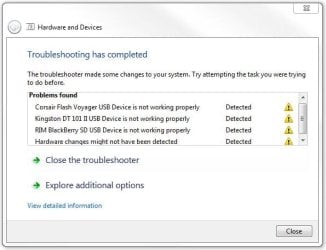
So, I have done everything I can think of and have spent at least 11 hours with MS
teir 1 tech support and they cant fix it either. We have been down every road I can think of. I will not do a system restore as it will take me back to April and I do not want to reformat. I want to pin point this issue and resolve it, not sweep it under the rug.
Also, another interesting fact to this issue is: I have 5 hot swapable bays on my rig, all is well until I pull one out. When I pull one out and then scan for new hardware it removes it from the list in DEVMAN and when I put it back in and re-scan it sees it just fine but give the old ERROR 32 again and what was once an accesable drive now becomes inaccesable. It takes a reboot to get them back.
Here are a few errors I found in my event log:
The driver \Driver\snapman failed to load for the device STORAGE\Volume\{9a59136f-04dc-11e0-959f-806e6f6e6963}#0000000000007E00.
The driver \Driver\snapman failed to load for the device STORAGE\Volume\{02d5794b-04f2-11e0-92fe-806e6f6e6963}#0000000006500000.
The driver \Driver\snapman failed to load for the device STORAGE\Volume\{9a331575-9085-11e0-96bc-806e6f6e6963}#000000AA606B0800.
The driver \Driver\snapman failed to load for the device STORAGE\Volume\{02d5794b-04f2-11e0-92fe-806e6f6e6963}#0000000000100000.
The driver \Driver\snapman failed to load for the device SCSI\Disk&Ven_WDC_WD64&Prod_00AAKS-00A7B0&Rev_01.0\5&22bede4e&0&000000.
The driver \Driver\snapman failed to load for the device IDE\DiskWDC_WD1002FAEX-00Z3A0___________________05.01D05\5&5c6cfd6&0&1.1.0.
The driver \Driver\snapman failed to load for the device IDE\DiskWDC_WD1001FALS-40U9B0___________________20.04F20\5&2ea7e938&0&0.1.0.
{This is my OS drive}
The driver \Driver\snapman failed to load for the device IDE\DiskWDC_WD3000HLFS-01G6U4___________________04.04V06\5&2ea7e938&0&0.0.0.
Please help me.
I am having a proving to be very difficult issue and getting virtually no viable support from MS so I come to you guys for help. Let me start with specs then I will get into my issue.
WIN7 64 Pro
12GB Crucial Balistiks DDR 1600
c:\ 300GB WD Raptor
5 1TB WD Caviar Blacks
ATI Radeon 4870 Dark Knight
Creative Sound Blaster Fataility
Asus P6X58D-E
Intel i7 930
Corsair 950 PSU
Obsidian 800D with 5 Hot swapable sata drive bays
***************************************************************
ISSUE:
After a MS update I noticed that one of my SATA drives dropped off as if it went bad, the indication for this was that it became inaccesable. I connected the drive via USB and still could not get into the drive. I connected it to my XP OS and presto it was back and fine. When I rebooted I noticed another drive formed a yellow BANG<!> sign, then another and another until all my drives besides the drive that contained my OS droped off.
After pulling my hair out for hours I was able to determin that without a doubt it was not my hardware as everything worked on my XP OS. I rebooted into WIN764 and I downloaded all the service packs and all available updates. After getting the updates and rebooting all my SATA drivesshowed back up which was an improvement but I was still not able to access my flash drives even though the DEVMAN could see them just fine. I could not and still cannot access any external drives, air card or phone that contains a SD card or mass storage.
The operating system sees all on the machine but in the device manager it has the following error message.
"A driver (service) for this device has been disabled. An alternate driver may be providing this functionality. (Code 32)"
So, I have done everything I can think of and have spent at least 11 hours with MS
teir 1 tech support and they cant fix it either. We have been down every road I can think of. I will not do a system restore as it will take me back to April and I do not want to reformat. I want to pin point this issue and resolve it, not sweep it under the rug.
Also, another interesting fact to this issue is: I have 5 hot swapable bays on my rig, all is well until I pull one out. When I pull one out and then scan for new hardware it removes it from the list in DEVMAN and when I put it back in and re-scan it sees it just fine but give the old ERROR 32 again and what was once an accesable drive now becomes inaccesable. It takes a reboot to get them back.
Here are a few errors I found in my event log:
The driver \Driver\snapman failed to load for the device STORAGE\Volume\{9a59136f-04dc-11e0-959f-806e6f6e6963}#0000000000007E00.
The driver \Driver\snapman failed to load for the device STORAGE\Volume\{02d5794b-04f2-11e0-92fe-806e6f6e6963}#0000000006500000.
The driver \Driver\snapman failed to load for the device STORAGE\Volume\{9a331575-9085-11e0-96bc-806e6f6e6963}#000000AA606B0800.
The driver \Driver\snapman failed to load for the device STORAGE\Volume\{02d5794b-04f2-11e0-92fe-806e6f6e6963}#0000000000100000.
The driver \Driver\snapman failed to load for the device SCSI\Disk&Ven_WDC_WD64&Prod_00AAKS-00A7B0&Rev_01.0\5&22bede4e&0&000000.
The driver \Driver\snapman failed to load for the device IDE\DiskWDC_WD1002FAEX-00Z3A0___________________05.01D05\5&5c6cfd6&0&1.1.0.
The driver \Driver\snapman failed to load for the device IDE\DiskWDC_WD1001FALS-40U9B0___________________20.04F20\5&2ea7e938&0&0.1.0.
{This is my OS drive}
The driver \Driver\snapman failed to load for the device IDE\DiskWDC_WD3000HLFS-01G6U4___________________04.04V06\5&2ea7e938&0&0.0.0.
Please help me.
My Computer
At a glance
WIN7 64I7 9306 GB G.Skill PI Series DDR3 16000ATI Radeon 4870 Dark Night
- OS
- WIN7 64
- CPU
- I7 930
- Motherboard
- Asus P6X58D-E
- Memory
- 6 GB G.Skill PI Series DDR3 16000
- Graphics Card(s)
- ATI Radeon 4870 Dark Night
- Sound Card
- Creative Fatality
- Monitor(s) Displays
- 2
- Hard Drives
- 3 1TB Western Digital 7,200 RPM Caviar Blacks
1 640 GB Western Digital 7,200 RPM Caviar Black
1 64 GB OCZ Agility SSD
- PSU
- Corsair 950 Watt
- Case
- Corsair Obsidian 800D
- Cooling
- Hyper 212


