| Windows 7: Problem in BIOS HALP! |
23 Jul 2011
|
#1 | | Windows 7 Ultimate x64 SP1 Lahore, Pakistan |
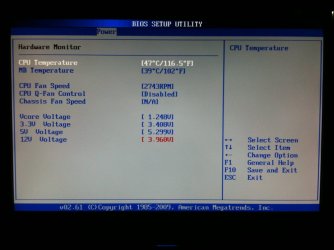
Problem in BIOS HALP! I just went into BIOS 2 days ago when i noticed this Red Highlighted value in the Hardware Monitor section in Power menu  Everything is running on stock i never touched the voltages or anything. Take a look in the Pic the 12v seems very low.... What could be the problem? is the Power Supply, Motherboard or the Processor? i even took out the GPU to check but it does'nt seem to effect with or without it HELP! | My System Specs |
| System Manufacturer/Model Number Self Built OS Windows 7 Ultimate x64 SP1 CPU Waiting for Haswell Motherboard Waiting for Haswell Memory G.Skill Ripjaws X 2x 2GB DDR3 1333 CL7 Graphics Card Will be next after Haswell Sound Card Built-In Monitor(s) Displays Samsung 933BW Plus Screen Resolution 1440x900 Keyboard A4Tech X7 G800 Mouse A4Tech X7 XL-747h + X7 801 Mouse Pad PSU Cooler Master GX-550w 80 Plus Bronze Case Cooler Master Elite 430 Black Cooling Waiting for Haswell Hard Drives Will buy after getting upcoming Haswell Internet Speed 4MB Cable Broadband Other Info Lamptron FC-5 V2 Fan Controller | Lamptron Dual CCFL Kit (Blue) | Liteon iHAS 322-07B DVD-RW | Xigmatek XLF-F1253 | CM 2x 120mm's | SVC 1.2KVA Off-line UPS |
23 Jul 2011
|
#2 | | Win7 Ultimate SP1 x64 / Windows 8 Pro / Android Mauritius |
Try to reset your BIOS, some voltage settings may be incorrectly set | My System Specs | | System Manufacturer/Model Number Custom Build OS Win7 Ultimate SP1 x64 / Windows 8 Pro / Android CPU Intel Core 2 Quad Q8200 OC'd 3.08GHz Motherboard Asus Rampage formula LGA775 Memory 8GB DDR2 900Mhz Graphics Card Zotac GTX 460OC 2GB GDDR5/Asus EN9600GT 1GB DDR3 PhyX Sound Card Supreme FX2 Monitor(s) Displays AOC 22' Screen Resolution 1680x1050 Keyboard Prolink keyboard Mouse Prolink optical mouse PSU Cooler Master GX 650W Cooling Cooler Master V6 + 3X fans Hard Drives 3X500GB hitachi, 2TB internal, 500GB Seagate FreeAgent, 640GB Samsung Internet Speed 1MiB/s Other Info 5.1 System + 2.1 System |
23 Jul 2011
|
#3 | | Win 7 Ultimate x64 Etobicoke, Ontario |
Sensor gone bad most likely. If the 12V reading really was that low the computer wouldn't even turn on.
If it is the sensor resetting the bios likely won't do anything. Flashing or re-flashing if you don't have it already with the latest bios, ASUSTeK Computer Inc. - Motherboards- ASUS P5G41T-M LX
might reset it. | My System Specs | | System Manufacturer/Model Number Me OS Win 7 Ultimate x64 CPU Phenom II x4 955 @ 4 GHz. Motherboard Asus M5A97 EVO Memory 2x2 GB Kingston HyperX DDR3 1600 Graphics Card Sapphire HD 6850 Sound Card Xonar DGX w/ Logitech X-530 Monitor(s) Displays Acer S232HL Abid Screen Resolution 1920x1080 Keyboard Logitech Wave Mouse Logitech G5 v2 PSU Antec Earthwatts 650W Green Case Antec Three Hundred Cooling Cooler Master 212 EVO Hard Drives 120 GB OCZ Vertex 3
500 GB Seagate 7200.12 Internet Speed 24000/1000 |
23 Jul 2011
|
#4 | | Windows 7 Ultimate x64 SP1 Lahore, Pakistan |
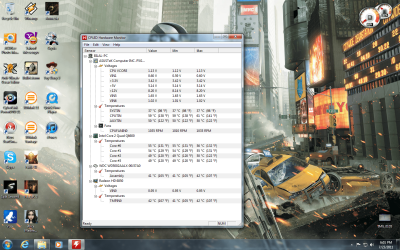
Ok i tried resetting to default settings nothing happened. I even updated the BIOS just before and still nothing happened.. What to do now? on CPUID Hardware Monitor i get these reading just like before updating the bios. | My System Specs | | System Manufacturer/Model Number Self Built OS Windows 7 Ultimate x64 SP1 CPU Waiting for Haswell Motherboard Waiting for Haswell Memory G.Skill Ripjaws X 2x 2GB DDR3 1333 CL7 Graphics Card Will be next after Haswell Sound Card Built-In Monitor(s) Displays Samsung 933BW Plus Screen Resolution 1440x900 Keyboard A4Tech X7 G800 Mouse A4Tech X7 XL-747h + X7 801 Mouse Pad PSU Cooler Master GX-550w 80 Plus Bronze Case Cooler Master Elite 430 Black Cooling Waiting for Haswell Hard Drives Will buy after getting upcoming Haswell Internet Speed 4MB Cable Broadband Other Info Lamptron FC-5 V2 Fan Controller | Lamptron Dual CCFL Kit (Blue) | Liteon iHAS 322-07B DVD-RW | Xigmatek XLF-F1253 | CM 2x 120mm's | SVC 1.2KVA Off-line UPS |
23 Jul 2011
|
#5 | | Windows 7 Enterprise x64 no SP |
Softwares read the same sensors as you bios, so they have to show the same. | My System Specs | | System Manufacturer/Model Number Custom Built PC OS Windows 7 Enterprise x64 no SP CPU Intel(R) Core(TM) i5-2500K CPU @ 3.30GHz 36°C Motherboard Gigabyte Technology Co., Ltd. Z68X-UD3-B3 (Socket 1155) 40°C Memory 4GB Hyperx 1600MHz stock XMP Graphics Card Asus GTS 450 stock or 900-1800, 1804 memory Sound Card Realtek High Definition Audio Monitor(s) Displays Samsung SyncMaster SA350 (SMS24A350H) Screen Resolution 1920x1080 pixels, 32 bits, 60 Hz Keyboard Trust Isla Wired Keyboard Mouse Gigabyte ECO600 (with extended usb wireless adapter) PSU 500W Coolink Case Cooler Master Elite 335 Cooling Cooler Master Hyper 212 Plus single fan Hard Drives 64GB Silicon Power E20 SSD (Intel SRT cache);
488GB Western Digital WDC WD5002AALX-00J37A0 38°C (cached);
733GB SAMSUNG SAMSUNG HD753LJ 27°C; Internet Speed down: 27 Mbps, up: 12 Mbps Other Info Optical Drive: TSSTcorp CDDVDW SH-S223F
Printer: HP Photosmart C5280 All-in-one
Genius G-Pen F610 (PenPad)
Genius 2.0 speakers, JBL speakers, Technics RPF880 Headphones
soft: Gdata, Zemana Antilogger, Nero, MSI Afterburner, Core Temp, CPUZ, Auslogics Disk Defrag |
23 Jul 2011
|
#6 | | Win 7 Ultimate x64 Etobicoke, Ontario |
Short of contacting Asus about a possible RMA, not much.
The fact that the computer even turns on with it reading that low sort of proves it is the sensor gone bad (did it ever show properly?), as like I said earlier the computer would not even turn on at all if it really was that low.
Software is also the most unreliable way to read voltages. Don't forget that the bios is nothing more than software as well. If you really want to know what the voltages are you have to measure them manually, Test your power supply with a multi meter - Tech Support Forum | My System Specs | | System Manufacturer/Model Number Me OS Win 7 Ultimate x64 CPU Phenom II x4 955 @ 4 GHz. Motherboard Asus M5A97 EVO Memory 2x2 GB Kingston HyperX DDR3 1600 Graphics Card Sapphire HD 6850 Sound Card Xonar DGX w/ Logitech X-530 Monitor(s) Displays Acer S232HL Abid Screen Resolution 1920x1080 Keyboard Logitech Wave Mouse Logitech G5 v2 PSU Antec Earthwatts 650W Green Case Antec Three Hundred Cooling Cooler Master 212 EVO Hard Drives 120 GB OCZ Vertex 3
500 GB Seagate 7200.12 Internet Speed 24000/1000 |
23 Jul 2011
|
#7 | | Windows 7 Ultimate x64 SP1 Lahore, Pakistan |
Yes it seems the sensor has gone bad  i do have Multi-Meter and this other tool the check the amps and other things from my dad's equipments but i dont know how to use them  also it was'nt like that before and the readings in CPUID HM and BIOS are both different which is weird. From few days my some of my Dual-Layer DVD-R's are'nt reading on both my Drives before they used to work fine without problems and they are scratch-less dvd's. Could it be related to any hardware problem? | My System Specs | | System Manufacturer/Model Number Self Built OS Windows 7 Ultimate x64 SP1 CPU Waiting for Haswell Motherboard Waiting for Haswell Memory G.Skill Ripjaws X 2x 2GB DDR3 1333 CL7 Graphics Card Will be next after Haswell Sound Card Built-In Monitor(s) Displays Samsung 933BW Plus Screen Resolution 1440x900 Keyboard A4Tech X7 G800 Mouse A4Tech X7 XL-747h + X7 801 Mouse Pad PSU Cooler Master GX-550w 80 Plus Bronze Case Cooler Master Elite 430 Black Cooling Waiting for Haswell Hard Drives Will buy after getting upcoming Haswell Internet Speed 4MB Cable Broadband Other Info Lamptron FC-5 V2 Fan Controller | Lamptron Dual CCFL Kit (Blue) | Liteon iHAS 322-07B DVD-RW | Xigmatek XLF-F1253 | CM 2x 120mm's | SVC 1.2KVA Off-line UPS |
23 Jul 2011
|
#8 | | Windows 7 64 Bit Home Premium SP1 In The Woods |
If you have a multimeter you can test like this:
Multimeter: plug the black wire into the COM plug, plug the red wire into the V-Ohm plug. Turn the multimeter on and switch the dial to V (Volts) at the DC 20 scale (modern meters show DC as the red zone).
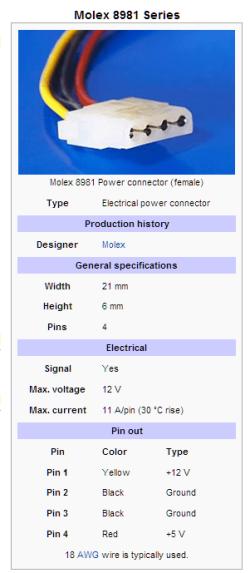
Computer: Open the case and find an unused plug from the power supply that has yellow and black wires. Move the plug to an easy to reach location. Turn the computer on.
Now take the pointed lead on the red wire and make contact with the yellow wire connection in the plug, then take the black lead and make contact with the black wire connection. Read the volts on the multimeter display. | My System Specs | | Computer type PC/Desktop System Manufacturer/Model Number Home Built - Jan 2013 OS Windows 7 64 Bit Home Premium SP1 CPU i7-3820 Motherboard Asus P9X79-PRO - Bios 3305 Memory GSkill F3-14900CL9Q - 16GB Graphics Card EVGA GeForce GTX660 - Driver 310.90 Sound Card On board Realtek ALC898 Monitor(s) Displays Acer S271HL Screen Resolution 1920 x 1080 Keyboard MS KC-0405 Mouse Intellimouse 5-button PSU Corsair CMPSU-850TX-V2 - 850 watt (by Seasonic) Case Corsair Obsidian 550D Cooling Standard 3 120mm case fans, Cooler Master Hyper 212 EVO Hard Drives #1- Samsung 840 Pro Series
#2- Western Digital WD1002FAEX Sata3 Black
#3- Western Digital WD1002FAEX Sata3 Black Internet Speed 25Mbits/Sec (on a good day) Antivirus Avast & Malwarebytes Browser Firefox Other Info Asus DVD - DRW-24B1ST 24X |
23 Jul 2011
|
#9 | | Windows 7 Ultimate x64 SP1 Lahore, Pakistan |
That sounds very complicated to me.. Can i test it while the PC is on? and should i plug the Red pointed pin with yellow wire and Black pointed pin with the black wire? | My System Specs | | System Manufacturer/Model Number Self Built OS Windows 7 Ultimate x64 SP1 CPU Waiting for Haswell Motherboard Waiting for Haswell Memory G.Skill Ripjaws X 2x 2GB DDR3 1333 CL7 Graphics Card Will be next after Haswell Sound Card Built-In Monitor(s) Displays Samsung 933BW Plus Screen Resolution 1440x900 Keyboard A4Tech X7 G800 Mouse A4Tech X7 XL-747h + X7 801 Mouse Pad PSU Cooler Master GX-550w 80 Plus Bronze Case Cooler Master Elite 430 Black Cooling Waiting for Haswell Hard Drives Will buy after getting upcoming Haswell Internet Speed 4MB Cable Broadband Other Info Lamptron FC-5 V2 Fan Controller | Lamptron Dual CCFL Kit (Blue) | Liteon iHAS 322-07B DVD-RW | Xigmatek XLF-F1253 | CM 2x 120mm's | SVC 1.2KVA Off-line UPS |
23 Jul 2011
|
#10 | | Windows 7 64 Bit Home Premium SP1 In The Woods |

Quote: Originally Posted by boogieboy That sounds very complicated to me.. Can i test it while the PC is on? You need to! Quote: and should i plug the Red pointed pin with yellow wire and Black pointed pin with the black wire? Yes. By convention the yellow wires are 12v leads. The black wires are grounds. The multimeter, connected as described, will measure if you are getting a true 12v.
If you are uncomfortable with this then don't do it. While it would be hard to mess anything up (you'd have to cross - or bridge - the connections to short anything out and do damage. (Don't do that!).
Can you get your father to show you how to use the equipment? It really is a good skill to know if you are going to play with electronics. | My System Specs | | Computer type PC/Desktop System Manufacturer/Model Number Home Built - Jan 2013 OS Windows 7 64 Bit Home Premium SP1 CPU i7-3820 Motherboard Asus P9X79-PRO - Bios 3305 Memory GSkill F3-14900CL9Q - 16GB Graphics Card EVGA GeForce GTX660 - Driver 310.90 Sound Card On board Realtek ALC898 Monitor(s) Displays Acer S271HL Screen Resolution 1920 x 1080 Keyboard MS KC-0405 Mouse Intellimouse 5-button PSU Corsair CMPSU-850TX-V2 - 850 watt (by Seasonic) Case Corsair Obsidian 550D Cooling Standard 3 120mm case fans, Cooler Master Hyper 212 EVO Hard Drives #1- Samsung 840 Pro Series
#2- Western Digital WD1002FAEX Sata3 Black
#3- Western Digital WD1002FAEX Sata3 Black Internet Speed 25Mbits/Sec (on a good day) Antivirus Avast & Malwarebytes Browser Firefox Other Info Asus DVD - DRW-24B1ST 24X Problem in BIOS HALP! problems? All times are GMT -5. The time now is 02:13 AM. | |