magicapples
New member
- Local time
- 1:32 AM
- Messages
- 5
Hi,
I have purchased a corsair SSD 250 gm hard drive and installed it in my acer lap top.
prior to installing the new hard drive, i created recovery disks so i could easily reload my windows 7 and drivers.
now, when i load windows, it still shows the old 450 gb western digital drive, and shows me how much space is used on it and how much is left. when i install anything, it says it is installing it on the old western digital drive.
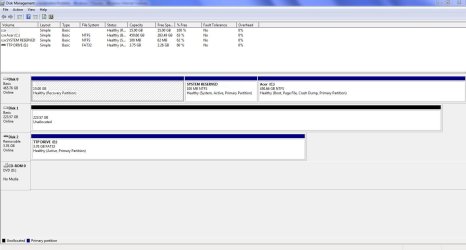
when i go to start -> computer -> manage i see the old hard drive and its partitions. i also see the new drive, and it says 240 gb unassigned.
i can see the corsair under my devices. so the computer is seeing it. but windows thinks the old hard drive is still in the computer.
not sure if this is impacting performance or not. is windows utilizing the ssd speed? i have no idea how much space is left on my hard drive.
anybody seen this before?
thanks
I have purchased a corsair SSD 250 gm hard drive and installed it in my acer lap top.
prior to installing the new hard drive, i created recovery disks so i could easily reload my windows 7 and drivers.
now, when i load windows, it still shows the old 450 gb western digital drive, and shows me how much space is used on it and how much is left. when i install anything, it says it is installing it on the old western digital drive.
when i go to start -> computer -> manage i see the old hard drive and its partitions. i also see the new drive, and it says 240 gb unassigned.
i can see the corsair under my devices. so the computer is seeing it. but windows thinks the old hard drive is still in the computer.
not sure if this is impacting performance or not. is windows utilizing the ssd speed? i have no idea how much space is left on my hard drive.
anybody seen this before?
thanks
My Computer
At a glance
windows 7 home premiumintel core i7 2630qm8 gb ddr3radeon 6850m
- Computer Manufacturer/Model Number
- acer aspire 7750g-9656
- OS
- windows 7 home premium
- CPU
- intel core i7 2630qm
- Motherboard
- unknown
- Memory
- 8 gb ddr3
- Graphics Card(s)
- radeon 6850m
- Sound Card
- internal
- Monitor(s) Displays
- 17" lcd
- Hard Drives
- corsair SSD f240 gb2-a
- PSU
- not sure