Windows 7 Forums


Windows 7: Slow reaction after clicking "Print" in any software

27 Jul 2011   #1

Win 7 64bit
 
 
Slow reaction after clicking "Print" in any software

I realised I have got this issue. Whenever I click print in any application, ( firefox, Powerpoint, Notepad etc) , my laptop would take quite awhile to react and enter the print options window.


I thought perhaps I may have disabled the print spooler service by accident, but it was on.

Any help would be greatly appreciated =D
My System SpecsSystem Spec

27 Jul 2011   #2

Windows 7 Enterprise x64 no SP


How many seconds does it take to do actually?
My System SpecsSystem Spec
27 Jul 2011   #3

Win 7 64bit


It depends. Between 15-35 seconds.
My System SpecsSystem Spec
.


27 Jul 2011   #4

Windows 7 Enterprise x64 no SP


1. check the connection btw the computer and the printer
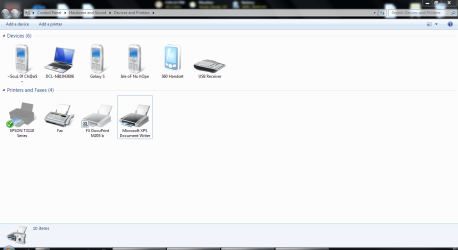
2. once the windows has opened, what devices are listen alongside your printer?
3. please post the exact model of your printer (I guess it is written on it )
My System SpecsSystem Spec
27 Jul 2011   #5

Win 7 64bit


Quote   Quote: Originally Posted by speedgamer01 View Post
1. check the connection btw the computer and the printer
2. once the windows has opened, what devices are listen alongside your printer?
3. please post the exact model of your printer (I guess it is written on it )
1. I changed the USB cable for the printer and the connection speed is still the same

2. Add PRinter,Epson Tx110 series,fax,FX docuprint 205b,Microsoft XPS document writer.

3. Epson Tx110 and Fuji Xerox docuprint M205b .


Oh, I fogotten to add, during the lag period, the software will be "Not Responding" and after the lag, it will be fine.
My System SpecsSystem Spec
27 Jul 2011   #6

Windows 7 Enterprise x64 no SP


thanks
interesting :$
You have 2 printers right? Disconnect all of your printers/fax(?) and hit print button again, if it reacts normally, plug in the printers one by one and do the same check.
ps: what do you mean by Add Printer, if you mean the print buttom, it's ok
My System SpecsSystem Spec
27 Jul 2011   #7

Windows 7 Ultimate X64 SP1
Mt. Crumpit/Whoville


Also try UNinstalling all printer software, rebooting, plug in ONE printer you want to use. See if windows will load a driver for you. IF not, install from the CD that came with the said printer.
My System SpecsSystem Spec
28 Jul 2011   #8

Win 7 64bit


Quote   Quote: Originally Posted by speedgamer01 View Post
thanks
interesting :$
You have 2 printers right? Disconnect all of your printers/fax(?) and hit print button again, if it reacts normally, plug in the printers one by one and do the same check.
ps: what do you mean by Add Printer, if you mean the print buttom, it's ok
Attempted it but still same result. Oh ignore the add printer part haha

Quote   Quote: Originally Posted by Britton30 View Post
Also try UNinstalling all printer software, rebooting, plug in ONE printer you want to use. See if windows will load a driver for you. IF not, install from the CD that came with the said printer.
Yup just did a full uninstall 3-4 days back ..
My System SpecsSystem Spec
28 Jul 2011   #9

Windows 7 Ultimate X64 SP1
Mt. Crumpit/Whoville


Sorry, I'm out of ideas.
Are you trying to print large documents or pictures? They may be taking some time to fill the print spooler.
My System SpecsSystem Spec
29 Jul 2011   #10

Win 7 64bit


Quote   Quote: Originally Posted by Britton30 View Post
Sorry, I'm out of ideas.
Are you trying to print large documents or pictures? They may be taking some time to fill the print spooler.
Nope. I tried a notepad document with only "a" and the reaction speed was equally slow .
My System SpecsSystem Spec
Reply

 Slow reaction after clicking "Print" in any software problems?


Thread Tools


Similar help and support threads for: Slow reaction after clicking "Print" in any software
Thread Forum
Password required instead of clicking " yes ' ot " continue " System Security
Right-clicking menu with "Fade or slide menus into view" seems laggy Performance & Maintenance
Clicking the red "x" will NOT close the window until I move the mouse. General Discussion
"Clicking" sound after performing Windows updates General Discussion
clicking "insert picture" it always defaults back to "large icons" General Discussion


All times are GMT -5. The time now is 08:32 PM.


Seven Forums Android App Seven Forums IOS App Follow us on Facebook

Windows 7 Forums is an independent web site and has not been authorized,
sponsored, or otherwise approved by Microsoft Corporation.
"Windows 7" and related materials are trademarks of Microsoft Corp.
© Designer Media Ltd
  

1 2 3 4 5 6 7 8 9 10 11 12 13 14 15 16 17 18 19 20 21 22 23 24 25 26 27 28 29 30 31 32