Windows 7 Forums Search
Welcome to Windows 7 Forums. Our forum is dedicated to helping you find solutions with any problems, errors or issues you are experiencing with Windows 7. The Windows 7 forum also covers news and updates and has an extensive Windows 7 tutorial section that covers a wide range of tips and tricks.


Windows 7 - Battery Problem - Consider replacing your battery

 
07-30-2011   #1


Windows 7 Home Premium


Battery Problem - Consider replacing your battery

Last night when i switched on my laptop i was welcomed by a red cross on my battery icon which says consider your replacing battery I bought the laptop a year ago ,actually 13 months ago but i don't think it is the time to change my battery !

What can i do ?? Can i use my this battery for a period of 6 months more atleast !

My System SpecsSystem Spec
07-31-2011   #2


Windows 7 Home Premium x64 SP1


This is apparently a known issue with Windows 7. Some laptops had an older BIOS not made for Windows 7. Some manufacturers have made "patches" available. And some have had luck with the method described in this thread:

"Consider Replacing Your Battery" Issue in Windows 7 - Microsoft Answers

Of course, this is assuming the battery isn't indeed in need of replacement. Good luck, let us know if you had success. A Guy
My System SpecsSystem Spec
07-31-2011   #3


Windows 7 Home Premium


NO,it din't worked out for me ! I tried the method told in the post ! but my battery is performing a bit less than average ! Earlier it gave me a backup of approx 75 min which had been now reduced to 40-45min ! But I'm still happy with it (because don't want to purchase a new one).
I'm thinking of using till i get an error 'Your battery is dead'

Can you tell me is it safe to use the battery for another 4-5 months ! I hope it won
t explode or something !!
My System SpecsSystem Spec
.


07-31-2011   #4


Windows 7 Home Premium x64 SP1


It won't blow up, it will just likely last less time on a charge until it won't charge at all. I'm sorry it didn't help you. A Guy
My System SpecsSystem Spec
07-31-2011   #5


MS Windows 7 Ultimate SP1 64-bit


technoankur,

download, install SIW (link in my sig).

This program will give you information regarding your battery.

In the meantime,
the biggest user of battery power is your display.

Consider reducing the display brightness.

Another way of extending battery life is by choosing the PowerSaver plan.

WIN + X | in the Battery Status section, choose PowerSaver.

While there you can change the PowerSaver display setting by clicking on the Display Brightness icon in the Brightness section.

WIN is the key with the wavy microsoft flag on top.
My System SpecsSystem Spec
07-31-2011   #6


MS Windows 7 Ultimate SP1 64-bit


technoankur,

Please fill out your system specs. Some battery problems are mfg specific.

UPDATE YOUR SEVENFORUMS SYSTEM SPECS


User CP (3rd item in the top menu bar) |
in left-hand column, under Your Profile, Edit System Spec |


Use Speccy - System Information - Free Download
and/or SIW to gather info for filling in the blanks.

Do me a favor. Please add the word laptop or desktop to the “system manufacturer” block.

Provide full windows version info, such as provided by Speccy:
MS Windows 7 Ultimate 64-bit SP1

Use the “Other Info” block for Optical Reader, Mouse, touchpad, wifi adapter, speakers, monitor

Scroll down and click on the SAVE CHANGES button.
My System SpecsSystem Spec
07-31-2011   #7


MS Windows 7 Ultimate SP1 64-bit


Oops.
Getting posts mixed up. Please give us the spec info.
My System SpecsSystem Spec
08-01-2011   #8


Windows 7 Home Premium


Updated info ! Check them and help !
My System SpecsSystem Spec
08-01-2011   #9


MS Windows 7 Ultimate SP1 64-bit


Did you select the PowerSaver power plan? Yes or No.

Did you adjust the display brightness to a minimum acceptable level? yes or no.

the battery status shown via the Win + X key combo--shows what percent charged?

What does SIW show for a battery life and status?
My System SpecsSystem Spec
08-01-2011   #10


MS Windows 7 Ultimate SP1 64-bit


technoankur,

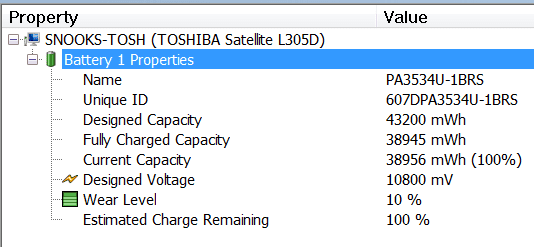
Here's a snippet of what SIW shows for my battery status:
Battery Problem - Consider replacing your battery-tosh-battery-info.png
My System SpecsSystem Spec
Reply

 Battery Problem - Consider replacing your battery problems?


Thread Tools


Similar Threads for: Battery Problem - Consider replacing your battery
Thread Forum
Battery Red X (consider replacing battery) General Discussion
Consider Replacing your battery General Discussion
Consider replacing your battery? (then it went away..) Performance & Maintenance
Consider replacing your battery Crashes and Debugging
Consider Replacing battery? General Discussion


All times are GMT -5. The time now is 10:37 AM.


Windows 7 Forums is an independent web site and has not been authorized,
sponsored, or otherwise approved by Microsoft Corporation.
"Windows 7" and related materials are trademarks of Microsoft Corp.
© Designer Media Ltd
  

1 2 3 4 5 6 7 8 9 10 11 12 13 14 15 16 17 18 19 20 21 22 23 24 25 26 27 28 29 30