| Windows 7: HP Pavilion laptop screen is messed up |
31 Jul 2011
|
#1 | | |
HP Pavilion laptop screen is messed up Hey all,
I have in my possession one of my friend's laptop, an HP Pavilion DV-4. She recently needed to replace the battery since Windows reported that her old battery needed to be replace since it couldn't hold a charge. She got the battery, replaced it, and that's where the problems began...
The laptop starts up fine, boots into Windows normal, but the screen itself doesn't work, a full on black screen. I have it connected to a VGA monitor to test if the graphics chipset is fine. It worked fine for the first five minutes on VGA with perfect color and all. Then it went weird and now there's a blue tinge. I tried to hook it to an HDMI monitor and started up the laptop, but the BIOS hung saying that it's "Preparing to boot to OS" and does nothing.
On HDMI, the BIOS doesn't have a blue tinge, on VGA, it does.
I looked at the replacement battery and it was 11.1 volts, it should be 10.8 like the original. My conclusion that I drew from this is that the battery slightly overvolted something, either the LCD screen, the inverter, or maybe a voltage converter. I'm now thinking the graphics chip is also damaged...
OH, I already tried power cycling it, so any comments and suggestions on what you guys think would help. I'm trying to get a second opinion.
I have yet to crack the sucker up and see if there's a loose connector. | My System Specs |
| System Manufacturer/Model Number ASUS OS Windows 7 Ultimate x64 CPU AMD Athlon 240 II @ 2.8-4.004 ghz Motherboard M4A78LT-M LE Memory SuperTalent 4gb DDR3 Graphics Card ATI Radeon 3000HD Screen Resolution 1440*900 Case Re-modded Dell Dimension 4550 Cooling Vantec 92mm Tornado x2 Other Info It looks pretty. |
31 Jul 2011
|
#2 | | MS Windows 7 Ultimate SP1 64-bit Austin, Texas |
Coke Robot,
1. Power off laptop
2. Remove battery
3. connect power back to the laptop (battery still removed)
Does the laptop work? yes or no | My System Specs | | System Manufacturer/Model Number Toshiba Satellite S875D-S7239 laptop OS MS Windows 7 Ultimate SP1 64-bit CPU AMD A10-4600M Motherboard AMD Pumori (Socket FT1) Memory 6.00 GB Dual-Channel DDR3 @ 798MHz (11-11-12-28) Graphics Card AMD Radeon HD 7660G Sound Card High Definition Audio Device Monitor(s) Displays Generic PnP Monitor (1600x900@60Hz) Screen Resolution 1600x900@60Hz Keyboard Standard PS/2 Keyboard Mouse HP Wireless Optical Mobile Mouse Model FHA-3410 Hard Drives SSD 119GB Corsair CSSD-V128GB2 ATA Device Internet Speed What the local pub, local coffee shop offers. Other Info Optical Drive:MATSHITA BD-CMB UJ160B ATA Device
Also have an Asus ha1002xp netbook with Win 7 Ultimate installed. |
01 Aug 2011
|
#3 | | |

Quote: Originally Posted by karlsnooks Coke Robot,
1. Power off laptop
2. Remove battery
3. connect power back to the laptop (battery still removed)
Does the laptop work? yes or no Yep, that's actually how I've been running it since I got it. | My System Specs | | System Manufacturer/Model Number ASUS OS Windows 7 Ultimate x64 CPU AMD Athlon 240 II @ 2.8-4.004 ghz Motherboard M4A78LT-M LE Memory SuperTalent 4gb DDR3 Graphics Card ATI Radeon 3000HD Screen Resolution 1440*900 Case Re-modded Dell Dimension 4550 Cooling Vantec 92mm Tornado x2 Other Info It looks pretty. |
01 Aug 2011
|
#4 | | |
UPDATE!! Something's odd going on. I connected it to a different VGA monitor, it correctly displayed the proper colors, and I plugged in the HDMI monitor, same outcome. I actually had the screen on the laptop work only once and it did that when I plugged in the other VGA monitor. Then I unplugged it, restarted, and still nothing on the laptop screen. | My System Specs | | System Manufacturer/Model Number ASUS OS Windows 7 Ultimate x64 CPU AMD Athlon 240 II @ 2.8-4.004 ghz Motherboard M4A78LT-M LE Memory SuperTalent 4gb DDR3 Graphics Card ATI Radeon 3000HD Screen Resolution 1440*900 Case Re-modded Dell Dimension 4550 Cooling Vantec 92mm Tornado x2 Other Info It looks pretty. |
01 Aug 2011
|
#5 | | MS Windows 7 Ultimate SP1 64-bit Austin, Texas |
coke robot,
Turn off the laptop.
Do not connect an external monitor.
do not connect any external devices to the laptop.
remove the power cable from the power inverter to the laptop.
insert the battery.
connect the power inverter to the laptop.
Connect the power inverter to the ac.
Power on the laptop.
Display function correctly? | My System Specs | | System Manufacturer/Model Number Toshiba Satellite S875D-S7239 laptop OS MS Windows 7 Ultimate SP1 64-bit CPU AMD A10-4600M Motherboard AMD Pumori (Socket FT1) Memory 6.00 GB Dual-Channel DDR3 @ 798MHz (11-11-12-28) Graphics Card AMD Radeon HD 7660G Sound Card High Definition Audio Device Monitor(s) Displays Generic PnP Monitor (1600x900@60Hz) Screen Resolution 1600x900@60Hz Keyboard Standard PS/2 Keyboard Mouse HP Wireless Optical Mobile Mouse Model FHA-3410 Hard Drives SSD 119GB Corsair CSSD-V128GB2 ATA Device Internet Speed What the local pub, local coffee shop offers. Other Info Optical Drive:MATSHITA BD-CMB UJ160B ATA Device
Also have an Asus ha1002xp netbook with Win 7 Ultimate installed. |
01 Aug 2011
|
#6 | | |

Quote: Originally Posted by karlsnooks coke robot,
Turn off the laptop.
Do not connect an external monitor.
do not connect any external devices to the laptop.
remove the power cable from the power inverter to the laptop.
insert the battery.
connect the power inverter to the laptop.
Connect the power inverter to the ac.
Power on the laptop.
Display function correctly? Hmm, problem. The old battery is literally wasted. It can't hold a charge or even start up even one LED on the whole system. I don't want to use the new one since I fear that might aggrivate things some. But I'll give this a try with the old one though. | My System Specs | | System Manufacturer/Model Number ASUS OS Windows 7 Ultimate x64 CPU AMD Athlon 240 II @ 2.8-4.004 ghz Motherboard M4A78LT-M LE Memory SuperTalent 4gb DDR3 Graphics Card ATI Radeon 3000HD Screen Resolution 1440*900 Case Re-modded Dell Dimension 4550 Cooling Vantec 92mm Tornado x2 Other Info It looks pretty. |
01 Aug 2011
|
#7 | | MS Windows 7 Ultimate SP1 64-bit Austin, Texas |
coke robot,
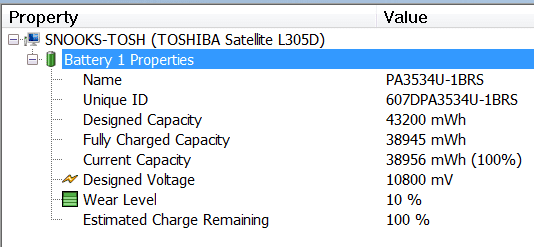
Use SIW (link in my sig) to determine state of the old battery.
Here's what SIW shows for my battery. | My System Specs | | System Manufacturer/Model Number Toshiba Satellite S875D-S7239 laptop OS MS Windows 7 Ultimate SP1 64-bit CPU AMD A10-4600M Motherboard AMD Pumori (Socket FT1) Memory 6.00 GB Dual-Channel DDR3 @ 798MHz (11-11-12-28) Graphics Card AMD Radeon HD 7660G Sound Card High Definition Audio Device Monitor(s) Displays Generic PnP Monitor (1600x900@60Hz) Screen Resolution 1600x900@60Hz Keyboard Standard PS/2 Keyboard Mouse HP Wireless Optical Mobile Mouse Model FHA-3410 Hard Drives SSD 119GB Corsair CSSD-V128GB2 ATA Device Internet Speed What the local pub, local coffee shop offers. Other Info Optical Drive:MATSHITA BD-CMB UJ160B ATA Device
Also have an Asus ha1002xp netbook with Win 7 Ultimate installed. |
01 Aug 2011
|
#8 | | MS Windows 7 Ultimate SP1 64-bit Austin, Texas |
Coke Robot,
While we are at this, let's give the battery a chance. WIN + X key combo | in the Battery status section, select PowerSaver |
click on the icon in the Display section, and set the display brightness to the minimum acceptable brightness. WIN is the key with the wavy microsoft flag on top. | My System Specs | | System Manufacturer/Model Number Toshiba Satellite S875D-S7239 laptop OS MS Windows 7 Ultimate SP1 64-bit CPU AMD A10-4600M Motherboard AMD Pumori (Socket FT1) Memory 6.00 GB Dual-Channel DDR3 @ 798MHz (11-11-12-28) Graphics Card AMD Radeon HD 7660G Sound Card High Definition Audio Device Monitor(s) Displays Generic PnP Monitor (1600x900@60Hz) Screen Resolution 1600x900@60Hz Keyboard Standard PS/2 Keyboard Mouse HP Wireless Optical Mobile Mouse Model FHA-3410 Hard Drives SSD 119GB Corsair CSSD-V128GB2 ATA Device Internet Speed What the local pub, local coffee shop offers. Other Info Optical Drive:MATSHITA BD-CMB UJ160B ATA Device
Also have an Asus ha1002xp netbook with Win 7 Ultimate installed. |
01 Aug 2011
|
#9 | | MS Windows 7 Ultimate SP1 64-bit Austin, Texas |
Coke Robot,
I'm a little slow tonite. I just recalled that HP recalled several units because of battery problems.
I recommend visiting the HP site to find out if there are any recall actions. To take advantage of HP's recalls, then she must register the laptop at the HP site. | My System Specs | | System Manufacturer/Model Number Toshiba Satellite S875D-S7239 laptop OS MS Windows 7 Ultimate SP1 64-bit CPU AMD A10-4600M Motherboard AMD Pumori (Socket FT1) Memory 6.00 GB Dual-Channel DDR3 @ 798MHz (11-11-12-28) Graphics Card AMD Radeon HD 7660G Sound Card High Definition Audio Device Monitor(s) Displays Generic PnP Monitor (1600x900@60Hz) Screen Resolution 1600x900@60Hz Keyboard Standard PS/2 Keyboard Mouse HP Wireless Optical Mobile Mouse Model FHA-3410 Hard Drives SSD 119GB Corsair CSSD-V128GB2 ATA Device Internet Speed What the local pub, local coffee shop offers. Other Info Optical Drive:MATSHITA BD-CMB UJ160B ATA Device
Also have an Asus ha1002xp netbook with Win 7 Ultimate installed. |
03 Aug 2011
|
#10 | | |

Quote: Originally Posted by karlsnooks coke robot,
Use SIW (link in my sig) to determine state of the old battery.
Here's what SIW shows for my battery. Attachment 167969 I'm going to get on that right now! | My System Specs | | System Manufacturer/Model Number ASUS OS Windows 7 Ultimate x64 CPU AMD Athlon 240 II @ 2.8-4.004 ghz Motherboard M4A78LT-M LE Memory SuperTalent 4gb DDR3 Graphics Card ATI Radeon 3000HD Screen Resolution 1440*900 Case Re-modded Dell Dimension 4550 Cooling Vantec 92mm Tornado x2 Other Info It looks pretty. HP Pavilion laptop screen is messed up problems? All times are GMT -5. The time now is 02:40 PM. | |