Windows 7 Forums


Windows 7: HDD "Access Denied" (help!!!)

01 Aug 2011   #1

Windows 7 Pro x64 SP1
 
 
HDD "Access Denied" (help!!!)

I am using Win 7 Pro x64 on a Sony VAIO notebook, 8GB RAM, 500GB HDD. I also have an external 500GB HDD on USB.

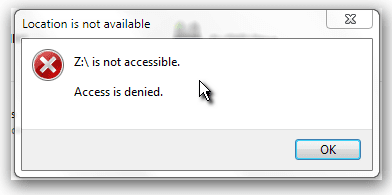
I was backing up my drive (creating a drive image) and during the process the notebook bluescreened. After rebooting, I tried to access the external HDD, but access was denied.

I ran "chkdsk Z: /R /B" and it took 14 hours to complete. Once it was done, same thing, "access denied."

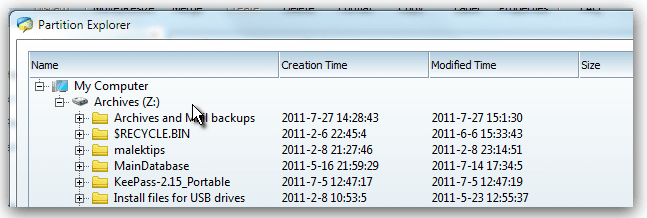
I ran my partition manager, and rana repair with it, and it took a couple of hours. The partition manager can explore (and see) the folders and files on the drive.

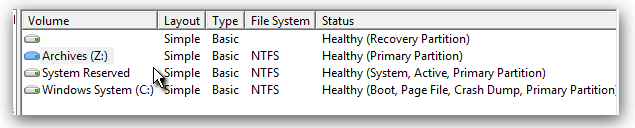
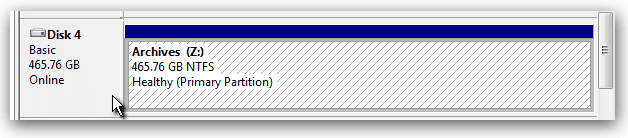
Windows Drive Manager says it is a healthy partition, NTFS formatted. But Windows cannot or will not access the drive. I powered the drive down and let it sit a few hours, tried changing the drive letter, etc...

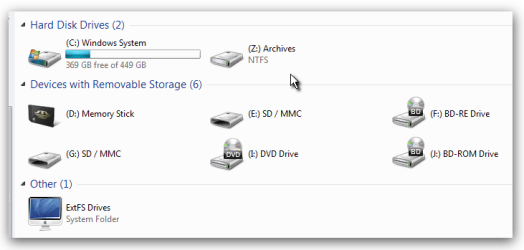
"Computer" in Windows Explorer shows the drive letter and label (correctly) but not the "used/free space" indicator.


Does anyone here know how I can regain access to this drive? I need to rescue my backups! They are there, but windows just won't open the drive.

See the screenshots for details.
Attached Thumbnails
HDD "Access Denied"  (help!!!)-snap_2011.08.01_20h37m26s_003.png   HDD "Access Denied"  (help!!!)-snap_2011.08.01_20h38m36s_004.png   HDD "Access Denied"  (help!!!)-snap_2011.08.01_20h40m00s_005.png   HDD "Access Denied"  (help!!!)-snap_2011.08.01_20h36m18s_002.png   HDD "Access Denied"  (help!!!)-snap_2011.08.01_20h34m50s_001.png  


Last edited by richprice; 01 Aug 2011 at 09:21 PM.. Reason: more info detail
My System SpecsSystem Spec

01 Aug 2011   #2

Windows 7 Ultimate 32bit
australia


My System SpecsSystem Spec
01 Aug 2011   #3

MS Windows 7 Ultimate SP1 64-bit
Austin, Texas


richprice,

Boot from a System Repair Disc.

Can you now access the files?

CREATE A SYSTEM REPAIR DISC

START | type System Repair | Enter key | Create Disc button
My System SpecsSystem Spec
.


01 Aug 2011   #4

Windows 7 Pro x64 SP1
 
 
Problem Solved !!!

Well, I've gotten past the problem and recovered all my backups.

I have a lot of different system repair discs (including the Windows System Repair Disc for this system) and I can't get into the drive with any of the Windows or WinPE-based CDs.

However, I did create a bootable USB key using MEPIS Linux v, 11 x64. It opened the drive, let me copy all my files and now everything is safe. I'll have to fix that external HDD or buy a new one, but at least I have all my files.

I do thank you for the repair disc suggestion.
My System SpecsSystem Spec
01 Aug 2011   #5

MS Windows 7 Ultimate SP1 64-bit
Austin, Texas


rich,
The repair disc should have gotten you in.

Now if you are interested in making that drive usable, let us know.
My System SpecsSystem Spec
02 Aug 2011   #6

Windows 7 Pro x64 SP1
 
 
Thanks

Well, I don''t know why none of the repair discs (and rescue CDs) would give me access. All of them SHOULD have. I only tried the Linux thing out of desperation. (I REALLY needed those files and backups.

Just so you know, I used my partitioning tool to reformat the drive, and it is usable again. I'm not going to trust it as much as I used to, so I'm getting 2 more backup drives. I get paranoid that way.

But I really do thank you all for your advice. I find a lot of good posts here just searching.
My System SpecsSystem Spec
02 Aug 2011   #7

7 Pro
San Diego


in the future, add the "Everyone" group to the ACL with full control. This will fix your problem anytime you format or change computers.
My System SpecsSystem Spec
02 Aug 2011   #8

MS Windows 7 Ultimate SP1 64-bit
Austin, Texas


The everyone group will automatically be added if he cleans and formats a new disk. Not only that, the everyone group will have full permission.
My System SpecsSystem Spec
02 Aug 2011   #9

Windows 7 Pro x64 SP1
 
 
Yep !!!

It's been cleaned and reformatted. It seems fine now; I'm going on the supposition that the error that caused the bluescreen during imaging corrupted the MFT or something else with drive info on it.

The drive is probably perfectly good now, but I'm still going to buy a couple more drives as redundant backups so that if one fails again, I still have the others to fall back on.

Thanks a million guys.
My System SpecsSystem Spec
02 Aug 2011   #10

MS Windows 7 Ultimate SP1 64-bit
Austin, Texas


rich,
Glad to hear that all is well now.

and enjoyed your sig advice on passwords.
My System SpecsSystem Spec
Reply

 HDD "Access Denied" (help!!!) problems?


Thread Tools


Similar help and support threads for: HDD "Access Denied" (help!!!)
Thread Forum
Import Pictures to NAS "Access Denied" Error Though User Has Access Network & Sharing
"Access is denied" - "Unable to display current owner" Network & Sharing
"Access denied:" How to overcome denied access to a folder General Discussion
"access denied" when using "assoc" and "ftype" from cmdline? General Discussion
Solved "Access Denied" for "Documents and Settings" General Discussion


All times are GMT -5. The time now is 11:48 PM.


Seven Forums Android App Seven Forums IOS App Follow us on Facebook

Windows 7 Forums is an independent web site and has not been authorized,
sponsored, or otherwise approved by Microsoft Corporation.
"Windows 7" and related materials are trademarks of Microsoft Corp.
© Designer Media Ltd
  

1 2 3 4 5 6 7 8 9 10 11 12 13 14 15 16 17 18 19 20 21 22 23 24 25 26 27 28 29 30 31 32