Windows 7 Forums Search
Welcome to Windows 7 Forums. Our forum is dedicated to helping you find solutions with any problems, errors or issues you are experiencing with Windows 7. The Windows 7 forum also covers news and updates and has an extensive Windows 7 tutorial section that covers a wide range of tips and tricks.


Windows 7 - USB 3.0 Ports Not Working with USB 3.0 Devices

 
08-02-2011   #1


Windows 7 Pro 64-bit


USB 3.0 Ports Not Working with USB 3.0 Devices

Greetings! Sorry if this has been covered but Seven Forums search isn't working atm -- I search for USB 3.0 and I get no results! I went through pages of posts and read all relevant posts but they haven't resolved my problem.

Anyway:

OS: win 7 pro 64 sp1
mobo: asrock x58 extreme6
cpu: i7 970

No overclocking, nothing else goofy going on.

I have two USB 3.0 devices and when I plug them in to USB 2.0 ports, they both are recognized. One is a drive and it fires right up. I can access it without issue. Another is a Black Magic Intensity Shuttle. The shuttle makes not promises about working with USB 2.0 but the important thing is that the USB 2.0 ports are working and both devices appear to be working.

Now, USB 2.0 devices work with my USB 3.0 ports as well.

I've updated the firmware to 3028 on both my NEC USB 3.0 controllers. I'm also running the latest drivers and NECs usb controller utility shows both controllers and reports no errors. USB 3.0 is listed as "enabled" in the BIOS.

I'm happy to post more info or run diagnostics at will. I'm really stuck!

My System SpecsSystem Spec
08-02-2011   #2


Windows 7 Ultimate X86 SP1


Welcome to Seven Forums LeadCarbonate.
Check Device Manager/USB devices/ USB 3.0. It should have a driver from Renesas, NEC no longer supports it.
My System SpecsSystem Spec
08-02-2011   #3


Windows 7 Pro 64-bit


Thanks for your reply. That is the name that comes up. I got the driver here:

SONY/NEC/RENESAS Drivers & Firmwares
My System SpecsSystem Spec
.


08-02-2011   #4


Windows 7 Home Premium 64 bit SP1


I am assuming you are using USB 3.0 cables with your USB 3.0 devices.

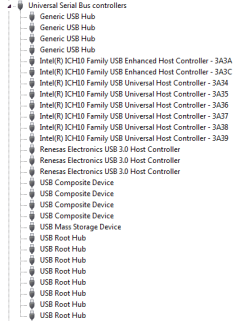
Can you please post a picture of device manager with Universal Serial Bus Controllers opened up.
My System SpecsSystem Spec
08-02-2011   #5


Windows 7 Pro 64-bit


Yes, definitely using blue USB cables in blue ports.

Here is the requested screenshot:

USB 3.0 Ports Not Working with USB 3.0 Devices-2011-08-02_181029.png
My System SpecsSystem Spec
08-02-2011   #6


Windows 7 Home Premium 64 bit SP1


Something is wrong but I am not sure how to fix it. My understanding is that you need a Root Hub for every Host Controller. You have no Renesas Root Hub installed. I will see if I can find any info on this. You could try removing and re-installing the driver.
Attached Images
 
My System SpecsSystem Spec
08-02-2011   #7


Windows 7 Pro 64-bit


Should I try *uninstalling* all of my root hubs and seeing if windows picks them back up correctly or is a more elaborate approach necessary?
My System SpecsSystem Spec
08-02-2011   #8


Windows 7 Pro 64-bit


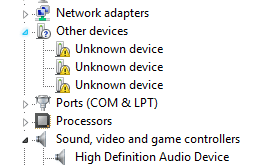
I have three "unknown devices" under "Other Devices" but "Update Driver" is grayed out.
My System SpecsSystem Spec
08-02-2011   #9


W7x64 Pro, SuSe 12.1/** W7 x64 Pro, XP MCE


I'm not certain that mine are right, because I don't use them yet, but I have two NEC host controllers and two root hubs in the Device Manager.
My System SpecsSystem Spec
08-02-2011   #10


Windows 7 Pro 64-bit


Hmm -- sounds like I'm definitely missing some root hubs in that case -- that gives me more to search on fortunately!
My System SpecsSystem Spec
Reply

 USB 3.0 Ports Not Working with USB 3.0 Devices problems?


Thread Tools


Similar Threads for: USB 3.0 Ports Not Working with USB 3.0 Devices
Thread Forum
Solved USB 3.0 Ports Not Working Hardware & Devices
Solved USB ports not working Hardware & Devices
Not all USB ports are working Hardware & Devices
USB ports stop working w/ too many devices Hardware & Devices
none of my USB ports are working Hardware & Devices


All times are GMT -5. The time now is 10:41 AM.


Windows 7 Forums is an independent web site and has not been authorized,
sponsored, or otherwise approved by Microsoft Corporation.
"Windows 7" and related materials are trademarks of Microsoft Corp.
© Designer Media Ltd
  

1 2 3 4 5 6 7 8 9 10 11 12 13 14 15 16 17 18 19 20 21 22 23 24 25 26 27 28 29 30