|
Welcome to Windows 7 Forums. Our forum is dedicated to helping you find solutions with any problems, errors or issues you are experiencing with Windows 7. The Windows 7 forum also covers news and updates and has an extensive Windows 7 tutorial section that covers a wide range of tips and tricks.
Windows 7 - Ram Won't Work in Dual Channel Memory Mode |
08-06-2011
|
#1 | | Windows 7 Home Ultimate 64bit |
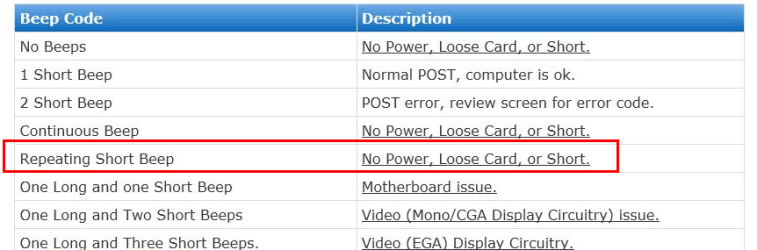
Ram Won't Work in Dual Channel Memory Mode Hi my problem is my ram won't work when i put it in dual channel memory mode, when i switch the PC on it will sound continueous short fast beeps? HELP
MOBO: Gigabyte GA-P55-USB3
CPU : Intel i3 540 3.06Ghz
RAM : OCZ Gold 4GB(2X2GB) DDR3 1600
| My System Specs | | System Manufacturer/Model Number Custom Build OS Windows 7 Home Ultimate 64bit CPU Intel Core i3 540 3.06Ghz Motherboard Gigabyte P55-USB3 Memory 4GB OCZ GOLD PC3 12800 Graphics Card Asus Geforce 1GB GDDR5 GTS 450 Monitor(s) Displays Samsung SyncMaster940MW PSU Corsair VX 550W Case Cooler Master HAF 932 Cooling Asorted Fans Hard Drives 250GB & 1TB Internet Speed 10 MB |
08-06-2011
|
#2 | | Windows 7 Enterprise x64 no SP |
Did you built the PC yourself?
I would first check if they are put in the place correctly, and not backward or something (I did it myself :lol) both little flaps should be folded down.
If they are, remove one module and try to boot that way, then try with the other 1 in another slot.
Keep us informed! | My System Specs | | System Manufacturer/Model Number Custom Built PC OS Windows 7 Enterprise x64 no SP CPU Intel(R) Core(TM) i5-2500K CPU @ 3.30GHz 36°C Motherboard Gigabyte Technology Co., Ltd. Z68X-UD3-B3 (Socket 1155) 40°C Memory 4GB Hyperx 1600MHz stock XMP Graphics Card Asus GTS 450 stock or 900-1800, 1804 memory Sound Card Realtek High Definition Audio Monitor(s) Displays Samsung SyncMaster SA350 (SMS24A350H) Screen Resolution 1920x1080 pixels, 32 bits, 60 Hz Keyboard Trust Isla Wired Keyboard Mouse Gigabyte ECO600 (with extended usb wireless adapter) PSU 500W Coolink Case Cooler Master Elite 335 Cooling Cooler Master Hyper 212 Plus single fan Hard Drives 64GB Silicon Power E20 SSD (Intel SRT cache);
488GB Western Digital WDC WD5002AALX-00J37A0 38°C (cached);
733GB SAMSUNG SAMSUNG HD753LJ 27°C; Internet Speed down: 27 Mbps, up: 12 Mbps Other Info Optical Drive: TSSTcorp CDDVDW SH-S223F
Printer: HP Photosmart C5280 All-in-one
Genius G-Pen F610 (PenPad)
Genius 2.0 speakers, JBL speakers, Technics RPF880 Headphones
soft: Gdata, Zemana Antilogger, Nero, MSI Afterburner, Core Temp, CPUZ, Auslogics Disk Defrag |
08-06-2011
|
#3 | | Windows 7 Ultimate X86 SP1 |
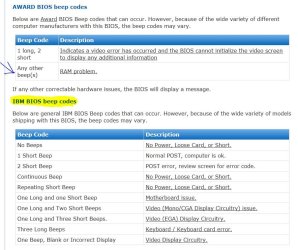
the beep code is for "Power error". Recheck all of your power supply connectors, make sure they are in the correcr place and tightly attached. | My System Specs | | System Manufacturer/Model Number Brittechnologies II OS Windows 7 Ultimate X86 SP1 CPU i5-2550K differing speeds depending on the day Motherboard ASUS P8X68-V PRO/GEN3 Memory 16GB G.Skill Sniper 2133MHz, 4X4GB Graphics Card ASUS ENGTX460 DirectCU/2DI/1GD5 GeForce GTX 460 Sound Card Onboard Realtek 5-1 Monitor(s) Displays Samsung P2570HD Screen Resolution 1920x1080 Keyboard Old Dell USB From 10 yrs Ago Mouse Gigabyte m6900 wired PSU Corsair HX650W Case Inwin Dragon rider Cooling Hyper 212 EVO w/two Noctua fans @1300 RPM Hard Drives TBA Internet Speed 8-19 Mbs down, 3-4 Mbs up Comcast Cable Other Info 5 fans, LG Bluray/R/RE, ASUS DVD/R/RW |
08-07-2011
|
#4 | | Windows 7 Enterprise x64 no SP |
I think that is only for IBM bioses, but not in gigabyte boards. Gigabyte boards usually have Award bios, so it must be a ram problem IMO: | My System Specs | | System Manufacturer/Model Number Custom Built PC OS Windows 7 Enterprise x64 no SP CPU Intel(R) Core(TM) i5-2500K CPU @ 3.30GHz 36°C Motherboard Gigabyte Technology Co., Ltd. Z68X-UD3-B3 (Socket 1155) 40°C Memory 4GB Hyperx 1600MHz stock XMP Graphics Card Asus GTS 450 stock or 900-1800, 1804 memory Sound Card Realtek High Definition Audio Monitor(s) Displays Samsung SyncMaster SA350 (SMS24A350H) Screen Resolution 1920x1080 pixels, 32 bits, 60 Hz Keyboard Trust Isla Wired Keyboard Mouse Gigabyte ECO600 (with extended usb wireless adapter) PSU 500W Coolink Case Cooler Master Elite 335 Cooling Cooler Master Hyper 212 Plus single fan Hard Drives 64GB Silicon Power E20 SSD (Intel SRT cache);
488GB Western Digital WDC WD5002AALX-00J37A0 38°C (cached);
733GB SAMSUNG SAMSUNG HD753LJ 27°C; Internet Speed down: 27 Mbps, up: 12 Mbps Other Info Optical Drive: TSSTcorp CDDVDW SH-S223F
Printer: HP Photosmart C5280 All-in-one
Genius G-Pen F610 (PenPad)
Genius 2.0 speakers, JBL speakers, Technics RPF880 Headphones
soft: Gdata, Zemana Antilogger, Nero, MSI Afterburner, Core Temp, CPUZ, Auslogics Disk Defrag |
08-07-2011
|
#5 | | Windows 7 ultimate 64 bit / XP Home sp3 |
Welcome to Seven Forums.
Not that this is the reason but it is always a good idea to look on the manufacturers QVL "Qualified Vendors List" When selecting Ram for your board. As you will see yours is not listed. Which only means it hasnn't been tested to run on your board. Which is not to say it won't. http://download.gigabyte.us/FileList...a-p55-usb3.pdf.
Secondly make sure you have read the manual as to the placement of the moduels http://download.gigabyte.us/FileList...sb3_v2.0_e.pdf
pages1-4 1-4-1
Once you are certian you have followed the proper placement for dual channel, if your still experiencing the same problem then I would suggest you run memtest86 Memtest86 - Download Page using one module at a time for atleat 5-6 runs to check each stick for ny errors. This will let you know if you may have a bad stick of Ram and thus causing the errors.
Fabe | My System Specs | | System Manufacturer/Model Number Self Built OS Windows 7 ultimate 64 bit / XP Home sp3 CPU intel Core 2 Duo E8400 3.0ghz Motherboard Asus P5ND bios 1401 Memory 8 gigs 1066 OCZ Fata1ty Graphics Card EVGA GTX 580 Call of Duty Black Ops Edition Sound Card Creative Soundblaster Audigy 2zs Monitor(s) Displays Asus 24in LCD's 2MS X2 Screen Resolution 1920x1080p @60Hz Keyboard Logitech Bluetooth Wireless MX5000 Mouse Logitech Bluetooth Wireless MX1000 PSU OCZ 700W GameXtreme Case NZXT Apollo Cooling Corsair H50 CPU/120mm x3 /60mm x2 /Corsair Dominator Ram Hard Drives WD Caviar 500 Black/ WD Caviar 200 Blue Internet Speed Download 19.83 Upload 0.97 Other Info Logitech Z2300 Speakers/ Bose Noise Cancelling Headphones/Avermedia PCI-e Hybrid TV Bravo/Epson NX415 all in one/ 4 Port Powered USB Hub/ LG 10x Bluray Burner /TSST Corp DVDRW External |
08-07-2011
|
#6 | | Windows 7 Ultimate X86 SP1 |
@SG 01 I also have a Gigglebyte board, My manual says continuous short beeps, Power Error. Also farther down on your snip... 
I have Award F3 BIOS. | My System Specs | | System Manufacturer/Model Number Brittechnologies II OS Windows 7 Ultimate X86 SP1 CPU i5-2550K differing speeds depending on the day Motherboard ASUS P8X68-V PRO/GEN3 Memory 16GB G.Skill Sniper 2133MHz, 4X4GB Graphics Card ASUS ENGTX460 DirectCU/2DI/1GD5 GeForce GTX 460 Sound Card Onboard Realtek 5-1 Monitor(s) Displays Samsung P2570HD Screen Resolution 1920x1080 Keyboard Old Dell USB From 10 yrs Ago Mouse Gigabyte m6900 wired PSU Corsair HX650W Case Inwin Dragon rider Cooling Hyper 212 EVO w/two Noctua fans @1300 RPM Hard Drives TBA Internet Speed 8-19 Mbs down, 3-4 Mbs up Comcast Cable Other Info 5 fans, LG Bluray/R/RE, ASUS DVD/R/RW |
08-07-2011
|
#7 | | Windows 7 Home Ultimate 64bit |
Thanks Guys the ram works fine in slot 1 & 2 (in normal mode so to speak). but i did try using just one stick to test each slot and in slot 3 & 4 i get the fast continueous beeps , is this normal or should one piece of ram work in any slot you place it? Thanks again | My System Specs | | System Manufacturer/Model Number Custom Build OS Windows 7 Home Ultimate 64bit CPU Intel Core i3 540 3.06Ghz Motherboard Gigabyte P55-USB3 Memory 4GB OCZ GOLD PC3 12800 Graphics Card Asus Geforce 1GB GDDR5 GTS 450 Monitor(s) Displays Samsung SyncMaster940MW PSU Corsair VX 550W Case Cooler Master HAF 932 Cooling Asorted Fans Hard Drives 250GB & 1TB Internet Speed 10 MB |
08-07-2011
|
#8 | | Windows 7 Enterprise x64 no SP |
Manufacturers recommend you to fill in slots 1 and 3 first, because slot 1-2 and 3-4 are wired together so by using 1. and 3. you double the access speed of the ram. 1 stick should work in any slot! I think your motherboard if faulty. You must have some kind of factory warranty for a few years. | My System Specs | | System Manufacturer/Model Number Custom Built PC OS Windows 7 Enterprise x64 no SP CPU Intel(R) Core(TM) i5-2500K CPU @ 3.30GHz 36°C Motherboard Gigabyte Technology Co., Ltd. Z68X-UD3-B3 (Socket 1155) 40°C Memory 4GB Hyperx 1600MHz stock XMP Graphics Card Asus GTS 450 stock or 900-1800, 1804 memory Sound Card Realtek High Definition Audio Monitor(s) Displays Samsung SyncMaster SA350 (SMS24A350H) Screen Resolution 1920x1080 pixels, 32 bits, 60 Hz Keyboard Trust Isla Wired Keyboard Mouse Gigabyte ECO600 (with extended usb wireless adapter) PSU 500W Coolink Case Cooler Master Elite 335 Cooling Cooler Master Hyper 212 Plus single fan Hard Drives 64GB Silicon Power E20 SSD (Intel SRT cache);
488GB Western Digital WDC WD5002AALX-00J37A0 38°C (cached);
733GB SAMSUNG SAMSUNG HD753LJ 27°C; Internet Speed down: 27 Mbps, up: 12 Mbps Other Info Optical Drive: TSSTcorp CDDVDW SH-S223F
Printer: HP Photosmart C5280 All-in-one
Genius G-Pen F610 (PenPad)
Genius 2.0 speakers, JBL speakers, Technics RPF880 Headphones
soft: Gdata, Zemana Antilogger, Nero, MSI Afterburner, Core Temp, CPUZ, Auslogics Disk Defrag Ram Won't Work in Dual Channel Memory Mode problems? All times are GMT -5. The time now is 10:46 AM. |  |