| Windows 7: 100mb unassigned on SSD disk. Why? |
10 Aug 2011
|
#1 | | Win 7 Home Premium 64-bit Norway |
100mb unassigned on SSD disk. Why? Hello dear users,
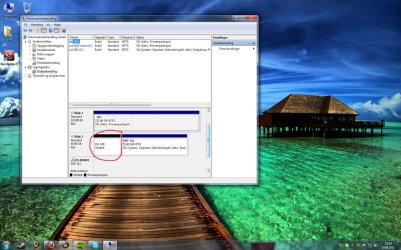
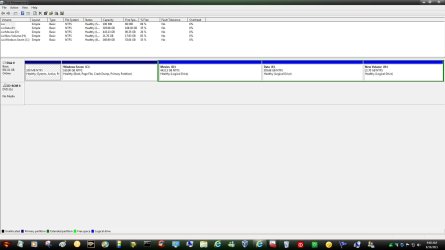
After I installed Windows 7 64-bit on my computer I got 100mb unassigned data on my SSD disk which I can't use for some reason...
- I think the reason is because lightning struck a few hundred meters away that day, so I lost electricity at home. Therefore, I had to start the installation again.
Is there any chance to get rid of those 100mb, so I can use them?
Check the picture I attached.
Thanks in advance!
BRG,
Evenol | My System Specs |
| System Manufacturer/Model Number Myself. OS Win 7 Home Premium 64-bit CPU Intel i7 920 Motherboard MSI X58 Platinum, 1366 socket Memory RAM: 6GB OCZ Platinum XTC DDR3 + 6GB Corsair DDR3 1600MHz Graphics Card Asus GeForce GTX 295 Sound Card Integrated Monitor(s) Displays Samsung 226BW Keyboard Logitech G15 Mouse QPAD 5k PRO PSU Corsair 750W Case Antec P182 Cooling Stock Hard Drives Corsair SSD Force GT 60GB
1x 500GB + 1x 250GB Samsung 7200RPM Internet Speed 25/5 Mbit/s |
10 Aug 2011
|
#2 | | Windows 7 Enterprise x64 no SP |
Here you can download a free partition wizard which will hopefully allow you to move the data to the beggining of the disk, and expand the partition.
edit: what is the name of that background? it looks awsome | My System Specs | | System Manufacturer/Model Number Custom Built PC OS Windows 7 Enterprise x64 no SP CPU Intel(R) Core(TM) i5-2500K CPU @ 3.30GHz 36°C Motherboard Gigabyte Technology Co., Ltd. Z68X-UD3-B3 (Socket 1155) 40°C Memory 4GB Hyperx 1600MHz stock XMP Graphics Card Asus GTS 450 stock or 900-1800, 1804 memory Sound Card Realtek High Definition Audio Monitor(s) Displays Samsung SyncMaster SA350 (SMS24A350H) Screen Resolution 1920x1080 pixels, 32 bits, 60 Hz Keyboard Trust Isla Wired Keyboard Mouse Gigabyte ECO600 (with extended usb wireless adapter) PSU 500W Coolink Case Cooler Master Elite 335 Cooling Cooler Master Hyper 212 Plus single fan Hard Drives 64GB Silicon Power E20 SSD (Intel SRT cache);
488GB Western Digital WDC WD5002AALX-00J37A0 38°C (cached);
733GB SAMSUNG SAMSUNG HD753LJ 27°C; Internet Speed down: 27 Mbps, up: 12 Mbps Other Info Optical Drive: TSSTcorp CDDVDW SH-S223F
Printer: HP Photosmart C5280 All-in-one
Genius G-Pen F610 (PenPad)
Genius 2.0 speakers, JBL speakers, Technics RPF880 Headphones
soft: Gdata, Zemana Antilogger, Nero, MSI Afterburner, Core Temp, CPUZ, Auslogics Disk Defrag |
10 Aug 2011
|
#3 | | Win 7 Home Premium 64-bit Norway |

Quote: Originally Posted by speedgamer01 Here you can download a free partition wizard which will hopefully allow you to move the data to the beggining of the disk, and expand the partition.
edit: what is the name of that background? it looks awsome Thanks a lot for your quick reply, speedgamer01!
After a bit research, I read that this 100mb data is for system files etc. for Windows 7. But in this case it wouldn't been named "unassigned"? Just so I don't remove any important files...?
About the background; Here - Just scroll a bit down. | My System Specs | | System Manufacturer/Model Number Myself. OS Win 7 Home Premium 64-bit CPU Intel i7 920 Motherboard MSI X58 Platinum, 1366 socket Memory RAM: 6GB OCZ Platinum XTC DDR3 + 6GB Corsair DDR3 1600MHz Graphics Card Asus GeForce GTX 295 Sound Card Integrated Monitor(s) Displays Samsung 226BW Keyboard Logitech G15 Mouse QPAD 5k PRO PSU Corsair 750W Case Antec P182 Cooling Stock Hard Drives Corsair SSD Force GT 60GB
1x 500GB + 1x 250GB Samsung 7200RPM Internet Speed 25/5 Mbit/s |
10 Aug 2011
|
#4 | | Windows 7 Enterprise x64 no SP |
sorry, thanks you for the image 
I don't think there anything can be stored
um where did you read that? | My System Specs | | System Manufacturer/Model Number Custom Built PC OS Windows 7 Enterprise x64 no SP CPU Intel(R) Core(TM) i5-2500K CPU @ 3.30GHz 36°C Motherboard Gigabyte Technology Co., Ltd. Z68X-UD3-B3 (Socket 1155) 40°C Memory 4GB Hyperx 1600MHz stock XMP Graphics Card Asus GTS 450 stock or 900-1800, 1804 memory Sound Card Realtek High Definition Audio Monitor(s) Displays Samsung SyncMaster SA350 (SMS24A350H) Screen Resolution 1920x1080 pixels, 32 bits, 60 Hz Keyboard Trust Isla Wired Keyboard Mouse Gigabyte ECO600 (with extended usb wireless adapter) PSU 500W Coolink Case Cooler Master Elite 335 Cooling Cooler Master Hyper 212 Plus single fan Hard Drives 64GB Silicon Power E20 SSD (Intel SRT cache);
488GB Western Digital WDC WD5002AALX-00J37A0 38°C (cached);
733GB SAMSUNG SAMSUNG HD753LJ 27°C; Internet Speed down: 27 Mbps, up: 12 Mbps Other Info Optical Drive: TSSTcorp CDDVDW SH-S223F
Printer: HP Photosmart C5280 All-in-one
Genius G-Pen F610 (PenPad)
Genius 2.0 speakers, JBL speakers, Technics RPF880 Headphones
soft: Gdata, Zemana Antilogger, Nero, MSI Afterburner, Core Temp, CPUZ, Auslogics Disk Defrag |
10 Aug 2011
|
#5 | | Win 7 Home Premium 64-bit Norway |

Quote: Originally Posted by speedgamer01 ok, but you're link is pointing to a wallpaper page 
I don't think there anything can be stored I'm not sure if I understand you right, but I don't know the name of the wallpaper. If you want the wallpaper, it's on the wallpaper site I just linked.  Just scroll down a bit. | My System Specs | | System Manufacturer/Model Number Myself. OS Win 7 Home Premium 64-bit CPU Intel i7 920 Motherboard MSI X58 Platinum, 1366 socket Memory RAM: 6GB OCZ Platinum XTC DDR3 + 6GB Corsair DDR3 1600MHz Graphics Card Asus GeForce GTX 295 Sound Card Integrated Monitor(s) Displays Samsung 226BW Keyboard Logitech G15 Mouse QPAD 5k PRO PSU Corsair 750W Case Antec P182 Cooling Stock Hard Drives Corsair SSD Force GT 60GB
1x 500GB + 1x 250GB Samsung 7200RPM Internet Speed 25/5 Mbit/s |
10 Aug 2011
|
#6 | | Windows 7 Enterprise x64 no SP |

Quote: Originally Posted by Evenol 
Quote: Originally Posted by speedgamer01 ok, but you're link is pointing to a wallpaper page 
I don't think there anything can be stored I'm not sure if I understand you right, but I don't know the name of the wallpaper. If you want the wallpaper, it's on the wallpaper site I just linked.  Just scroll down a bit. Thanks, i was reading fast and I was looking for the source of the 100mb system file explanation | My System Specs | | System Manufacturer/Model Number Custom Built PC OS Windows 7 Enterprise x64 no SP CPU Intel(R) Core(TM) i5-2500K CPU @ 3.30GHz 36°C Motherboard Gigabyte Technology Co., Ltd. Z68X-UD3-B3 (Socket 1155) 40°C Memory 4GB Hyperx 1600MHz stock XMP Graphics Card Asus GTS 450 stock or 900-1800, 1804 memory Sound Card Realtek High Definition Audio Monitor(s) Displays Samsung SyncMaster SA350 (SMS24A350H) Screen Resolution 1920x1080 pixels, 32 bits, 60 Hz Keyboard Trust Isla Wired Keyboard Mouse Gigabyte ECO600 (with extended usb wireless adapter) PSU 500W Coolink Case Cooler Master Elite 335 Cooling Cooler Master Hyper 212 Plus single fan Hard Drives 64GB Silicon Power E20 SSD (Intel SRT cache);
488GB Western Digital WDC WD5002AALX-00J37A0 38°C (cached);
733GB SAMSUNG SAMSUNG HD753LJ 27°C; Internet Speed down: 27 Mbps, up: 12 Mbps Other Info Optical Drive: TSSTcorp CDDVDW SH-S223F
Printer: HP Photosmart C5280 All-in-one
Genius G-Pen F610 (PenPad)
Genius 2.0 speakers, JBL speakers, Technics RPF880 Headphones
soft: Gdata, Zemana Antilogger, Nero, MSI Afterburner, Core Temp, CPUZ, Auslogics Disk Defrag |
10 Aug 2011
|
#7 | | Win 7 Home Premium 64-bit Norway |

Quote: Originally Posted by speedgamer01 
Quote: Originally Posted by Evenol 
Quote: Originally Posted by speedgamer01 ok, but you're link is pointing to a wallpaper page 
I don't think there anything can be stored I'm not sure if I understand you right, but I don't know the name of the wallpaper. If you want the wallpaper, it's on the wallpaper site I just linked.  Just scroll down a bit. Thanks, i was reading fast and I was looking for the source of the 100mb system file explanation  No worries.
I just found out here that the 100MB is actually a reserve for the system files, so I think I'll keep it as it is now. | My System Specs | | System Manufacturer/Model Number Myself. OS Win 7 Home Premium 64-bit CPU Intel i7 920 Motherboard MSI X58 Platinum, 1366 socket Memory RAM: 6GB OCZ Platinum XTC DDR3 + 6GB Corsair DDR3 1600MHz Graphics Card Asus GeForce GTX 295 Sound Card Integrated Monitor(s) Displays Samsung 226BW Keyboard Logitech G15 Mouse QPAD 5k PRO PSU Corsair 750W Case Antec P182 Cooling Stock Hard Drives Corsair SSD Force GT 60GB
1x 500GB + 1x 250GB Samsung 7200RPM Internet Speed 25/5 Mbit/s |
10 Aug 2011
|
#8 | | Windows7 Pro 64bit SP-1; Windows XP Pro 32bit Grafton,IL |
This should help explain some of the usage of the 100MB. Quote: (Bare Foot Kid)It is where the boot files are created for Windows 7 when it is installed to an unallocated Hard Disk Drive (HDD), one that has never been formatted before; it is not necessary but it does several other very useful functions, one being it adds a link to the "Windows Recovery Console" in the F8 or the "Advanced Boot Options" menu at system startup, like in the snip below. Quote: The main advantage of the System Reserved partition, it adds a link to WinRE (Windows Recovery Environment) to the F8 advanced boot options in Windows 7 that can be accessed during PC startup to repair startup errors if a Windows installer or a system repair disk isn't available for use; it also creates a central location to store the boot files needed to start Windows in a dual/multi boot situation and that makes it very easy to replace/remove a single OS when needed. | My System Specs | | System Manufacturer/Model Number Hopalong/ Godzilla OS Windows7 Pro 64bit SP-1; Windows XP Pro 32bit CPU Intel Core i7-870 Lynnfield 2.93GHz LGA 1156 95W Quad-Core Motherboard ASUS P7P55D-E PRO Memory 8GB@1400MHz Crucial Ballistix DDR3-1600 4x2GB Graphics Card ASUS ENGTX460 DirectCU/2DI/1GD5 1GB 256-bit GDDR5 Sound Card VIA Onboard Monitor(s) Displays Asus VS248H-P 24"; Samsung SyncMaster 941BW 19"ws Screen Resolution 1920x1080; 1440x900 Keyboard Logitech K-320 Mouse Kensington PSU COOLER MASTER Silent Pro RS850-AMBAJ3-US 850W Modular Case COOLER MASTER HAF 932 RC-932-KKN5-GP Black Cooling Scythe "Mugen-2 Rev.B" (2 ScytheKaze-Jyuni PWM fans) Hard Drives Samsung 830 120GB SSD
Intel 320 120GB SSD
Western Digital Caviar Black WD7501AALS 750GB 7200 RPM SATA 3.0Gb/s
Western Digital Caviar Black WD6401AALS 640GB 7200 RPM SATA 3.0Gb/s Antivirus Avast Inernet Suite Browser IE 9 ; Chrome |
10 Aug 2011
|
#9 | | Windows 7 Ultimate SP1 X64/ linux in VM NW Florida |
Certainly someone will correct me if I am wrong, but the System Reserved would not be marked unassigned if it was in fact the system reserved. I'm sorry that I don't read the language in your screen shot, but it appears that the C partition is marked active. If C is the active partition, then the boot files reside there and there is no system reserved. | My System Specs | | Computer type PC/Desktop System Manufacturer/Model Number Home Built- Always under construction OS Windows 7 Ultimate SP1 X64/ linux in VM CPU Intel i7-3770K Motherboard Asus Maximus V Extreme Z77 Memory 8GB G.Skill Ripjaws Z DDR3-2400 (2X4GB) Graphics Card EVGA GTX 670 SC 4GB Sound Card On Board Monitor(s) Displays Asus 24" LCD Screen Resolution 1920X1080 Keyboard Logitech G510 Mouse Logitech G500 PSU CORSAIR AX850 Case Cooler Master HAF X Cooling Custom Water Cooling Hard Drives Samsung 840 Pro 256 GB, Samsung 840 Pro 256 GB, Samsung 830 256GB, Samsung HD103SJ 1TB . External HD- Black X dock esata 1TB Samsung Spinpoint, Rosewill USB 3.0 dock 1TB Samsung Spinpoint Internet Speed carrier pigeon speed Antivirus MSE/MBAM Browser ie8 Other Info 2nd Rig,Windows 7 Ultimate SP1 X64, i7-2600K, Asrock P67 Extreme 4, 8GB DDR3-2133, HAF XM case, Noctua NH-D14, Gigabyte HD6950 OC 1GB, 2 X Crucial M4 128GB, Asus 24" LED.
Laptop- Samsung RF711-SO1 17" i5-2310M, 8GB DDR3-1333, Crucial M4 and OCZ vertex2, Nvidia GT540M.Win 7 HP X64 SP1. |
10 Aug 2011
|
#10 | | Windows 7 Enterprise x64 no SP |
Yes, i was pointing to the same thing.
There might have been a 100mb System reserved partition earlier, but now it has gone, and the primary parititon was left in place. | My System Specs | | System Manufacturer/Model Number Custom Built PC OS Windows 7 Enterprise x64 no SP CPU Intel(R) Core(TM) i5-2500K CPU @ 3.30GHz 36°C Motherboard Gigabyte Technology Co., Ltd. Z68X-UD3-B3 (Socket 1155) 40°C Memory 4GB Hyperx 1600MHz stock XMP Graphics Card Asus GTS 450 stock or 900-1800, 1804 memory Sound Card Realtek High Definition Audio Monitor(s) Displays Samsung SyncMaster SA350 (SMS24A350H) Screen Resolution 1920x1080 pixels, 32 bits, 60 Hz Keyboard Trust Isla Wired Keyboard Mouse Gigabyte ECO600 (with extended usb wireless adapter) PSU 500W Coolink Case Cooler Master Elite 335 Cooling Cooler Master Hyper 212 Plus single fan Hard Drives 64GB Silicon Power E20 SSD (Intel SRT cache);
488GB Western Digital WDC WD5002AALX-00J37A0 38°C (cached);
733GB SAMSUNG SAMSUNG HD753LJ 27°C; Internet Speed down: 27 Mbps, up: 12 Mbps Other Info Optical Drive: TSSTcorp CDDVDW SH-S223F
Printer: HP Photosmart C5280 All-in-one
Genius G-Pen F610 (PenPad)
Genius 2.0 speakers, JBL speakers, Technics RPF880 Headphones
soft: Gdata, Zemana Antilogger, Nero, MSI Afterburner, Core Temp, CPUZ, Auslogics Disk Defrag 100mb unassigned on SSD disk. Why? problems? All times are GMT -5. The time now is 07:41 PM. | |