Windows 7 Forums Search
Welcome to Windows 7 Forums. Our forum is dedicated to helping you find solutions with any problems, errors or issues you are experiencing with Windows 7. The Windows 7 forum also covers news and updates and has an extensive Windows 7 tutorial section that covers a wide range of tips and tricks.


Windows 7 - hard drive issue!

 
08-10-2011   #1


windows 7 home premium 32 bit


hard drive issue!

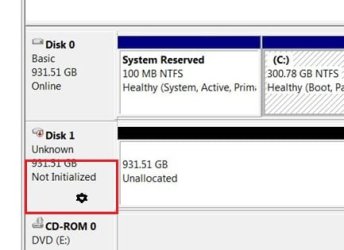
i just got some new computer stuff, like a new mobo, processor, and hdd. my new mobo wouldnt start up [not shorted out, power supply is sufficient] so i put the old stuff back in. it works perfect, and so i put my new hdd in along with my old hdd. no problems with my old one, but my new one doesnt show up when i go into computer! so i looked in the computer properties, and the hard drive was listed at the bottom. i ran some troubleshooters, and the device said it was working perfectly. in one of the menus, it said the device was not initialized? wtf? western digital black caviar 1tb 7200 rpm HDD is my new one.

My System SpecsSystem Spec
08-10-2011   #2
whs


Vista and Windows7, sometimes Ubuntu and Fedora


Did you try to initialize it in Disk Management. Right click on where it says Disk0, Disk1, etc.
My System SpecsSystem Spec
08-10-2011   #3


windows 7 home premium 32 bit


okay, yea, it's disk 1, disk 0 is my 150 gig hdd
My System SpecsSystem Spec
.


08-10-2011   #4


windows 7 home premium 32 bit


how do i initialize it? the only options when i right click it are: new spanned volume, new striped volume, convert to dynamic disk, convert to gpt disk, properties, help.
My System SpecsSystem Spec
08-10-2011   #5


W 7 64-bit Ultimate


Hello, do not convert to a Dynamic or GPT disk or Windows will not boot.


Click here.
click to enlarge
hard drive issue!-here.jpg
My System SpecsSystem Spec
08-10-2011   #6


windows 7 home premium 32 bit


i didn't. and it says [Online] where that screenshot says [not initialized]. it still doesn't show up in {Start menu > computer}
My System SpecsSystem Spec
08-10-2011   #7


W 7 64-bit Ultimate


If it says "Online" then you're good to go.


You have to create and format partition(s) before it will show in "Computer" at all.
My System SpecsSystem Spec
08-10-2011   #8


windows 7 home premium 32 bit


but how do i access it if it doesn't show up in computer?

how do i do that -_-

Last edited by Brink; 08-10-2011 at 04:08 PM.. Reason: merged
My System SpecsSystem Spec
08-10-2011   #9


W 7 64-bit Ultimate


OK have a look at these links.


Note   Note

You can always extend the Windows partition to include the remaining unallocated space on the HDD / SSD or create additional Primary partitions or an Extended partition after the installation completes if you choose.

My System SpecsSystem Spec
08-10-2011   #10


windows 7 home premium 32 bit


wow dude, thanks so much!!!!! + rep
My System SpecsSystem Spec
Reply

 hard drive issue! problems?


Thread Tools


Similar Threads for: hard drive issue!
Thread Forum
Solved Hard Drive Issue Hardware & Devices
Hard Drive Issue - Notificiation Hardware & Devices
hard drive issue Hardware & Devices
Hard-drive partition issue Hardware & Devices
Another hard Drive issue. Hardware & Devices


All times are GMT -5. The time now is 10:51 AM.


Windows 7 Forums is an independent web site and has not been authorized,
sponsored, or otherwise approved by Microsoft Corporation.
"Windows 7" and related materials are trademarks of Microsoft Corp.
© Designer Media Ltd
  

1 2 3 4 5 6 7 8 9 10 11 12 13 14 15 16 17 18 19 20 21 22 23 24 25 26 27 28 29 30