Windows 7 Forums Search
Welcome to Windows 7 Forums. Our forum is dedicated to helping you find solutions with any problems, errors or issues you are experiencing with Windows 7. The Windows 7 forum also covers news and updates and has an extensive Windows 7 tutorial section that covers a wide range of tips and tricks.


Windows 7 - Please help with UPS surge protector.

 
08-11-2011   #1


Windows 7 Retail


Please help with UPS surge protector.

Hello. I was looking at a surge protector for my PC with 850W PSU. I was checking out the surge protectors, and noticed that they have wattage.

The one I was looking at is 330W:
Newegg.com - CyberPower Standby Series CP550SLG 550 VA 330 Watts 8 Outlets UPS Replaces existing model# CP550SL

Does this matter? Should this surge protector be able to keep my computer on for a few minutes in case the power goes out?

The power in this place probably went out twice because they forget to pay their bills. But often, there have been times when the power would blink off for a second or 2, then come back on. Enough to shut off my computer.

My System SpecsSystem Spec
08-11-2011   #2


Windows 7 Ultimate 64bit (Build 7600)


Have a looky over here pal UPS Power Calculator (change the settings to the country you reside in)
My System SpecsSystem Spec
08-15-2011   #3


Windows 7 Retail


It doesn't have an option for power supply. 850W. How does it work? I can't tell what I should get.
My System SpecsSystem Spec
.


08-15-2011   #4


Windows 7 Retail


I don't understand. I just need something that will keep my computer on in case my power blinks on and off. Or goes off so I can shut it down in a few minutes. I don't need a UPS that will keep my computer on for an hour or so. I have 850W PSU so does the watts on a UPS matter?
My System SpecsSystem Spec
08-15-2011   #5


Windows 7 Home Premium x64


The 850 watt rating of your power supply is telling you the maximum amount of power it can supply continuously. If your system is not being pushed hard by gaming or video encoding or the like, then the power requirement will be much less.

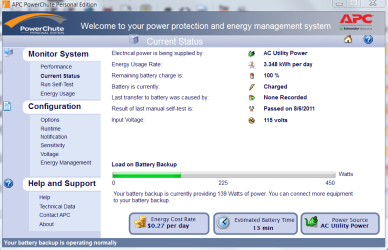
For example, I have an APC brand battery backup rated at 1500VA (865 watts). Plugged in to the battery backup are the following items:

PC with 650 watt power supply
PC with 350 watt power supply
25" LCD monitor
cable modem
wireless router
gigabit switch
HP 6110 all-in-one printer

The display on the battery backup is showing 224 watts, even with all those items plugged in and operating.

So, unless you're playing a game or video encoding when the power blinks, a 300 watt battery backup will probably be more than sufficient. Pay careful attention to the rating as 300 VA is not the same as 300 watts. A rating of 300 VA would give roughly 175 watts which may or may not be enough to keep your system going.
My System SpecsSystem Spec
08-15-2011   #6


Windows 7 Retail


Thanks! That helps alot. Ya the VA and Watts are on the box.


What if the usage goes over? Like say for example, you were running games, and had more than 865W showing on your APC UPS display. Will it still be able to keep it on for awhile if the power goes out?

OK I see about the PSU. So if I have an 850W PSU, I have to make sure that my PC isn't running anything higher than that right? I think everything I have will stay under 850W.

What if I have 2 GTX560 cards installed in SLI mode, and playing a high-end online game like TERA or something? So that particular UPS I was looking at was 330W. What if I'm playing something like that on my PC with 850W max power, and pushing more than 330W, and the power goes out. Will that UPS thing still keep the power on? Or do I have to look for something higher.

My build will be i7 processor, 1 hard drive, 2 GTX560 in SLI running on 850W Corsair PSU. I don't know how much Watts it will be using while playing a highend game, but I'm sure the 850W will cover. Just hoping the UPS will cover it as well.
My System SpecsSystem Spec
08-15-2011   #7


Windows 7 Retail


How do I measure how much Watts my computer is using? Does Windows 7 do that or is there a software for that?
My System SpecsSystem Spec
08-15-2011   #8


Windows 7 Ultimate x64


Quote   Quote: Originally Posted by crimson View Post
How do I measure how much Watts my computer is using? Does Windows 7 do that or is there a software for that?
For that you would need a hardware meter for your plug socket, search for a plug in power usage meter and there are a range available from as little as £10. Many utility companies in the UK will give you one depending on your tarriff.

Most modern UPS's WILL continue to deliver the power above their rated wattage (it's more to do with current) but a risk of triggering a thermal cut out (instant off and ups reset) and a significantly reduced operating time. I would only have my rig and display powered from it for emergencies. The manufacturer warranty would also be void by such treatment.
My System SpecsSystem Spec
08-15-2011   #9


Windows 7 Retail


If I have the 850W PSU, I don't think my PC will even be using close to that much.

Here's one I found with 600W
Intelligent LCD Series - CP1000AVRLCD | CyberPower Systems, Inc.

Do you think this one with 600W should be able to handle the system I described above? (850W PSU, i7 processor, and 2 GTX 560 cards.)

They also have a 510W, 750W, 810W, 900W.

Do you think the 600W one will be able to handle everything fine, or should I go with the 810W? It's about a $45 difference.
My System SpecsSystem Spec
08-15-2011   #10


Windows 7 Home Premium 64bit


I recommend an APC UPS
Newegg.com - apc ups

Specifically: Newegg.com - apc ups
My System SpecsSystem Spec
Reply

 Please help with UPS surge protector. problems?


Thread Tools


Similar Threads for: Please help with UPS surge protector.
Thread Forum
spy protector System Security
Pen-drive Protector! Software
UPS or good surge protector Hardware & Devices
AOL Homepage Protector? Software
Do laptop power supplies have abuilt in surge-protector Hardware & Devices


All times are GMT -5. The time now is 10:52 AM.


Windows 7 Forums is an independent web site and has not been authorized,
sponsored, or otherwise approved by Microsoft Corporation.
"Windows 7" and related materials are trademarks of Microsoft Corp.
© Designer Media Ltd
  

1 2 3 4 5 6 7 8 9 10 11 12 13 14 15 16 17 18 19 20 21 22 23 24 25 26 27 28 29 30