Windows 7 Forums Search
Welcome to Windows 7 Forums. Our forum is dedicated to helping you find solutions with any problems, errors or issues you are experiencing with Windows 7. The Windows 7 forum also covers news and updates and has an extensive Windows 7 tutorial section that covers a wide range of tips and tricks.


Windows 7 - Second Hard Drive Doesn't Show Up

 
08-15-2011   #1


Windows 7 Professional x64


Second Hard Drive Doesn't Show Up

I just built a computer and I have a 64GB Crucial M4 SSD as my primary drive and a 500GB WD Caviar Blue as my secondary drive. The issue is that Windows 7 doesn't recognize the WD Caviar Blue, only the SSD. Both the BIOS and the Device Manager recognize the WD Hard Drive it just doesn't show up in Windows 7.

My System SpecsSystem Spec
08-15-2011   #2


Windows 7 SP1, Home Premium, 64-bit


Does it show up in Disk Management?? Can you assign a drive letter to it there?
My System SpecsSystem Spec
08-15-2011   #3


Windows 7 Professional x64


Im going to try to do that right now
My System SpecsSystem Spec
.


08-15-2011   #4


Windows 7 Professional x64


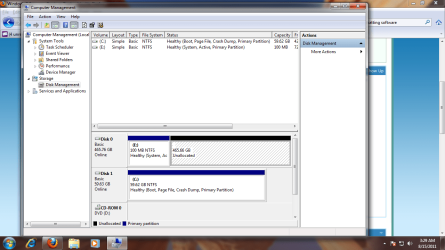
It's actually not in there. I'll post a picture of my disk management then you analyze it.
Attached Thumbnails
Second Hard Drive Doesn't Show Up-untitled.png  
My System SpecsSystem Spec
08-15-2011   #5


Windows 7 Ultimate x64 SP1


It needs to be formatted and then assigned a drive letter. It looks like you may have the SATA ports reversed as well, since the installer picked up the WD drive before your SSD.
My System SpecsSystem Spec
08-15-2011   #6


Windows 7 Professional x64


What do you mean by the SATA ports? They are both plugged innto SATA 6GB's sockets as they're both SATA 6GB's drives.
My System SpecsSystem Spec
08-15-2011   #7


Windows 7 SP1, Home Premium, 64-bit


Not sure how you got that 100 MB E partition. I'm guessing you had the 500 GB drive plugged in when you installed Windows onto the SSD??

I thought you meant you couldn't see the drive at all. Looks like it there OK and just needs to be formatted as the Deacon says.
My System SpecsSystem Spec
08-15-2011   #8


Windows 7 Professional x64


The 100MB partition is from the 500GB drive it's the system file partition. BUt how do I format the drive. There isn't that option...
My System SpecsSystem Spec
08-15-2011   #9


Windows 7 SP1, Home Premium, 64-bit


The SATA port thing probably doesn't matter, but you might swap cables on two ports you are using so that the SSD shows up first as drive 0 rather than drive 1. As I say, it may not matter. I have had a system running with the OS partition as drive 1 for years with no issues.
My System SpecsSystem Spec
08-15-2011   #10


Windows 7 Professional x64


So seeing my disk management, what would you say to do?
My System SpecsSystem Spec
Reply

 Second Hard Drive Doesn't Show Up problems?


Thread Tools


Similar Threads for: Second Hard Drive Doesn't Show Up
Thread Forum
can an external dvd drive be made to show as hard drive? Music, Pictures & Video
Doesn't show external drive anymore but visible in the disk management General Discussion
one internal hard drive doesn't show up on restart Hardware & Devices
External Hard drive doesn't show up! Hardware & Devices
✯ 3rd Hard drive doesn't show up ✯ General Discussion


All times are GMT -5. The time now is 10:56 AM.


Windows 7 Forums is an independent web site and has not been authorized,
sponsored, or otherwise approved by Microsoft Corporation.
"Windows 7" and related materials are trademarks of Microsoft Corp.
© Designer Media Ltd
  

1 2 3 4 5 6 7 8 9 10 11 12 13 14 15 16 17 18 19 20 21 22 23 24 25 26 27 28 29 30