Windows 7 Forums Search
Welcome to Windows 7 Forums. Our forum is dedicated to helping you find solutions with any problems, errors or issues you are experiencing with Windows 7. The Windows 7 forum also covers news and updates and has an extensive Windows 7 tutorial section that covers a wide range of tips and tricks.


Windows 7 - Show us your SSD performance

 
01-23-2010   #101
whs


Vista and Windows7, sometimes Ubuntu and Fedora


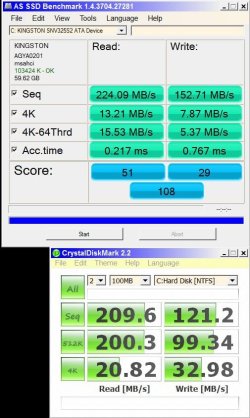
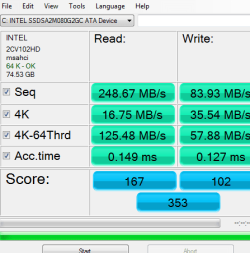
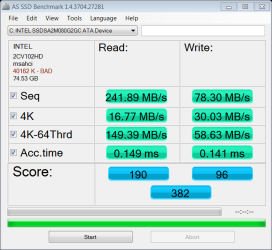
nate, it's As SSD Benchmark, a German Tool. There is an English version - look on the bottom of the linked page (above Donate)..

My System SpecsSystem Spec
01-23-2010   #102


Quote   Quote: Originally Posted by nate42nd View Post
Welcome to the forum and thanks for posting the results. Very interesting to see,. What are you using there to test? I recognize it from somewhere, but can't remember what program that is....
Thanks for the welcome. I am loving the SSD, despite the steep price of entry. The benchmark I am using is as whs says.
Quote   Quote: Originally Posted by whs View Post
nate, it's As SSD Benchmark, a German Tool. There is an English version - look on the bottom of the linked page (above Donate)..
Also, at the top of the page the word "download" is clickable. The version is switchable between English and German.

Its a nice tool, developed especially for benchmarking SSD's. There is even a handy Screenshot function to generate the picture you see posted.
My System SpecsSystem Spec
01-23-2010   #103


Windows 7 Professional x64


Quote   Quote: Originally Posted by Gildor View Post
Quote   Quote: Originally Posted by nate42nd View Post
Welcome to the forum and thanks for posting the results. Very interesting to see,. What are you using there to test? I recognize it from somewhere, but can't remember what program that is....
Thanks for the welcome. I am loving the SSD, despite the steep price of entry. The benchmark I am using is as whs says.
Quote   Quote: Originally Posted by whs View Post
nate, it's As SSD Benchmark, a German Tool. There is an English version - look on the bottom of the linked page (above Donate)..
Also, at the top of the page the word "download" is clickable. The version is switchable between English and German.

Its a nice tool, developed especially for benchmarking SSD's. There is even a handy Screenshot function to generate the picture you see posted.
Thanks a lot for the info.
My System SpecsSystem Spec
.


01-24-2010   #104


Windows 7 64-bit


Here is my Patriot M28 64-G (using the evil forbidden unapproved (at least by patriot)VBM19C1Q firmware) in Win 7 64-bit (optimized mine further for SSD)...

Show us your SSD performance-hdtune-01082010.jpg
My System SpecsSystem Spec
01-24-2010   #105
whs


Vista and Windows7, sometimes Ubuntu and Fedora


Hmm, how come it jerks around so much. Usually it is pretty much a flat line. And 2ms access time sounds very high - it should be in the nanosec range (which this program cannot show, it usually shows 0.0ms or 0.1ms instead). Maybe your unapproved firmware is not all that good for the bit.
My System SpecsSystem Spec
01-25-2010   #106


Windows 7 64-bit


Samsung based SSD has always had the jagged line from HDTune. My guess is that it is the 128M cache... The older firmware did not have trim support in Win 7... This run was done 10 minutes after filling up the drive and deleting the file to test trim support. When I did it with the old version, reads went down to 100 MBS and were a lot 'spikier'. Still fast! (7.2 Win experience... Ya, could be better)
ALTHOUGH.... A few more charges on the CC and I can get an Intel X25 drive with the points.....

PLUS... This is on my laptop with the MS AHCI drivers with 3 VMs running in the background.
My System SpecsSystem Spec
01-25-2010   #107
whs


Vista and Windows7, sometimes Ubuntu and Fedora


Quote   Quote: Originally Posted by lightningltd View Post
Samsung based SSD has always had the jagged line from HDTune. My guess is that it is the 128M cache... The older firmware did not have trim support in Win 7... This run was done 10 minutes after filling up the drive and deleting the file to test trim support. When I did it with the old version, reads went down to 100 MBS and were a lot 'spikier'. Still fast!
ALTHOUGH.... A few more charges on the CC and I can get an Intel X25 drive with the points.....

PLUS... This is on my laptop with the MS AHCI drivers with 3 VMs running in the background.
Understand. Trim is worth having. I had to mail my OCZ Vertex to OCZ to upgrade it to FW 1.4. My firmware level was so old, I could not flash it myself. But they did it free of charge - even paid the return postage. But on this system I have an 80GB Intel.
My System SpecsSystem Spec
01-25-2010   #108


Windows 7 64-bit


I think the 0.2ms is actually accurate..... I have seen quite a few that reported 0.0ms with HDTune that got worse read performance than my hard drive... The fastest theoretical access speed would be limited to just how many clock ticks it takes to execute the command plus drive speed plus overhead, so it could never be 0.0.. Must be the way some MFGRs do the caching.... For me, HDTune numbers are only a reference in the reads and I take the other stats with a grain of salt.
My System SpecsSystem Spec
01-25-2010   #109


Windows 7 64-bit


OK... Here is my latest HDTune... The reason my other screenshot was so wierd is that I was running HDTune on my boot disk with everything running.
Here it is when running in safe mode (no virus scanner slowing it down (Darn MS virus scanner!)):
Show us your SSD performance-hdt01252010sm.jpg
Better???
Ok... Little more tweaks to the M28... New numbers from top to bottom:
179.7, 246.1, 224.4, 0.1, 180.4, -1

Last edited by lightningltd; 01-26-2010 at 02:31 AM.. Reason: Add newer benchmark numbers
My System SpecsSystem Spec
01-25-2010   #110


Windows 7 Professional x64


^^^^^Wow! nice numbers......245.7 is a good looking number, my Torqx has never been that high at it's peak!

Thanks for posting, keep us updated.
My System SpecsSystem Spec
Closed Thread

 Show us your SSD performance problems?


Thread Tools


Similar Threads for: Show us your SSD performance
Thread Forum
Show us your SSD performance 2 Hardware & Devices
Show us your hard drive performance Hardware & Devices
HDDs Show in BIOS, But Do Not Show in Disk Management Hardware & Devices
Show us your Mechanical HDD performance... Hardware & Devices
show hidden folders show file extensions thru registry General Discussion


All times are GMT -5. The time now is 11:02 AM.


Windows 7 Forums is an independent web site and has not been authorized,
sponsored, or otherwise approved by Microsoft Corporation.
"Windows 7" and related materials are trademarks of Microsoft Corp.
© Designer Media Ltd
  

1 2 3 4 5 6 7 8 9 10 11 12 13 14 15 16 17 18 19 20 21 22 23 24 25 26 27 28 29 30