- Local time
- 8:29 AM
- Messages
- 3,028
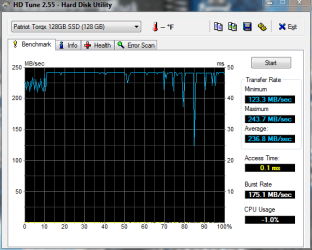
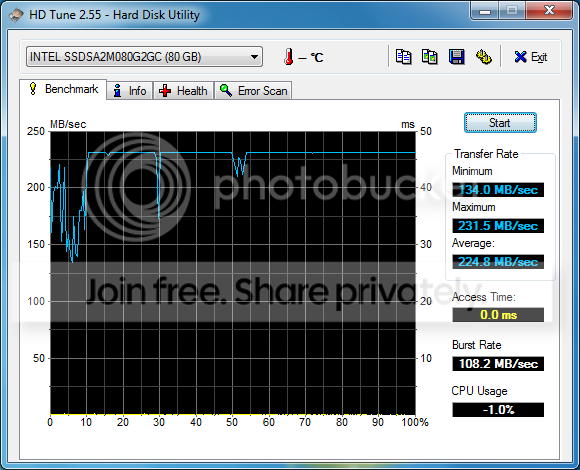
....thanks for pointing that outIf you read my post in the link you would have seen that I have updated the firmware (not a noob)
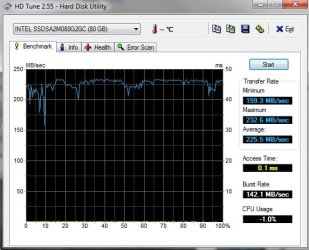
1. is the Alignment right?...Yep, it's good
2. its in ahci or ide?...IDE. I have had it set to AHCI but boot time decreased and overall increase in speed was minimal (I posted these results here but can't find them right now)
3. i see you cloned the HDD 2 SSD? some times the alignment dont take. and you need to redo it with Diskpar.
now using the new Intel Driver.

just something maybe to look @.
How to setup Core V1/2, Solid, Apex, Vertex SSD with aligned partitions using USB (if available on the drive) or SATA. Updated to show how to use Vista recovery disk
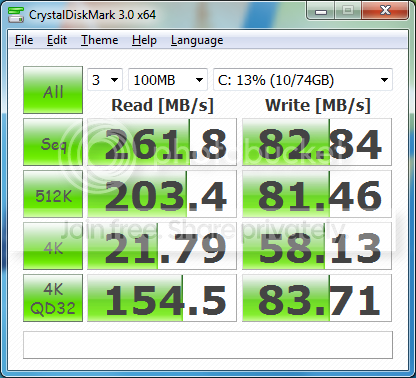
P.S, you try it with 100MB instead of 1000MB
Attachments

My Computer
At a glance
Windows 7 Ultimate (x64) SP1Intel 3770k 4.6GHz8GB (2x 4GB) Crucial BallistixSapphire 7950 (1060/1600)
- Computer Manufacturer/Model Number
- tw33k
- OS
- Windows 7 Ultimate (x64) SP1
- CPU
- Intel 3770k 4.6GHz
- Motherboard
- ASUS Maximus V Formula
- Memory
- 8GB (2x 4GB) Crucial Ballistix
- Graphics Card(s)
- Sapphire 7950 (1060/1600)
- Sound Card
- On Board Realtek HD Audio
- Monitor(s) Displays
- 27" Acer B273HU (via HDMI)
- Screen Resolution
- 2048 x 1152
- Hard Drives
- Crucial M4 128GB
2TB WD Black
1TB Samsung F3 SATA
1TB WD Elite External
2TB WD USB 3.0
- PSU
- Corsair AX750 Gold
- Case
- Corsair Obsidian 800DW
- Cooling
- Corsair H100 (2x AP-121/2x UK-3000 push/pull)
- Keyboard
- Microsoft Wireless 5000
- Mouse
- Microsoft Wireless 5000
- Internet Speed
- 5mb/s
- Other Info
- Logitech z-2300 2.1 speakers
Lamptron FC-5 v2