Windows 7 Forums Search
Welcome to Windows 7 Forums. Our forum is dedicated to helping you find solutions with any problems, errors or issues you are experiencing with Windows 7. The Windows 7 forum also covers news and updates and has an extensive Windows 7 tutorial section that covers a wide range of tips and tricks.


Windows 7 - Show us your SSD performance

 
07-28-2009   #21


Windows 7 Professional x64


HD tune and ATTO are free for the basic level program. It's basic but show some benchmarks.

My System SpecsSystem Spec
08-14-2009   #22


win 7


My Patriot 64 GB SSD benchmark

screenshot attached
Attached Thumbnails
Show us your SSD performance-hdtune_benchmark_patriot_warp_v2_64gb_ssd.png  
My System SpecsSystem Spec
08-15-2009   #23


Windows 7 RTM X64


I like the GSkill Falcon SSD myself. I'm still waiting to get them though. I'll be going RAID 0 with three of the 128GB SSD's.
My System SpecsSystem Spec
.


08-15-2009   #24


Windows 7 x64 Ultimate


Well my single X-25M opens Photoshop CS3 in 1.5 seconds flat on a 2.6 gig Core 2 duo.

That's about all the "Benchmarking" that really matters
My System SpecsSystem Spec
08-17-2009   #25


Windows 7 Ultimate x64


Quote   Quote: Originally Posted by dchurch55 View Post
screenshot attached
Wow thats slow for an SSD. My Intel X25-M does 220Meg max average was 210Meg.
Attached Thumbnails
Show us your SSD performance-hdd.jpg  
My System SpecsSystem Spec
08-17-2009   #26


Windows 7


64GB G.Skill Falcon SSD
Attached Thumbnails
Show us your SSD performance-ht-tune-pro-benchmark.jpg  
My System SpecsSystem Spec
08-17-2009   #27


Windows 7 RTM


SSD and Windows 7

I'm using the 80GB Intel X-25M as it received great reviews on tomshardware.com. Since I was planning on a Windows 7 install I waited for the drive. So I have changed 3 things. The move to the SSD, a new OS and I'm running the 64-bit version of OS. Was using 32-bit XP. I can tell you the disk writes are blazing, the reads are unbelievable. Its slowed down a bit with being part of a domain and running login scripts but the overall performance is a noticable difference. The E6500 is no slouch either. I can honestly say with this setup - This is what I think a personal computer should be. Multitasking including video or music with all of Aero effects turned up is pretty flawless. Some people have talked about removing the page file but from my research you could run into problems with older software so I let windows adjust. The one problem I did have was USB power settings getting plain stupid with my mouse. I change the advanced power settings and all is fine. If you are buying a drive just for an OS on the desktop or for a mobile platform you should consider a SSD. Its quieter, cooler, and faster.
My System SpecsSystem Spec
08-18-2009   #28


Windows 7 Ultimate x64


Quote   Quote: Originally Posted by Stingray View Post
I'm using the 80GB Intel X-25M as it received great reviews on tomshardware.com. Since I was planning on a Windows 7 install I waited for the drive. So I have changed 3 things. The move to the SSD, a new OS and I'm running the 64-bit version of OS. Was using 32-bit XP. I can tell you the disk writes are blazing, the reads are unbelievable. Its slowed down a bit with being part of a domain and running login scripts but the overall performance is a noticable difference. The E6500 is no slouch either. I can honestly say with this setup - This is what I think a personal computer should be. Multitasking including video or music with all of Aero effects turned up is pretty flawless. Some people have talked about removing the page file but from my research you could run into problems with older software so I let windows adjust. The one problem I did have was USB power settings getting plain stupid with my mouse. I change the advanced power settings and all is fine. If you are buying a drive just for an OS on the desktop or for a mobile platform you should consider a SSD. Its quieter, cooler, and faster.
I love my Intel X25-M. Windows 7 installed in no time, applications open instantly...No noise...Tiny drive in my massive tower...
My System SpecsSystem Spec
08-23-2009   #29


Windows 7 Professional x64


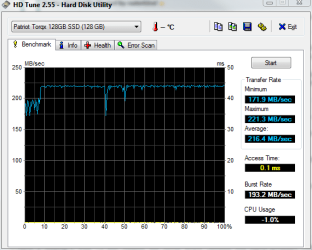
Keep these coming! It's very interesting to see the SSDs people have. The Intel and Falcon are looking pretty good. I think the Falcon has the same controller as my Torqx.

It IS funny to see one of these in a massive tower. I have mine in a full tower Lian Li case bolted right into the hard drive cage. You can barely see it unless you look hard. haha
My System SpecsSystem Spec
08-24-2009   #30


Windows 7 Home Premium x64


Quote   Quote: Originally Posted by Stingray View Post
I'm using the 80GB Intel X-25M as it received great reviews on tomshardware.com. Since I was planning on a Windows 7 install I waited for the drive. So I have changed 3 things. The move to the SSD, a new OS and I'm running the 64-bit version of OS. Was using 32-bit XP. I can tell you the disk writes are blazing, the reads are unbelievable. Its slowed down a bit with being part of a domain and running login scripts but the overall performance is a noticable difference. The E6500 is no slouch either. I can honestly say with this setup - This is what I think a personal computer should be. Multitasking including video or music with all of Aero effects turned up is pretty flawless. Some people have talked about removing the page file but from my research you could run into problems with older software so I let windows adjust. The one problem I did have was USB power settings getting plain stupid with my mouse. I change the advanced power settings and all is fine. If you are buying a drive just for an OS on the desktop or for a mobile platform you should consider a SSD. Its quieter, cooler, and faster.
Snap - Just fitted my X-25M (2nd Generation) drive today and am using it as the Win 7 systems disk. Absolutely amazing performance

I have moved my page file to my 7200rpm WD hard drive and it seems to have improved my WEI Memory score hugely as well.

You can move the page file to a different disk, then switch Windows back to managing the page file automatically in its new location.
My System SpecsSystem Spec
Closed Thread

 Show us your SSD performance problems?


Thread Tools


Similar Threads for: Show us your SSD performance
Thread Forum
Show us your SSD performance 2 Hardware & Devices
Show us your hard drive performance Hardware & Devices
HDDs Show in BIOS, But Do Not Show in Disk Management Hardware & Devices
Show us your Mechanical HDD performance... Hardware & Devices
show hidden folders show file extensions thru registry General Discussion


All times are GMT -5. The time now is 11:02 AM.


Windows 7 Forums is an independent web site and has not been authorized,
sponsored, or otherwise approved by Microsoft Corporation.
"Windows 7" and related materials are trademarks of Microsoft Corp.
© Designer Media Ltd
  

1 2 3 4 5 6 7 8 9 10 11 12 13 14 15 16 17 18 19 20 21 22 23 24 25 26 27 28 29 30