
 | | Welcome to Windows 7 Forums. Our forum is dedicated to helping you find solutions with any problems, errors or issues you are experiencing with Windows 7. The Windows 7 forum also covers news and updates and has an extensive Windows 7 tutorial section that covers a wide range of tips and tricks. | Windows 7 - Show us your SSD performance
|
07-26-2009
|
#1 | | Windows 7 Professional x64 |
Show us your SSD performance I'm interested to see what others are getting out of their SSD or SSDs in RAID. It's cool to look through the "Show us your hard drive performance" thread but here's a place for just SSD performance. I have a 128GB Patriot Torqx. (F/W v1881) Please post your benchmarks.
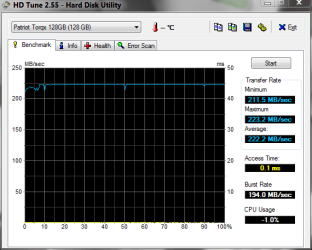
Edit: I now have 2 Patriot Torqx drives (Indilinx controlled) and am running v1881 F/W and LOVE them both like my own kids. haha They are great drives but there are better ones out there and even better ones coming out soon. Thanks to whoever made this a "sticky" It's a good thread. Benchmark Program Links:
Last edited by Brink; 05-13-2010 at 01:15 PM..
Reason: added program links
| My System Specs | | System Manufacturer/Model Number Keeps changing - (Custom) OS Windows 7 Professional x64 CPU Intel Core i7 860 Motherboard Gigabyte GA-P55-UD4P Memory 4GB DDR3 Mushkin 1600Mhz @ 7-8-7-20 Graphics Card MSI GTS250 1GB DDR3 Twin Frozr Sound Card Onboard realtek Monitor(s) Displays Samsung SyncMaster 24" P2450 + Samsung 20" 2033 Screen Resolution 1920 X 1080 and 1600 X 900 (#2 system 1440 X 900) Keyboard Gigabyte USB keyboard Mouse Microsoft wireless laser mouse 5000 PSU Corsair 750 HX Modular Case Lancool PC-K62 Cooling Cooler Master TX3 CPU cooler and 4-140mm and 1-120mm case Hard Drives Patriot Inferno 120GB SSD + 3 WD Blue 640GB drives Internet Speed 7 Mb down 1.5 up Other Info System #2: AMD Phenom II X6 1055T (Freezer 7 Pro cooler) - Gigabyte 880GMA-UD2H - WD 500GB Black - 9500GT (1GB) 500W OCZ modular PSU - Antec 200 case. System #3 (LapTop) Core 2 Duo T6670 - 320GB 7200RPM HD - 4GB DDR3 RAM. |
07-26-2009
|
#3 | | |
While I understand that SSD's are great with read speeds and almost non-existent access times.....there is no denying that their write speeds are staggeringly bad.
So, my question for the SSD's users out here is what you really think overall about the SSD drive? I'm not talking about a screenshot of a benchmark, or a timed reboot of your machine...but rather what is performance like installing the OS, installing some software, installing some games, etc. | My System Specs | | System Manufacturer/Model Number Self-Built in July 2009 OS Windows 7 Ultimate x64 CPU Intel Q9550 2.83Ghz OC'd to 3.40Ghz Motherboard Gigabyte GA-EP45-UD3R rev. 1.1, F12 BIOS Memory 8GB G.Skill PI DDR2-800, 4-4-4-12 timings Graphics Card EVGA 1280MB Nvidia GeForce GTX570 Sound Card Realtek ALC899A 8 channel onboard audio Monitor(s) Displays 23" Acer x233H Screen Resolution 1920x1080 Keyboard ABS M1 Mechanical Mouse Logitech G9 Laser Mouse PSU Corsair 620HX modular Case Antec P182 Cooling stock Hard Drives Intel X25-M 80GB Gen 2 SSD
Western Digital 1TB Caviar Black, 32MB cache. WD1001FALS Internet Speed 15/1 cable modem Other Info Windows and Linux enthusiast. Logitech G35 Headset. |
07-26-2009
|
#4 | | Windows 7 Professional x64 |
I have not done anything with games but I LOVE mine. I would have a hard time going back now. The write times on this drive are fine. Programs open VERY fast including every Windows related program in the OS itself.
I would like this thread to turn into somewhere for benchmarks and discussion about SSDs. I have found the manufacturer sites to be not quite up to par with Sevenforums standards.
I know some of you have SSDs....post some numbers and what you think of yours. | My System Specs | | System Manufacturer/Model Number Keeps changing - (Custom) OS Windows 7 Professional x64 CPU Intel Core i7 860 Motherboard Gigabyte GA-P55-UD4P Memory 4GB DDR3 Mushkin 1600Mhz @ 7-8-7-20 Graphics Card MSI GTS250 1GB DDR3 Twin Frozr Sound Card Onboard realtek Monitor(s) Displays Samsung SyncMaster 24" P2450 + Samsung 20" 2033 Screen Resolution 1920 X 1080 and 1600 X 900 (#2 system 1440 X 900) Keyboard Gigabyte USB keyboard Mouse Microsoft wireless laser mouse 5000 PSU Corsair 750 HX Modular Case Lancool PC-K62 Cooling Cooler Master TX3 CPU cooler and 4-140mm and 1-120mm case Hard Drives Patriot Inferno 120GB SSD + 3 WD Blue 640GB drives Internet Speed 7 Mb down 1.5 up Other Info System #2: AMD Phenom II X6 1055T (Freezer 7 Pro cooler) - Gigabyte 880GMA-UD2H - WD 500GB Black - 9500GT (1GB) 500W OCZ modular PSU - Antec 200 case. System #3 (LapTop) Core 2 Duo T6670 - 320GB 7200RPM HD - 4GB DDR3 RAM. |
07-27-2009
|
#5 | | |
you can improve write speeds by moving the Windows swapfile to a separate HDD, away from the OS
- mine's an SSD/HDD hybrid rig, with a 32-bit Windows 7 OS installed on the SSD
- I put the swapfile on the HDD, set at 5500MB min/max
- works a treat and frees up SSD space, too.. | My System Specs | | System Manufacturer/Model Number benchtec, built to personal specs OS 64-Bit Windows7 Ult-SP1 CPU i7-965 Extreme Edition (8 Cores) at 3.3GHz (no OC) Motherboard BloodRage QuantumForce X58 (Socket1366) Memory 6G Corsair Dominator DDR3 - tripled Graphics Card 2xMSI AMD6870's in crossfire Sound Card Sonar(SB)X-Fi onboard Monitor(s) Displays SyncMaster P2050 20" Screen Resolution 1600x900 (widescreen) Keyboard Logitech G19 (wired) Mouse Logitech G9 Laser (wired) PSU 1000w Corsair Case ANTEC 900/2 all blue lights, etc.. Cooling Noctua SE1366 NH-U12P Hard Drives 64G\OCZSeries2SSD, 60G\OCZVertex2SSD, 1TB\spinpointF1SATA Internet Speed 50mb |
07-27-2009
|
#6 | | |

Quote: Originally Posted by pparks1 While I understand that SSD's are great with read speeds and almost non-existent access times.....there is no denying that their write speeds are staggeringly bad.
So, my question for the SSD's users out here is what you really think overall about the SSD drive? I'm not talking about a screenshot of a benchmark, or a timed reboot of your machine...but rather what is performance like installing the OS, installing some software, installing some games, etc. Staggeringly bad wrandom write speeds in real life use plauge a lot of SSDs it's true, but Intel and OCZ have seen the light and they both post random write speeds as good as a single high perfoamance hard drives at the cost of a slight reduction in "overall" write speeds in benchmarks.
Many drives when brand new post great sequential write speeds out of the gate and that's what the manufacturers tout and most people never look further from, but then fail to almost useless when they start to fill up or use random write block sizes. Not so with the latest offerings with latest firmware from Intel and OCZ.
Intel and OCZ had rough starts with this but have clered up dramatically in the last few months. I finally was willing to actually buy an SSD for myself after months of seeing them fail miserably when put to real use.
Toms and Anandtech have some pretty in depth articles on the subject.
[Edit]
I got the 160 gig X-25M, not really benchmarked it yet but in a test install of 7100 I got a WEI score of 7.6 for the drive  The harddrive is no longer by far the slowest thing in my mahcine but is now by far the fastest.
Last edited by fseal; 07-27-2009 at 10:49 AM..
| My System Specs | | System Manufacturer/Model Number Scratch built OS Windows 7 x64 Ultimate CPU i7 960 Motherboard Asus P6X58D Memory 12 Gig Corsair Dominator Graphics Card Nvidia 480 Sound Card Maudio Delta 44 + breakout box Monitor(s) Displays Dell UltraSharp U2410 24in and Samsung 21 dual monitors Screen Resolution 1920x1200 and 1280x1024 Keyboard Logitech G15 + N52 game pad Mouse Logitech MX518 PSU Corasair TX850 Case Cooler Master HAF Cooling Corsair H50 Hard Drives Primary: Intel X-25M G2 160G SSD
Secondary: Segate baracuda 1.0 TB
HDs in AHCI mode. Internet Speed 15kbs down 4.5kbps up Other Info WEI 7.6
CPU & RAM 7.6
Graphics 7.9
Hard disk 7.7 |
07-27-2009
|
#7 | | Windows 7 Professional x64 |
The new generation controllers by Samsung and Indilinx are still "up in the air" on this subject. I have an Indilinx in mine and it seems to be fine. I guess we'll see what happens but this write speed issue is changing I believe. | My System Specs | | System Manufacturer/Model Number Keeps changing - (Custom) OS Windows 7 Professional x64 CPU Intel Core i7 860 Motherboard Gigabyte GA-P55-UD4P Memory 4GB DDR3 Mushkin 1600Mhz @ 7-8-7-20 Graphics Card MSI GTS250 1GB DDR3 Twin Frozr Sound Card Onboard realtek Monitor(s) Displays Samsung SyncMaster 24" P2450 + Samsung 20" 2033 Screen Resolution 1920 X 1080 and 1600 X 900 (#2 system 1440 X 900) Keyboard Gigabyte USB keyboard Mouse Microsoft wireless laser mouse 5000 PSU Corsair 750 HX Modular Case Lancool PC-K62 Cooling Cooler Master TX3 CPU cooler and 4-140mm and 1-120mm case Hard Drives Patriot Inferno 120GB SSD + 3 WD Blue 640GB drives Internet Speed 7 Mb down 1.5 up Other Info System #2: AMD Phenom II X6 1055T (Freezer 7 Pro cooler) - Gigabyte 880GMA-UD2H - WD 500GB Black - 9500GT (1GB) 500W OCZ modular PSU - Antec 200 case. System #3 (LapTop) Core 2 Duo T6670 - 320GB 7200RPM HD - 4GB DDR3 RAM. |
07-27-2009
|
#8 | | Windows 7 RTM (TechNet), XP Pro x64, Vista x64, Ubuntu |
This is a really good article for starters. It's long but really worth reading (as well as the follow-ups). AnandTech: The SSD Anthology: Understanding SSDs and New Drives from OCZ | My System Specs | | System Manufacturer/Model Number Dell: XPS 420, XPS 420, XPS M1330, XPS M1330, Mini 9, Mini 10v OS Windows 7 RTM (TechNet), XP Pro x64, Vista x64, Ubuntu CPU Q6600, Q6700, T7500, T7500, N270, N270 Motherboard Dell Memory 4GB, 8GB, 4GB, 4GB, 2GB, 2GB Graphics Card ATI, nVidia, nVidia, nVidia, Intel, Intel Monitor(s) Displays Dell 2408WFP Keyboard Logitech Wave Hard Drives A drawer full. OCZ Vertex 2x30GB in RAID 0 on my main desktop.....fast, fast, fast! Internet Speed 29 Mbps DL / .95 Mbps UL Other Info New project(9/09)...Built a low power (38-40 watts using Kill-a-Watt) Windows Home Server machine. Zotac ION (Atom 330, GeForce9400), 2GB RAM, 2x1TB Seagate 7200.12, IN WIM miniITX Case. Fits on a shelf in laundry closet, practically silent. |
07-27-2009
|
#9 | | Windows 7 Professional x64 |
That IS a good article. I hope once Windows 7 comes out in full force we can get a sticky for a thread like this so we can see what users are experiencing with SSDs and Windows 7.
I am about ready to start a website as a repository for info about using them with Windows. How to configure, etc..... | My System Specs | | System Manufacturer/Model Number Keeps changing - (Custom) OS Windows 7 Professional x64 CPU Intel Core i7 860 Motherboard Gigabyte GA-P55-UD4P Memory 4GB DDR3 Mushkin 1600Mhz @ 7-8-7-20 Graphics Card MSI GTS250 1GB DDR3 Twin Frozr Sound Card Onboard realtek Monitor(s) Displays Samsung SyncMaster 24" P2450 + Samsung 20" 2033 Screen Resolution 1920 X 1080 and 1600 X 900 (#2 system 1440 X 900) Keyboard Gigabyte USB keyboard Mouse Microsoft wireless laser mouse 5000 PSU Corsair 750 HX Modular Case Lancool PC-K62 Cooling Cooler Master TX3 CPU cooler and 4-140mm and 1-120mm case Hard Drives Patriot Inferno 120GB SSD + 3 WD Blue 640GB drives Internet Speed 7 Mb down 1.5 up Other Info System #2: AMD Phenom II X6 1055T (Freezer 7 Pro cooler) - Gigabyte 880GMA-UD2H - WD 500GB Black - 9500GT (1GB) 500W OCZ modular PSU - Antec 200 case. System #3 (LapTop) Core 2 Duo T6670 - 320GB 7200RPM HD - 4GB DDR3 RAM. |
07-27-2009
|
#10 | | |

Quote: Originally Posted by fseal Intel and OCZ have seen the light and they both post random write speeds as good as a single high perfoamance hard drives at the cost of a slight reduction in "overall" write speeds in benchmarks. Well, this is good to know. I might investigate a little further and do some more reading on these drives then. 
Quote: Originally Posted by fseal Many drives when brand new post great sequential write speeds out of the gate and that's what the manufacturers tout and most people never look further from, but then fail to almost useless when they start to fill up or use random write block sizes. Not so with the latest offerings with latest firmware from Intel and OCZ. Yeah, that was the experience that I had heard about. We had an exec in our office with a Mac Book with an SSD drive and while good at the start, become a nightmare once his drive started filling up. In fact, it became so bad that he ordered a new Mac Book Pro and get a standard hard drive in the new one. Of course, we formatted the other machine and gave it to another employee...who was delighted at first...but I'm not sure how they feel at this point. | My System Specs | | System Manufacturer/Model Number Self-Built in July 2009 OS Windows 7 Ultimate x64 CPU Intel Q9550 2.83Ghz OC'd to 3.40Ghz Motherboard Gigabyte GA-EP45-UD3R rev. 1.1, F12 BIOS Memory 8GB G.Skill PI DDR2-800, 4-4-4-12 timings Graphics Card EVGA 1280MB Nvidia GeForce GTX570 Sound Card Realtek ALC899A 8 channel onboard audio Monitor(s) Displays 23" Acer x233H Screen Resolution 1920x1080 Keyboard ABS M1 Mechanical Mouse Logitech G9 Laser Mouse PSU Corsair 620HX modular Case Antec P182 Cooling stock Hard Drives Intel X25-M 80GB Gen 2 SSD
Western Digital 1TB Caviar Black, 32MB cache. WD1001FALS Internet Speed 15/1 cable modem Other Info Windows and Linux enthusiast. Logitech G35 Headset. | Show us your SSD performance | All times are GMT -5. The time now is 03:38 AM. |  |
