Hello,
I recently bought some new hardware and I installed them by myself. But I faced a few problems.
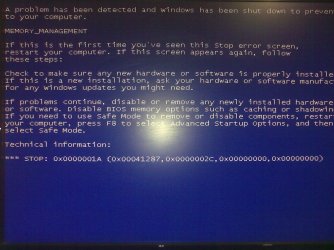
1- I always install both windows XP and 7, but on the new device when I want to install XP SP3, after loading installation files bluescreen error apears:
A problem has been detected and windows has been shut down to prevent damage to your computer.
MEMORY_MANAGEMENT
If this is...
Technical information:
*** STOP: 0x0000001A (0x00041287,0x0000002C,0x00000000,0x00000000)
2-when I'm working on windows 7 suddenly both video and audio freeze. I just can restart PC. this happens several times a day and it's very annoying.
3-Again during working with 7 bluescreen error apears:
memory dump.
My new hardware:
Asus P8Z68-V pro
Intel i3 2120
3x Kingston 2GB 1333 (KVR1333D3N9/2G)
Maxtor 300GB
Western 1TB kaviar green
600 turbo power
by the way my power supply is a bit old and it has 4 pin cpu connector.
I could find KVR1333D3N9K2/4G on mothboard supported ram list ,but mine isn't exactly the same model, is that a problem?
I recently bought some new hardware and I installed them by myself. But I faced a few problems.
1- I always install both windows XP and 7, but on the new device when I want to install XP SP3, after loading installation files bluescreen error apears:
A problem has been detected and windows has been shut down to prevent damage to your computer.
MEMORY_MANAGEMENT
If this is...
Technical information:
*** STOP: 0x0000001A (0x00041287,0x0000002C,0x00000000,0x00000000)
2-when I'm working on windows 7 suddenly both video and audio freeze. I just can restart PC. this happens several times a day and it's very annoying.
3-Again during working with 7 bluescreen error apears:
memory dump.
My new hardware:
Asus P8Z68-V pro
Intel i3 2120
3x Kingston 2GB 1333 (KVR1333D3N9/2G)
Maxtor 300GB
Western 1TB kaviar green
600 turbo power
by the way my power supply is a bit old and it has 4 pin cpu connector.
I could find KVR1333D3N9K2/4G on mothboard supported ram list ,but mine isn't exactly the same model, is that a problem?
Attachments

My Computer
At a glance
Windows 7 Ultimate x64Intel i3 2120Kingston 2GB 1333 - x3Onboard
- OS
- Windows 7 Ultimate x64
- CPU
- Intel i3 2120
- Motherboard
- Asus P8Z68-V PRO
- Memory
- Kingston 2GB 1333 - x3
- Graphics Card(s)
- Onboard
- Sound Card
- None
- Monitor(s) Displays
- Sumsung
- Hard Drives
- x3