Windows 7 Forums Search
Welcome to Windows 7 Forums. Our forum is dedicated to helping you find solutions with any problems, errors or issues you are experiencing with Windows 7. The Windows 7 forum also covers news and updates and has an extensive Windows 7 tutorial section that covers a wide range of tips and tricks.


Windows 7 - USB's Drive Not assigned

 
08-26-2011   #1


Windows 7 PRO 32 Bit


USB's Drive Not assigned

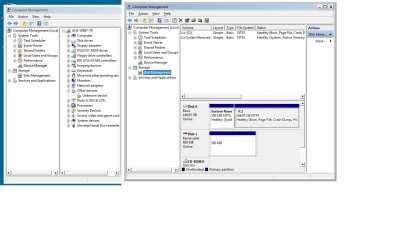
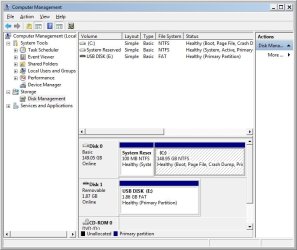
Hi I am running Windows 7 32 bit Professional. When I plug a USB in the message that the device has installed appears. When I go to Printers and Devices the USB appears. When I go to Device Manager the Device appears as a uninstalled device and in Disk Management it has not been assigned a drive letter. Any thoughts?

My System SpecsSystem Spec
08-26-2011   #2


Windows 7 Ultimate X86 SP1


Assuming the USB you refer to is a flash drive, have you formatted it? In Disk Management Right click it and choose Assign drive leter, any one will do.
My System SpecsSystem Spec
08-28-2011   #3


Windows 7 PRO 32 Bit


Hi Britton 30, Yes the USB is formatted. It works on XP machines fine and also one of my Win 7 machines but not the others. I have 30 machines in one lab and the ones that fail give me the following message when I try to assign a Drive. "The operation failed because the disk management tool is not up to date. REfresh the view, Close the disk management or restart the PC" After attempting all these things I still get the same message. Any other suggestions would be greatly appreciated.
My System SpecsSystem Spec
.


08-28-2011   #4


Windows 7 Ultimate X86 SP1


Very odd. Maybe some file corruption, try running SFC /SCANNOW Command - System File Checker. Then, or, try a manual Windows update after doing this: Windows Update - Reset, using Option Two.
My System SpecsSystem Spec
08-28-2011   #5


Windows 7 PRO 32 Bit


Silly me... I just did a driver scan for the unrecognised device in Device Manager and it found a generic volume for the drive and thus assigned a drive letter. However I can not have my users do these steps everytime they plug a USB into the machine. Can the generic driver be placed in a location that all users have access to and would be found automatically on connection of a USB.

By the way the scan file produced no integrity violations!
My System SpecsSystem Spec
08-28-2011   #6


Windows 7 Ultimate X86 SP1


I'm not fluent in networks, but I think it could be placed on one of the PCs and deployed to the rest?
But Windows should install a generic driver on its own. Have you tried different USB drives? Maybe you have a wonky (tech term ) one.
My System SpecsSystem Spec
08-28-2011   #7


Windows 7 PRO 32 Bit


Pluged USB 1 in Appears in Device Manager as unknown device
Update Driver - it installs the generic volume
Still appears in Device Manager as an unknown device (although it can now be accessed)
Update Driver Again - it installs the WPD File System Volume Driver
Now appears as a recognised Driver in Device Manager

Plugged in USB 2 - Had to perform same steps
Plugged in USB 3 - Same scenario - 3 out of 3 not working dont think it is therefore a USB error but rather a setup or system error.

All installs of Drivers were from scans of the c: so surelly a scan for these drivers should perform automatically when a usb is plugged in? Confused !
My System SpecsSystem Spec
08-28-2011   #8


Windows 7 Ultimate X86 SP1


Me too buddy, I'll ask for some one more knowledgable for help. Check back regularly, it may not be right away.
My System SpecsSystem Spec
08-29-2011   #9


Windows 7 Ultimate x64


You could try this fix; USB Driver - General Fix for Problems[2]=Hardware%20and%20Drivers
My System SpecsSystem Spec
08-29-2011   #10


Windows 7 PRO 32 Bit


Hi Pooch thank you for your suggestion. I followed as outlined in your post deleting all unknown devices and the cache file. Plugged in a known working USB and recreated the infcache file - USB Worked like a charm. Connected a different USB but same thing happens... appears in Device Manager as unknown device and requires the driver to be updated.
My System SpecsSystem Spec
Reply

 USB's Drive Not assigned problems?


Thread Tools


Similar Threads for: USB's Drive Not assigned
Thread Forum
Solved No access to GPT drive in Windows 7, no drive letter can be assigned Hardware & Devices
External Sata drive will not keep assigned drive letter Hardware & Devices
Drive letters cannot be re-assigned Hardware & Devices
Q: Drive letters - where stored and how assigned? Hardware & Devices
Assigned Letters to Drive Keeps Disappearing Hardware & Devices


All times are GMT -5. The time now is 11:07 AM.


Windows 7 Forums is an independent web site and has not been authorized,
sponsored, or otherwise approved by Microsoft Corporation.
"Windows 7" and related materials are trademarks of Microsoft Corp.
© Designer Media Ltd
  

1 2 3 4 5 6 7 8 9 10 11 12 13 14 15 16 17 18 19 20 21 22 23 24 25 26 27 28 29 30