|
Welcome to Windows 7 Forums. Our forum is dedicated to helping you find solutions with any problems, errors or issues you are experiencing with Windows 7. The Windows 7 forum also covers news and updates and has an extensive Windows 7 tutorial section that covers a wide range of tips and tricks.
|
08-28-2011
|
#1 | | |
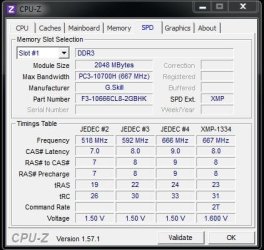
RAM Timings Hi, I've got 2 1600MHZ Patriot Sticks, The latest 4GB 2x2gb pc3-12800 1600mhz sticks I installed are running at a slower timing as my other 2 sticks at the minute. Do these need to be overclocked? http://img84.imageshack.us/img84/5486/ramw.jpg
or underclocked rather?, (So they all can run at 1333, or 1600mhz even)
any experiance
thanks | My System Specs | | OS Windows 7 x64 CPU AMD i5 2500k Motherboard ASRock z68 Extreme3 Gen7 Memory 16GB DDR3 1600 Corsair Vengeance Graphics Card 6950 2GB Sapphire Sound Card USB Tascam MK II Monitor(s) Displays Samsung 27" S27A950 + LG 23" W2353V Screen Resolution 1920x1080 PSU Seasonic X850 Case FT03 Cooling N/A Hard Drives Crucial 128MB M4
WD2002FAEX
500GB Seagate 7200.11 |
08-28-2011
|
#2 | | Windows 7 Ultimate X86 SP1 |
Sorry, you can't OC specific RAM slots. All the RAM wil default to the lowest "speed" of the RAM installed. Unless you install two more 1600MHz sticks, it will all run at 1066MHz. Also you could remove the two 1066MHz modules and get your 1600MHz at stock speed. | My System Specs | | System Manufacturer/Model Number Brittechnologies II OS Windows 7 Ultimate X86 SP1 CPU i5-2550K differing speeds depending on the day Motherboard ASUS P8X68-V PRO/GEN3 Memory 16GB G.Skill Sniper 2133MHz, 4X4GB Graphics Card ASUS ENGTX460 DirectCU/2DI/1GD5 GeForce GTX 460 Sound Card Onboard Realtek 5-1 Monitor(s) Displays Samsung P2570HD Screen Resolution 1920x1080 Keyboard Old Dell USB From 10 yrs Ago Mouse Gigabyte m6900 wired PSU Corsair HX650W Case Inwin Dragon rider Cooling Hyper 212 EVO w/two Noctua fans @1300 RPM Hard Drives TBA Internet Speed 8-19 Mbs down, 3-4 Mbs up Comcast Cable Other Info 5 fans, LG Bluray/R/RE, ASUS DVD/R/RW |
08-29-2011
|
#3 | | |
are there 2 ram slots on my motherboard capped to 1066mhz??
my motherboard is gigabyte 890gpa-ud3h, both sticks have labelled on the Ram package PC-12800 1600mhz.
are only 2 sticks on my board allowed to run at 1600mhz? not really sure why this is, looks like I can't use 2 of my sticks at the minute | My System Specs | | OS Windows 7 x64 CPU AMD i5 2500k Motherboard ASRock z68 Extreme3 Gen7 Memory 16GB DDR3 1600 Corsair Vengeance Graphics Card 6950 2GB Sapphire Sound Card USB Tascam MK II Monitor(s) Displays Samsung 27" S27A950 + LG 23" W2353V Screen Resolution 1920x1080 PSU Seasonic X850 Case FT03 Cooling N/A Hard Drives Crucial 128MB M4
WD2002FAEX
500GB Seagate 7200.11 |
08-29-2011
|
#4 | | windows 7 64 bit and dual boot Pinguyos |
Looking at your image, it suggests that you don't have a matched set and they are 2 different types of ram with different latency's etc. as a result as has been previously suggested at best you would only get the lower speed.
your Bios should give you the overall set speed or use something like CPUZ which will again give a total set speed. | My System Specs | | System Manufacturer/Model Number home built PC. Laptop studio1557 OS windows 7 64 bit and dual boot Pinguyos CPU PC, intel i7 920 2.7ghz, laptop i7 720 Motherboard PC, Asus P6t .laptop probably rubbish from dell Memory PC 6GB, laptop 2GB, me 2 seconds after 6 pints Graphics Card PC Asus eah5870,laptop, ati hd 4580 Monitor(s) Displays Sharp 42" HD TV using HDMI + HDMI to onkyo surround amp Screen Resolution 1920x1080 Keyboard logitek wave Mouse x8 sidewinder PSU OCZ 700w Case antec 902 Cooling antec khuler h20 920 Hard Drives 1x ssd OCZ 60GB, 2x250GB raid0, 2x1TB (storage),2TB Internet Speed dog slow |
08-29-2011
|
#5 | | Windows 7 Ultimate X86 SP1 |

Quote: Originally Posted by manolz are there 2 ram slots on my motherboard capped to 1066mhz??
my motherboard is gigabyte 890gpa-ud3h, both sticks have labeled on the Ram package PC-12800 1600mhz.
are only 2 sticks on my board allowed to run at 1600mhz? not really sure why this is, looks like I can't use 2 of my sticks at the minute It is a limitation of all motherboards. RAM will run at the speed of the slowest you have installed, regardless of the speed of any other RAM sticks or what slots you have them in. You will get the 1600MHz only if you:
1. remove the 1066MHz RAM
2. Replace the 1066MHZ with 1600MHz.
the BIOS will treat any RAM you have installed with the 1066MHz as 1066MHz, no matter what the label reads. | My System Specs | | System Manufacturer/Model Number Brittechnologies II OS Windows 7 Ultimate X86 SP1 CPU i5-2550K differing speeds depending on the day Motherboard ASUS P8X68-V PRO/GEN3 Memory 16GB G.Skill Sniper 2133MHz, 4X4GB Graphics Card ASUS ENGTX460 DirectCU/2DI/1GD5 GeForce GTX 460 Sound Card Onboard Realtek 5-1 Monitor(s) Displays Samsung P2570HD Screen Resolution 1920x1080 Keyboard Old Dell USB From 10 yrs Ago Mouse Gigabyte m6900 wired PSU Corsair HX650W Case Inwin Dragon rider Cooling Hyper 212 EVO w/two Noctua fans @1300 RPM Hard Drives TBA Internet Speed 8-19 Mbs down, 3-4 Mbs up Comcast Cable Other Info 5 fans, LG Bluray/R/RE, ASUS DVD/R/RW |
08-29-2011
|
#6 | | |
this is the new sektor5 ram i bought of PCCG a couple days ago
this is the speed its running at, my old patriot memory was running at 1600mhz previously,
it has designed for Intel, and ive been told intel ram isn't fussy with AMD. any assistance?
anything in BIOS i can do to OC the timings to where they should be, or should I return this memory (most likely sell it on OC boards) and buy the patriot memory I'm using atm
thanks | My System Specs | | OS Windows 7 x64 CPU AMD i5 2500k Motherboard ASRock z68 Extreme3 Gen7 Memory 16GB DDR3 1600 Corsair Vengeance Graphics Card 6950 2GB Sapphire Sound Card USB Tascam MK II Monitor(s) Displays Samsung 27" S27A950 + LG 23" W2353V Screen Resolution 1920x1080 PSU Seasonic X850 Case FT03 Cooling N/A Hard Drives Crucial 128MB M4
WD2002FAEX
500GB Seagate 7200.11 |
08-29-2011
|
#7 | | |
the name of my ram states Patriot 1600, it should be running at 1600mhz this is absurd. I'll have to return these sticks if no one has an advancement. Ill be buying the same sticks I previously had in my system (waiting for reply) | My System Specs | | OS Windows 7 x64 CPU AMD i5 2500k Motherboard ASRock z68 Extreme3 Gen7 Memory 16GB DDR3 1600 Corsair Vengeance Graphics Card 6950 2GB Sapphire Sound Card USB Tascam MK II Monitor(s) Displays Samsung 27" S27A950 + LG 23" W2353V Screen Resolution 1920x1080 PSU Seasonic X850 Case FT03 Cooling N/A Hard Drives Crucial 128MB M4
WD2002FAEX
500GB Seagate 7200.11 |
08-29-2011
|
#8 | | |
this is the speed my rams running at now
is this Slow compared to where it should be?
shouldnt my mhz be at 1600mhz? (I believe this RAM i have running is also intended for Intel chipsets)
Can anyone recommend me RAM that runs at 1600mhz SOLID for AMD chips compatatible with my GB 890gpa-ud3h
motherboard.
appreciate it thanks | My System Specs | | OS Windows 7 x64 CPU AMD i5 2500k Motherboard ASRock z68 Extreme3 Gen7 Memory 16GB DDR3 1600 Corsair Vengeance Graphics Card 6950 2GB Sapphire Sound Card USB Tascam MK II Monitor(s) Displays Samsung 27" S27A950 + LG 23" W2353V Screen Resolution 1920x1080 PSU Seasonic X850 Case FT03 Cooling N/A Hard Drives Crucial 128MB M4
WD2002FAEX
500GB Seagate 7200.11 |
08-29-2011
|
#9 | | Windows 7 Ultimate x64 SP1 |

Quote: Originally Posted by manolz the name of my ram states Patriot 1600, it should be running at 1600mhz this is absurd. I'll have to return these sticks if no one has an advancement. Ill be buying the same sticks I previously had in my system (waiting for reply) Just because they are rated to run up to 1600 Mhz, doesn't mean they will. If you have slower memory in your computer, then your 1600 Mhz sticks will be running down at that speed. This is the way it is and always has been. It is not a defect, nor is it something to be worried/angered/care about. There is nothing absurd about it. | My System Specs | | OS Windows 7 Ultimate x64 SP1 CPU Intel Core i7-2600 Motherboard Gigabyte GA-P67A-UD3P-B3 Memory 12 GB Patriot Extreme DDR3-1333 Graphics Card Nvidia GTX 470 Monitor(s) Displays Dell UltraSharp 2209WA PSU OCZ ModStream 700W Case CoolerMaster HAF 912 Advanced Cooling CoolerMaster Hyper 212 Plus Hard Drives OCZ Agility3 240 GB, WD5001AALS, WD7501AALS |
08-29-2011
|
#10 | | Windows 7 Ultimate X86 SP1 |
Do this, Remove the 1066MHz sticks and see what you get. Put them in a drawer. Buy 2 more 1600MHz indentical to what you now have, put them in.
In BIOS set CPU NB FREQ to X11
CPU FREQ 200
Mem clock/Manual, X8 | My System Specs | | System Manufacturer/Model Number Brittechnologies II OS Windows 7 Ultimate X86 SP1 CPU i5-2550K differing speeds depending on the day Motherboard ASUS P8X68-V PRO/GEN3 Memory 16GB G.Skill Sniper 2133MHz, 4X4GB Graphics Card ASUS ENGTX460 DirectCU/2DI/1GD5 GeForce GTX 460 Sound Card Onboard Realtek 5-1 Monitor(s) Displays Samsung P2570HD Screen Resolution 1920x1080 Keyboard Old Dell USB From 10 yrs Ago Mouse Gigabyte m6900 wired PSU Corsair HX650W Case Inwin Dragon rider Cooling Hyper 212 EVO w/two Noctua fans @1300 RPM Hard Drives TBA Internet Speed 8-19 Mbs down, 3-4 Mbs up Comcast Cable Other Info 5 fans, LG Bluray/R/RE, ASUS DVD/R/RW All times are GMT -5. The time now is 11:10 AM. |  |