Windows 7 Forums Search
Welcome to Windows 7 Forums. Our forum is dedicated to helping you find solutions with any problems, errors or issues you are experiencing with Windows 7. The Windows 7 forum also covers news and updates and has an extensive Windows 7 tutorial section that covers a wide range of tips and tricks.


Windows 7 - USB speed changing

 
08-30-2011   #1


Windows 7 Home Premium


USB speed changing

I thought this had been solved, but it's still a problem.

I have an external hard drive where I store all my photos. My system is Windows 7, 64 bit.

When I plug in my USB external hard drive I get this message:

"This USB device can perform faster if you connect it to a HI speed USB 2.0 port."

As I read somewhere, I went into Device Manager to update the driver. It said, "... best software already installed".

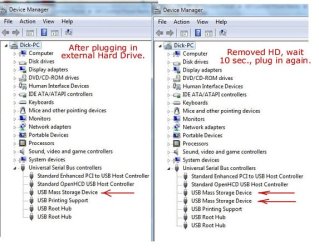
At first, the external hard drive runs very slowly (photos take a long time to load), but if I simply un-plug it then plug it back into the very same USB port, it now works normally. Then, a second "USB Mass Storage Device" appears in Device Mgr.
I've done this numerous times, so it's not just a one-shot thing.

Q. Any ideas about how to fix this?

Here is a screen shot of my Device Mgr. that might help.
http://dickh.zenfolio.com/img/v32/p1035620515-3.jpg


Attached Thumbnails
USB speed changing-p1035620515-3.jpg  
My System SpecsSystem Spec
09-04-2011   #2


Windows 7 Home Premium


Quote   Quote: Originally Posted by Dick H View Post
I thought this had been solved, but it's still a problem.

I have an external hard drive where I store all my photos. My system is Windows 7, 64 bit.

When I plug in my USB external hard drive I get this message:

"This USB device can perform faster if you connect it to a HI speed USB 2.0 port."

As I read somewhere, I went into Device Manager to update the driver. It said, "... best software already installed".

At first, the external hard drive runs very slowly (photos take a long time to load), but if I simply un-plug it then plug it back into the very same USB port, it now works normally. Then, a second "USB Mass Storage Device" appears in Device Mgr.
I've done this numerous times, so it's not just a one-shot thing.

Q. Any ideas about how to fix this?

Here is a screen shot of my Device Mgr. that might help.
http://dickh.zenfolio.com/img/v32/p1035620515-3.jpg
Hmmm. 4 days and 189 views and not even a single idea. Perhaps I didn't explain the problem clearly enough.
Oh, well. I guess I'll just have to keep plugging and re-plugging.
My System SpecsSystem Spec
09-04-2011   #3


Win 7 32


Quote   Quote: Originally Posted by Dick H View Post
I thought this had been solved, but it's still a problem.

I have an external hard drive where I store all my photos. My system is Windows 7, 64 bit.

When I plug in my USB external hard drive I get this message:

"This USB device can perform faster if you connect it to a HI speed USB 2.0 port."

As I read somewhere, I went into Device Manager to update the driver. It said, "... best software already installed".

At first, the external hard drive runs very slowly (photos take a long time to load), but if I simply un-plug it then plug it back into the very same USB port, it now works normally. Then, a second "USB Mass Storage Device" appears in Device Mgr.
I've done this numerous times, so it's not just a one-shot thing.

Q. Any ideas about how to fix this?

Here is a screen shot of my Device Mgr. that might help.
http://dickh.zenfolio.com/img/v32/p1035620515-3.jpg
Hmmm. 4 days and 189 views and not even a single idea. Perhaps I didn't explain the problem clearly enough.
Oh, well. I guess I'll just have to keep plugging and re-plugging.
Hey i cant help much with the technicalities of this but i know what you mean about wanting some help,,, I have had this issue with a few usb flash drives, usually when im conecting to a usb hub, i would assume you tried to connect directly to a usb off the motherboard and not through a hub? is it possibly the cable your using too? have you tried multiple cables?
Also i believe that some older drives/usb devices may not be found to be hi-speed causing a slower preformance. There maybe a program somewhere that would allow you to set your own USB ports speeds manually but im not sure.
Good luck with it!!
JRockZ
My System SpecsSystem Spec
.


09-04-2011   #4


Windows 7 Home Premium


[/QUOTE]
Hmmm. 4 days and 189 views and not even a single idea. Perhaps I didn't explain the problem clearly enough.
Oh, well. I guess I'll just have to keep plugging and re-plugging. [/QUOTE]

I just did a more extensive search and I think the problem is solved.
The answer came from "dunderhead" last May.
"I just right-clicked on Universal Serial Bus controllers and clicked "scan for hardware changes". A couple of seconds later the problem was solved."

I just plugged in my ext. HD and NO MSG. Yeah!
My System SpecsSystem Spec
Reply

 USB speed changing problems?


Thread Tools


Similar Threads for: USB speed changing
Thread Forum
fast download speed but browseing speed slow. Network & Sharing
Computer Bottleneck- HDD - SSD. giving data speed to proccessing speed Hardware & Devices
Download speed is limited, but upload speed is fine Network & Sharing
High Speed Connection - Low Speed Download? Network & Sharing
HIGH speed USB hub running at FULL speed.H Hardware & Devices


All times are GMT -5. The time now is 11:11 AM.


Windows 7 Forums is an independent web site and has not been authorized,
sponsored, or otherwise approved by Microsoft Corporation.
"Windows 7" and related materials are trademarks of Microsoft Corp.
© Designer Media Ltd
  

1 2 3 4 5 6 7 8 9 10 11 12 13 14 15 16 17 18 19 20 21 22 23 24 25 26 27 28 29 30