Windows 7 Forums


Windows 7: intel core 2 quad q6600 kentfield g0 OVERClocking help

31 Aug 2011   #1


intel core 2 quad q6600 kentfield g0 OVERClocking help

my bios is locked i am lookung to clock 2.40ghz to 3.0ghz what tools will i need to do this last time i used clock gen but when i overclocked to 3.0ghz it locked up the computer so also i overclocked to 2.80ghz but my computer would not go into hibernate so what am i doing wrong

My System SpecsSystem Spec

31 Aug 2011   #2

32bit: XP, Win7 H.P. / 64bit: 2008R2, Win7 Pro, Ultimate / Several flavors of Linux
Denver, Colorado


You haven't posted your RAM type.

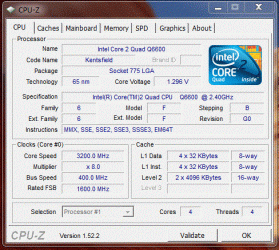
If you have DDR2-800 (PC-6400), then run the multiplier at x8, BUS at 400 yields core speed of 3.2GHz - keeps clocks nice (FSB-DRAM divider = 1:1) and makes the RAM very happy.

intel core 2 quad q6600 kentfield g0 OVERClocking help-q6600-cpu.gif

intel core 2 quad q6600 kentfield g0 OVERClocking help-q6600-mem.gif

Regards,
GEWB
My System SpecsSystem Spec
31 Aug 2011   #3

Windows 7, 64 bit Home SP1, Win 8 Pro 64 bit
Citrus Co, FL


I have a Q6600 with an Intel DP35DP motherboard. There is nothing in the BIOS that allows overclocking the CPU or memory.
My System SpecsSystem Spec
.


31 Aug 2011   #4

32bit: XP, Win7 H.P. / 64bit: 2008R2, Win7 Pro, Ultimate / Several flavors of Linux
Denver, Colorado


Quote   Quote: Originally Posted by fireberd View Post
I have a Q6600 with an Intel DP35DP motherboard. There is nothing in the BIOS that allows overclocking the CPU or memory.
Correct. (Can't get there from here.)

Regards,
GEWB
My System SpecsSystem Spec
22 Jan 2012   #5
Fx4

Windows 7 64 bit


I know this thread is a little old but you can over clock this board via the bios, it's just indirect. You need to use a program called SetFsb. I get 2.83 GHz out of mine reliably, however many get 3.0 GHz and a few make 3.2 and even a few more make 3.4. That being said most can make 3GHz just using SetFSB. There is also the pin trick that just wires the CPU to 3GHz but my die was just a hair to slow so I couldn't use this approach and be reliable. Note with SetFSB if you go into the bios and reset it in any way you must rerun SetFSB because the new clock settings will be wiped out. Also set the fan to aggressive in thes bios prior to using SetFSB.
My System SpecsSystem Spec
Reply

 intel core 2 quad q6600 kentfield g0 OVERClocking help problems?


Thread Tools


Similar help and support threads for: intel core 2 quad q6600 kentfield g0 OVERClocking help
Thread Forum
Solved intel core 2 quad q6600 kentfield help temp General Discussion
intel core 2 quad q6600 kentfield g0 and ram Hardware & Devices
intel core 2 quad q6600 kentfield g0 help buying new cpu Hardware & Devices
intel core 2 quad q6600 kentfield g0 overclock Hardware & Devices
Help me overclock my Intel Quad-Core Q6600 Performance & Maintenance


All times are GMT -5. The time now is 06:29 AM.


Seven Forums Android App Seven Forums IOS App Follow us on Facebook

Windows 7 Forums is an independent web site and has not been authorized,
sponsored, or otherwise approved by Microsoft Corporation.
"Windows 7" and related materials are trademarks of Microsoft Corp.
© Designer Media Ltd
  

1 2 3 4 5 6 7 8 9 10 11 12 13 14 15 16 17 18 19 20 21 22 23 24 25 26 27 28 29 30 31 32