Windows 7 Forums


Windows 7: New Widescreen Monitor - Smaller Font Printed With WL Mail

06 Sep 2011  
Win7rap

Win 7
109 posts
 
 
New Widescreen Monitor - Smaller Font Printed With WL Mail

Installed a bigger widescreen monitor but when I print emails (with WL Mail) the text is smaller than with old monitor. Don't understand it - went back to an email that I printed a week ago and printed again ... sure enough, the text size was smaller (the image contained, however, was the same size). Thought the font size (of text in an email) was 'fixed' when sent - so why is it different with a larger monitor.

Now, I did tell Windows 7 to display the text size larger (so could see it better on larger screen) ... but, if anything, I'd have expected printed size to be larger.

Any suggestions of what to do? (I know can copy email text to another file then go to NotePad ++ and change the size - then print ... but that shouldn't be necessary.)


{Not sure if this is right forum, so let me know immediately and I'll reopen in appropriate one}
My System SpecsSystem Spec

06 Sep 2011  
Roderunner

Win7 H.Prem. 32bit+SP1
1,780 posts
Scotland


Hi Win7rap, I use WLM 2010. If no message is selected, text size can be adjusted on the 'View' tab.
My System SpecsSystem Spec
06 Sep 2011  
Win7rap

Win 7
109 posts


Thanks Roderunner.

I'm using WLM 2011 (which think is basically the same) but didn't see anything that addressed text or text size. Am I looking at the right 'view' tab?

New Widescreen Monitor - Smaller Font Printed With WL Mail-wlm2011view.png
My System SpecsSystem Spec
.


07 Sep 2011  
Roderunner

Win7 H.Prem. 32bit+SP1
1,780 posts
Scotland


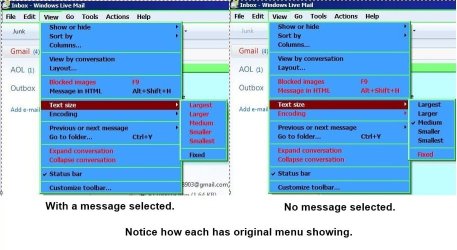
As your using WLM 2011 it might take a bit of exploring. Here's mine.

New Widescreen Monitor - Smaller Font Printed With WL Mail-rr.jpg
My System SpecsSystem Spec
07 Sep 2011  
Win7rap

Win 7
109 posts


Thank you - unfortunately I didn't find any reference to 'text size' in any tab (email, Home, Folder, View, or Account).

BTW how do you get the drop-down (as in your View image)? When I left click on the View tab I get the 'ribbon view' (as in my image) and right clicking just gives the ribbon choices drop-down.

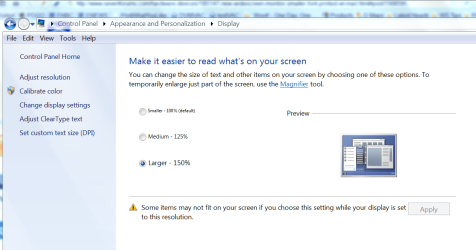
I suspect setting the 'text size' (as in your drop-down) just sets the size of the text displayed - not the printed size. I set the global text size (for all of Windows by):
New Widescreen Monitor - Smaller Font Printed With WL Mail-changetxsz.png.

So the displayed text is good ... but the printed text size is very small (seems to be 'governed' by the monitor resolution).
My System SpecsSystem Spec
07 Sep 2011  
metalmania31

Windows 7 Pro 64bit build 7601 SP1
680 posts
CA


My System SpecsSystem Spec
07 Sep 2011  
Roderunner

Win7 H.Prem. 32bit+SP1
1,780 posts
Scotland


If you uninstall your version of Windows Live Essentials completely, you can get WLM 2010 from:-
Download Details - Microsoft Download Center - Windows Live Essentials
My System SpecsSystem Spec
07 Sep 2011  
Win7rap

Win 7
109 posts


Who knew that IE would be involved? Not me !!

Since IE is not my default browser I wonder if Firefox settings will alter print size?

As it turns out, when I attempt to launch IE from my Prog Files I seem to get Chrome??

To be continued later
My System SpecsSystem Spec
07 Sep 2011  
Win7rap

Win 7
109 posts


My response is out of sync because i was responding to the Post-1 when the latest post arrived.

I can't remember right now, but there was some 2010 feature that didn't work right so I installed 2011 which 'fixed'
the problem. Thus I'm reluctant to 'back up'.
My System SpecsSystem Spec
07 Sep 2011  
Win7rap

Win 7
109 posts


Finally got IE9 fixed. Changed font size to 12 in IE9 and printed again ... no joy !

The printed text was small (same as before).

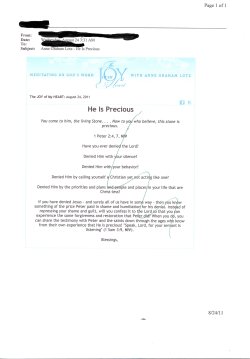
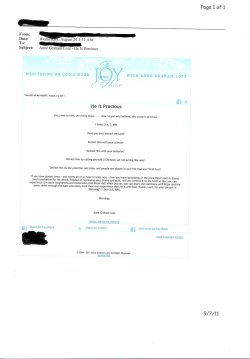
Here is an example of a good print and a small print (unfortunately the scanned images don't show the problem very well(both are from my wife's email):

Good Print(1st) .......................................Small print(2nd)
New Widescreen Monitor - Smaller Font Printed With WL Mail-xgoodprint.jpg ..................... New Widescreen Monitor - Smaller Font Printed With WL Mail-xsmallprint.jpg

As you can see, the email header ( Name, To field, etc) and the email image are OK in both emails... but the text in the (2nd) is smaller (difficult for wife to read).

Last edited by Win7rap; 07 Sep 2011 at 10:55 PM..
My System SpecsSystem Spec
Reply

 New Widescreen Monitor - Smaller Font Printed With WL Mail problems?


Thread Tools


Similar help and support threads for: New Widescreen Monitor - Smaller Font Printed With WL Mail
Thread Forum
Outlook 2010 (x-86) FONT TOO BIG and can't make smaller Microsoft Office
Setting smaller system font when win 7 tools don't go small enough General Discussion
Which Widescreen Monitor? Hardware & Devices
Widescreen Monitor General Discussion
Problem with a widescreen monitor Graphic Cards


All times are GMT -5. The time now is 02:43 PM.


Windows 7 Forums is an independent web site and has not been authorized,
sponsored, or otherwise approved by Microsoft Corporation.
"Windows 7" and related materials are trademarks of Microsoft Corp.
© Designer Media Ltd