|
Welcome to Windows 7 Forums. Our forum is dedicated to helping you find solutions with any problems, errors or issues you are experiencing with Windows 7. The Windows 7 forum also covers news and updates and has an extensive Windows 7 tutorial section that covers a wide range of tips and tricks.
Windows 7 - Installed SSD, WEI didn't budge and can't open in 'computer'. |
09-09-2011
|
#1 | | Windows 7x64 Home Premium service pack 1 |
Installed SSD, WEI didn't budge and can't open in 'computer'. I just installed a Kingston Hyperx 120gb and I am disappointed. I installed it with Paragon Migrate and all went well. I went into the bios and changed the boot order and assigned it a drive letter with Macrium Reflect. I ran the WEI and it is the same as before..5.9. All I migrated was the os, Adobe PhotoElements 8, and Totalmedia theater 3. I didn't do the achi change as I thought I'd screw something up.
Any ideas? Thanks.
| My System Specs | | OS Windows 7x64 Home Premium service pack 1 CPU AMD Phenom II X6 1090T Motherboard Asus M4A89GTD Pro/USB3 Memory Corsair CMV4GX3M1A1333C9 4x4GB Graphics Card Sapphire HD8670 Monitor(s) Displays LG W2252TQ PSU Corsair TX650W Case Antec Hard Drives Kingston SH100S3120G SSD "0" drive(ACHI) |
09-09-2011
|
#2 | | |
Yes. After backing up, Do the AHCI change.
Also make sure the partition on the SSD is properly aligned. It would help if you downloaded the ASSD benchmark and posted the result here. | My System Specs | | System Manufacturer/Model Number Home built (GeneO industries)/Model 2 OS Windows 7 64 bit SP1 CPU i5 2500k @ 4.5 GHz, 1.256V 120 GFlop (with AVX) Motherboard ASUS P8Z68-V PRO/GEN3 Memory 16GB (4GBx4) 1600MHz G.skill Ripjaws X 8-8-8-24 Graphics Card Asus Nvidia ENGTS450, 1GB 4030 MHz DDR5 clock, 915 Mhz GPU Sound Card Onboard Realtek HD Monitor(s) Displays NEC Spectraview 2490WUXi-SV Screen Resolution 1920 x 1200 Keyboard HP Wireless Mouse HP wireless PSU Antec TruePower New 650W Case Fractal Design "Define R3" Cooling CM Hyper 212+ push/pull, 5 120mm, 1 140mm case fans Hard Drives Crucial 128GB M4 (system), 2x WD Caviar 1TB Black internal (data), 1x Seagate 750G Barracuda Internal (backups), 1x WD Blue 6Gb/s 320GB Internal, 1x Corsair F40 SSD for cache, 1x 2TB eSata WD20EARS Green, 2x 500GB Seagate external USB, 1x 350GB exte Internet Speed 25.7 Mb/s down, 4.5 Mb/s up Other Info USB 3.0 x4 , SATA III x4, eSATA x3, SATA II x4, USB 2.0 x8. 2 Samsung DVD R/W drives.
WEI: CPU 7.7, Memory 7.9, Graphics 7.4, Disk 7.9 |
09-09-2011
|
#3 | | Windows 7x64 Home Premium service pack 1 |
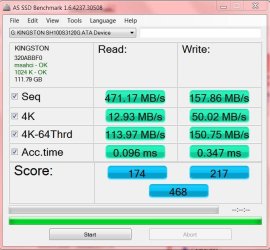
Here is the benchmark. Thanks for the response, GeneO. I'm not sure what you mean about the partition alignment. I assumed Paragon Migrate would take care of that. Anyway here is the result of the benchmark you asked me to obtain. | My System Specs | | OS Windows 7x64 Home Premium service pack 1 CPU AMD Phenom II X6 1090T Motherboard Asus M4A89GTD Pro/USB3 Memory Corsair CMV4GX3M1A1333C9 4x4GB Graphics Card Sapphire HD8670 Monitor(s) Displays LG W2252TQ PSU Corsair TX650W Case Antec Hard Drives Kingston SH100S3120G SSD "0" drive(ACHI) |
09-09-2011
|
#4 | | Windows 7 Ultimate x64 sp1 |

Quote: Originally Posted by dancinbear I'm not sure what you mean about the partition alignment. Attachment 174641 To check the alignment of your SSD's partition, it is quite simple.
In windows 7, run msinfo32 by typing it into the search box on your start menu and hitting enter.
click on: components => storage => disks
Look for your SSD and check the partition starting offset.
It needs to be divisible by 4096 (ie return a whole number when you divide by this) otherwise the alignment is not correct. | My System Specs | | System Manufacturer/Model Number 2011 Christmas gift from self. OS Windows 7 Ultimate x64 sp1 CPU Intel Core i7 3930K Sandy Bridge-E 3.2GHz. Motherboard Gigabyte GA-X79-UD7 LGA 2011 Memory Corsair Vengeance CML16GX3M4A1600C9 16GB Graphics Card Gigabyte GeForce GTX 570 1280MB OC V2 Sound Card Onboard Monitor(s) Displays Asus VW266H Screen Resolution 1920x1200 @ 60Hz Keyboard Logitech Media Keyboard 600 Mouse Logitech M705 Marathon Mouse PSU Corsair 850 hx Case Antec Eleven Hundred Black Cooling Intel RTS2011LC Liquid Cooling System Hard Drives Crucial M4 SSD 128GB
WD 1TB Black Caviar
WD 2TB Green
Samsung F3 1TB x 2 Internet Speed Wireless Mobile Broadband 21.5mbs |
09-09-2011
|
#5 | | Windows 7x64 Home Premium service pack 1 |
Got it. Thanks to you as well, Rustberger. My offset was 1,048,576 which indeed is divisible by 4096. Is that offset ok as high as it is? Also, i went into computer management and my SSD is active and online. All looks ok, at least to a novice, but why can't I get any results when I try to view the contents of the SSD? Anyway, thanks for your help. | My System Specs | | OS Windows 7x64 Home Premium service pack 1 CPU AMD Phenom II X6 1090T Motherboard Asus M4A89GTD Pro/USB3 Memory Corsair CMV4GX3M1A1333C9 4x4GB Graphics Card Sapphire HD8670 Monitor(s) Displays LG W2252TQ PSU Corsair TX650W Case Antec Hard Drives Kingston SH100S3120G SSD "0" drive(ACHI) |
09-09-2011
|
#6 | | |

Quote: Originally Posted by dancinbear Thanks for the response, GeneO. I'm not sure what you mean about the partition alignment. I assumed Paragon Migrate would take care of that. Anyway here is the result of the benchmark you asked me to obtain. Attachment 174641 THe AS-SSD shows your partition is aligned (the green 1024K - OK it displayed).
So with those numbers the SSd is performing well and should boot pretty fast (around 15 seconds after windows itself starts booting).
Oh, I see this isn't your C: boot drive. You won't see any improvement in WEI or boot time unless Windows is installed on the SSD. Are you accidentally booted to your old system drive? | My System Specs | | System Manufacturer/Model Number Home built (GeneO industries)/Model 2 OS Windows 7 64 bit SP1 CPU i5 2500k @ 4.5 GHz, 1.256V 120 GFlop (with AVX) Motherboard ASUS P8Z68-V PRO/GEN3 Memory 16GB (4GBx4) 1600MHz G.skill Ripjaws X 8-8-8-24 Graphics Card Asus Nvidia ENGTS450, 1GB 4030 MHz DDR5 clock, 915 Mhz GPU Sound Card Onboard Realtek HD Monitor(s) Displays NEC Spectraview 2490WUXi-SV Screen Resolution 1920 x 1200 Keyboard HP Wireless Mouse HP wireless PSU Antec TruePower New 650W Case Fractal Design "Define R3" Cooling CM Hyper 212+ push/pull, 5 120mm, 1 140mm case fans Hard Drives Crucial 128GB M4 (system), 2x WD Caviar 1TB Black internal (data), 1x Seagate 750G Barracuda Internal (backups), 1x WD Blue 6Gb/s 320GB Internal, 1x Corsair F40 SSD for cache, 1x 2TB eSata WD20EARS Green, 2x 500GB Seagate external USB, 1x 350GB exte Internet Speed 25.7 Mb/s down, 4.5 Mb/s up Other Info USB 3.0 x4 , SATA III x4, eSATA x3, SATA II x4, USB 2.0 x8. 2 Samsung DVD R/W drives.
WEI: CPU 7.7, Memory 7.9, Graphics 7.4, Disk 7.9 |
09-10-2011
|
#7 | | Windows 7x64 Home Premium service pack 1 |
This is starting to make sense. I didn't see any changes in speed and I was beginning to think the old drive was continuing to boot. What can I do to make the ssd my c drive? Thanks for your continuing help. | My System Specs | | OS Windows 7x64 Home Premium service pack 1 CPU AMD Phenom II X6 1090T Motherboard Asus M4A89GTD Pro/USB3 Memory Corsair CMV4GX3M1A1333C9 4x4GB Graphics Card Sapphire HD8670 Monitor(s) Displays LG W2252TQ PSU Corsair TX650W Case Antec Hard Drives Kingston SH100S3120G SSD "0" drive(ACHI) |
09-10-2011
|
#8 | | Windows7 Pro 64bit SP-1; Windows XP Pro 32bit |
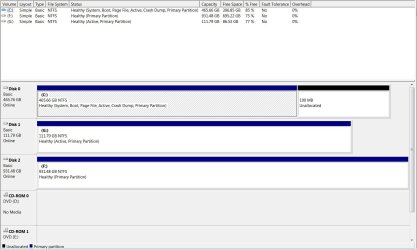
Just in case you need to know how how to open Disk Management. Quote: 1. Open the Start Menu, then right click on the Computer button (dark right side) and click on Manage. A) Go to step 3. OR 2. Open the Start Menu, then type compmgmt.msc OR diskmgmt.msc in the search box and press enter. 3. If prompted by UAC, then click on Yes. 4. In the left pane of Computer Management, click on Disk Management under Storage. (see screenshots below) Open disk management and make a Snip and post it. That will help everyone see what your set up is showing.
It will look similar to below Snip. | My System Specs | | System Manufacturer/Model Number Hopalong/ Godzilla OS Windows7 Pro 64bit SP-1; Windows XP Pro 32bit CPU Intel Core i7-870 Lynnfield 2.93GHz LGA 1156 95W Quad-Core Motherboard ASUS P7P55D-E PRO Memory 8GB@1400MHz Crucial Ballistix DDR3-1600 4x2GB Graphics Card ASUS ENGTX460 DirectCU/2DI/1GD5 1GB 256-bit GDDR5 Sound Card VIA Onboard Monitor(s) Displays Samsung SyncMaster 941BW 19"ws Screen Resolution 1440x900 Keyboard Logitech K-320 PSU COOLER MASTER Silent Pro RS850-AMBAJ3-US 850W Modular Case COOLER MASTER HAF 932 RC-932-KKN5-GP Black Cooling Scythe "Mugen-2 Rev.B" (2 ScytheKaze-Jyuni PWM fans) Hard Drives Intel 320 120GB SSD
Western Digital Caviar Black WD7501AALS 750GB 7200 RPM SATA 3.0Gb/s
Western Digital Caviar Black WD6401AALS 640GB 7200 RPM SATA 3.0Gb/s |
09-10-2011
|
#9 | | Windows 7x64 Home Premium service pack 1 |
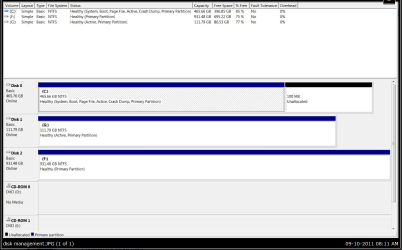
Disk management snip Here go HopalongX. G: is my SSD and F: is my external hd. Thanks. | My System Specs | | OS Windows 7x64 Home Premium service pack 1 CPU AMD Phenom II X6 1090T Motherboard Asus M4A89GTD Pro/USB3 Memory Corsair CMV4GX3M1A1333C9 4x4GB Graphics Card Sapphire HD8670 Monitor(s) Displays LG W2252TQ PSU Corsair TX650W Case Antec Hard Drives Kingston SH100S3120G SSD "0" drive(ACHI) |
09-10-2011
|
#10 | | Windows7 Pro 64bit SP-1; Windows XP Pro 32bit |
Sorry I couldn't get back to you earlier. I had to go to the hospital.
I posted for more help.
This tutorial should help explain some basics.> SSD - Install and transfer the Operating System
Good luck.
Mike | My System Specs | | System Manufacturer/Model Number Hopalong/ Godzilla OS Windows7 Pro 64bit SP-1; Windows XP Pro 32bit CPU Intel Core i7-870 Lynnfield 2.93GHz LGA 1156 95W Quad-Core Motherboard ASUS P7P55D-E PRO Memory 8GB@1400MHz Crucial Ballistix DDR3-1600 4x2GB Graphics Card ASUS ENGTX460 DirectCU/2DI/1GD5 1GB 256-bit GDDR5 Sound Card VIA Onboard Monitor(s) Displays Samsung SyncMaster 941BW 19"ws Screen Resolution 1440x900 Keyboard Logitech K-320 PSU COOLER MASTER Silent Pro RS850-AMBAJ3-US 850W Modular Case COOLER MASTER HAF 932 RC-932-KKN5-GP Black Cooling Scythe "Mugen-2 Rev.B" (2 ScytheKaze-Jyuni PWM fans) Hard Drives Intel 320 120GB SSD
Western Digital Caviar Black WD7501AALS 750GB 7200 RPM SATA 3.0Gb/s
Western Digital Caviar Black WD6401AALS 640GB 7200 RPM SATA 3.0Gb/s Installed SSD, WEI didn't budge and can't open in 'computer'. problems? All times are GMT -5. The time now is 11:23 AM. |  |