Windows 7 Forums Search
Welcome to Windows 7 Forums. Our forum is dedicated to helping you find solutions with any problems, errors or issues you are experiencing with Windows 7. The Windows 7 forum also covers news and updates and has an extensive Windows 7 tutorial section that covers a wide range of tips and tricks.


Windows 7 - USB Unknown device

 
09-12-2011   #1


win enterprice 32 bit


USB Unknown device

Hi
I have an Acer desktop running win 7. I keep getting two unknown usb devices but there are no usb device connected. I have tried disabling the devices, unstalling drivers and even formatted the HD, but they keep popping back. I have updated all my drivers.

In device manager the have this as "strong name for drivernode" (translated from norwegian) usb.inf:Generic.Section.NTx86:BADDEVICE.Dev:6.1.7601.17586:usb\unknown

They are really driving me mad! How can I get rid of them?

My System SpecsSystem Spec
09-12-2011   #2


Windows 7 64 Bit Home Premium SP1


Hello forbru. Welcome to the Forum.

I found this:
Unknown USB Device - Microsoft Answers
See if it will help.
My System SpecsSystem Spec
09-13-2011   #3


win enterprice 32 bit


Tried it all

Txs for your reply. I did it all and for 10 minutes I thought it was ok, but den it started again. Two unknown usb devices popping up

Last edited by frobru; 09-13-2011 at 03:16 PM.. Reason: Fixing my spelling
My System SpecsSystem Spec
.


09-13-2011   #4


Windows 7 64 Bit Home Premium SP1


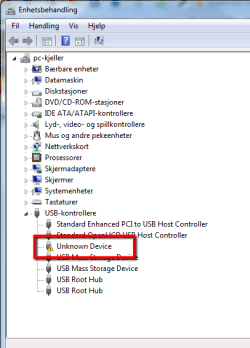
Can you post a screen shot of your Device Manager with the 2 problem devices expanded?

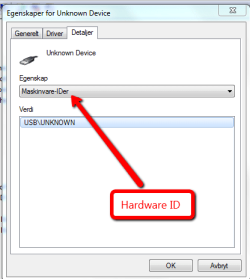
Also, can you look on the Details Tab for those devices, and under the Property drop down, see what it lists for "Hardware IDs"?
My System SpecsSystem Spec
09-14-2011   #5


Windows 7 Ultimate 64 bit


Have you recently pluged in a usb portable (removable) devices such as a thumb drive, external drive and removed them?
My System SpecsSystem Spec
09-14-2011   #6


Windows 7 Home Premium 64bit 6.1 Build 7601 (SP1)


Quote   Quote: Originally Posted by frobru View Post
I keep getting two unknown usb devices but there are no usb device connected.
If truly you have nothing at all plugged-in to your PC's USB ports, does your PC have a built-in card reader? Any other built-in that is USB related? If yes, then I would look for updated drivers for whatever reader/gizmo you may have.

If not, well, please explain what you mean by unknown devices "popping up"--I don't know what you are seeing specifically. Screenshot(s)?

Apart from what these "pop-ups" are that are annoying you, I might've said to simply ignore the entries in DM if the PC is otherwise working properly.

P.S. It occurs to me that "of course" you have USB devices. Unless yours is an ancient PC you have a USB mouse or USB keyboard. Maybe a USB webcam? If mouse or keyboard, does it have any special features e.g. multimedia buttons? Acer PCs will typically have some sort of ancillary software associated with these features e.g. Dritek Launch Manager or some such...
My System SpecsSystem Spec
09-17-2011   #7


win enterprice 32 bit


I dont have a card reader so it cant be that. I am usually an apple guy but need this pc for som programmingwork. Keyboard and mouse are usb and plugged in, but tyhe have been changed and unplugged and it hasnt helped either. Did that before i formatted the disc.

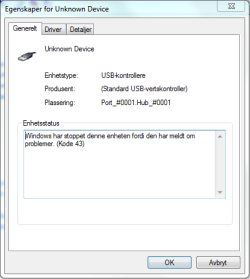
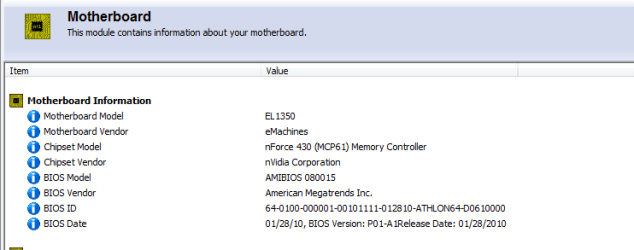
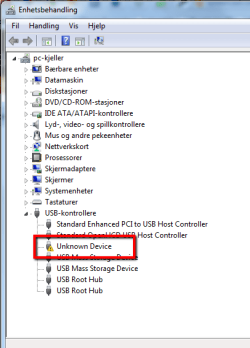
Thanks for all help and here are some screenshots
Attached Thumbnails
USB Unknown device-bilde1_dm.png   USB Unknown device-bilkde2_dm.png   USB Unknown device-bilkde_3_dm.png  
My System SpecsSystem Spec
09-17-2011   #8


Windows 7 Home Premium 64bit 6.1 Build 7601 (SP1)


Quote   Quote: Originally Posted by frobru View Post
I keep getting two unknown usb devices...

They are really driving me mad! How can I get rid of them?
Sorry to press, but you're still not being clear--what is "popping back"? Where is the 2nd "unknown device"? Why are they "driving you mad"? How is this unknown device keeping you from getting your work done?

Usually unknown devices sit in Device Manager and don't bother anything. I can't tell from your description how this is impacting the operation of your PC.
My System SpecsSystem Spec
09-17-2011   #9


win enterprice 32 bit


They keep going on and of, making the connection sound and so on, showing the alert messages. The second device didnt show up today. As I said I am used to macs and sure know my way around them but havent realy used windows for the last 10 years. I think this messages is a fault and dont like it. I appreciate your effort, but if you dont think its a problem then good for you - its still a problem for me. As I said in my first post I even did format the HD to get rid of it. If its common in the windows world to have unknown devices in the device manager then I'll just have to keep up with it for some weeks - and then its Linux time
My System SpecsSystem Spec
09-17-2011   #10


win enterprice 32 bit


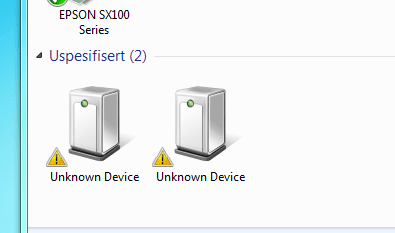
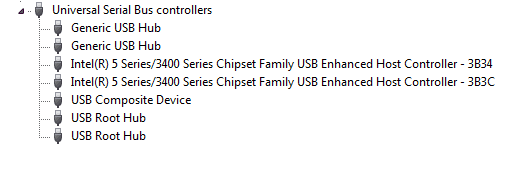
The second one
Attached Thumbnails
USB Unknown device-2011-09-18_0147.png  
My System SpecsSystem Spec
Reply

 USB Unknown device problems?


Thread Tools


Similar Threads for: USB Unknown device
Thread Forum
Solved Unknown Device Hardware & Devices
base system device, video controller and unknown device missing Drivers
Solved Unknown Device Hardware & Devices
Unknown Device in Device manager. Hardware & Devices
Device Manager reports Unknown Device & explorer crash Drivers


All times are GMT -5. The time now is 11:26 AM.


Windows 7 Forums is an independent web site and has not been authorized,
sponsored, or otherwise approved by Microsoft Corporation.
"Windows 7" and related materials are trademarks of Microsoft Corp.
© Designer Media Ltd
  

1 2 3 4 5 6 7 8 9 10 11 12 13 14 15 16 17 18 19 20 21 22 23 24 25 26 27 28 29 30