|
Welcome to Windows 7 Forums. Our forum is dedicated to helping you find solutions with any problems, errors or issues you are experiencing with Windows 7. The Windows 7 forum also covers news and updates and has an extensive Windows 7 tutorial section that covers a wide range of tips and tricks.
Windows 7 - Quick or Full Format for new Intel Series-320 |
09-17-2011
|
#1 | | |
Quick or Full Format for new Intel Series-320 Just received my two new Intel 320-Series and want to put them in one of my Sager notebooks, which already has an x25-m 160 boot drive. I did the v.1.92 f/w update successfully. I want to use the two Series-320s for user data files only, not O/S boot drive. So do you recommend a “quick” or “full” format? Does it matter which? Does “full” still check sectors on a new empty SSD? Any special concerns or advice with these series-320 SSDs since they won’t be the boot HDD? I’m a bit rusty on the SSDs since I haven’t kept up with the new SSD particulars since my initial install of my X25-m boot drives a year ago. Thanks for any advice/comments for the 320s! garuda
| My System Specs | | System Manufacturer/Model Number Sager NP-9280 notebook OS Windows 7 Ultimate x64 CPU Core i7-975 3.33GHz - 6.4 GT/s Motherboard Clevo D900F Memory 12GB DDR3 - 1333MHz Triple channel Graphics Card nVidia GTX280m - 1GB GDDR3 Sound Card Realtek 5.1 Surround Monitor(s) Displays 2ea - 24" Gateway FHD2400; 2ea- 26" Samsung T260 TV/Monitors Screen Resolution 1920 x 1200 (for all four) Keyboard Full + Num Pad Mouse Microsoft ARC Case Sager/Clevo D900F Cooling 3 internal fans - 7 external fans Hard Drives Intel X25-M 160GB SSD boot; 2x-Intel 320-series 600GB internal drives; 12TB total external drives w/SIIG ssUSB 3.0 dockers Other Info NLE Video Editing: Avid & Adobe Prod Premium Suite CS4. |
09-17-2011
|
#2 | | |
I don't full format anything these days. | My System Specs | | System Manufacturer/Model Number Self-Built in July 2009 OS Windows 7 Ultimate x64 CPU Intel Q9550 2.83Ghz OC'd to 3.40Ghz Motherboard Gigabyte GA-EP45-UD3R rev. 1.1, F12 BIOS Memory 8GB G.Skill PI DDR2-800, 4-4-4-12 timings Graphics Card EVGA 1280MB Nvidia GeForce GTX570 Sound Card Realtek ALC899A 8 channel onboard audio Monitor(s) Displays 23" Acer x233H Screen Resolution 1920x1080 Keyboard ABS M1 Mechanical Mouse Logitech G9 Laser Mouse PSU Corsair 620HX modular Case Antec P182 Cooling stock Hard Drives Intel X25-M 80GB Gen 2 SSD
Western Digital 1TB Caviar Black, 32MB cache. WD1001FALS Internet Speed 15/1 cable modem Other Info Windows and Linux enthusiast. Logitech G35 Headset. |
09-17-2011
|
#3 | | |
Don't full format an SSD, do a quick format. | My System Specs | | System Manufacturer/Model Number Home built (GeneO industries)/Model 2 OS Windows 7 64 bit SP1 CPU i5 2500k @ 4.5 GHz, 1.256V 120 GFlop (with AVX) Motherboard ASUS P8Z68-V PRO/GEN3 Memory 16GB (4GBx4) 1600MHz G.skill Ripjaws X 8-8-8-24 Graphics Card Asus Nvidia ENGTS450, 1GB 4030 MHz DDR5 clock, 915 Mhz GPU Sound Card Onboard Realtek HD Monitor(s) Displays NEC Spectraview 2490WUXi-SV Screen Resolution 1920 x 1200 Keyboard HP Wireless Mouse HP wireless PSU Antec TruePower New 650W Case Fractal Design "Define R3" Cooling CM Hyper 212+ push/pull, 5 120mm, 1 140mm case fans Hard Drives Crucial 128GB M4 (system), 2x WD Caviar 1TB Black internal (data), 1x Seagate 750G Barracuda Internal (backups), 1x WD Blue 6Gb/s 320GB Internal, 1x Corsair F40 SSD for cache, 1x 2TB eSata WD20EARS Green, 2x 500GB Seagate external USB, 1x 350GB exte Internet Speed 25.7 Mb/s down, 4.5 Mb/s up Other Info USB 3.0 x4 , SATA III x4, eSATA x3, SATA II x4, USB 2.0 x8. 2 Samsung DVD R/W drives.
WEI: CPU 7.7, Memory 7.9, Graphics 7.4, Disk 7.9 |
09-17-2011
|
#4 | | |
You really want to be careful on alignment of your SSD drives.
I am linking to a good friend of mine, she is one of the most knowledgeable reviewers of SSD drives to be found. Read this information here and she links to a program for setting the alignment to ensure the longevity of your new drives.
Dee's SSD Facts and Questions | My System Specs | | System Manufacturer/Model Number My Build OS win7 Ult 64 CPU i7 3930K & 3960X Motherboard ASUS P9X79 Deluxe Memory 16GB G-Skill 2133MHz Graphics Card Sapphire HD 7970 Sound Card On-board Monitor(s) Displays ASUS 27 inch Screen Resolution 1920X1080 Keyboard Mionix Mouse Mionix PSU Corsair AX1200 Case NZXT 810 Cooling Custom Loop, Swiftech HDBlock Hard Drives Crucial M4 256GB, 1.5TB WD Black for Data/Images Internet Speed Cable |
09-18-2011
|
#5 | | MS Windows 7 Ultimate SP1 64-bit |

Quote: Originally Posted by garuda Just received my two new Intel 320-Series and want to put them in one of my Sager notebooks, which already has an x25-m 160 boot drive. I did the v.1.92 f/w update successfully. I want to use the two Series-320s for user data files only, not O/S boot drive. So do you recommend a “quick” or “full” format? Does it matter which? Does “full” still check sectors on a new empty SSD? Any special concerns or advice with these series-320 SSDs since they won’t be the boot HDD? I’m a bit rusty on the SSDs since I haven’t kept up with the new SSD particulars since my initial install of my X25-m boot drives a year ago. Thanks for any advice/comments for the 320s! garuda First don't sweat all of the advice you get on SSDs. Win 7 correctly handles SSDs. There are some other will known operating systems out there which do not.
2nd, I always peform a full format on a new drive. If the mfg has done his job, then this step is overkill, but that isn't always the case and QC does not 100% test.
3rd. Win 7 is not going to try and defrag your SSDs since that is not pertinent to a non-sequential storage media such as a SSD. Win 7 is rather smart. | My System Specs | | System Manufacturer/Model Number Toshiba Satellite L305D laptop OS MS Windows 7 Ultimate SP1 64-bit CPU AMD Athlon X2 Dual-Core QL-64, 2100 Mhz, 2 Cores Motherboard TOSHIBA Portable PC (Socket M2/S1G1) Memory 4.0GB (2x2GB) DDR2 @ 333MHz 5-5-5-15 Graphics Card ATI Radeon 3100 Graphics (Toshiba) Sound Card Realtek High Definition Audio Monitor(s) Displays Generic PnP Monitor @ 1280x800 Screen Resolution 1280 x 800 Keyboard standard PS/2 Keyboard Mouse HP Wireless Optical Mobile Mouse Model FHA-3410 Hard Drives 125.03GB Corsair CSSD-V128GB2 ATA Device (IDE)
Depending upon testing, organized as 1,2, or 3 partitions with/without a 100mb system partition at the front. Internet Speed What the local pub, local coffee shop offers. Other Info Optical Drives HL-DT-ST DVDRAM GSA-T50N ATA Device
Synaptics PS/2 Port TouchPad
Speakers (Realtek High Definition Audio)
Atheros AR5007EG Wireless Network Adapter
Also have an Asus ha1002xp netbook with Win 7 Ultimate installed. |
09-18-2011
|
#6 | | |

Quote: Originally Posted by karlsnooks 2nd, I always peform a full format on a new drive. If the mfg has done his job, then this step is overkill, but that isn't always the case and QC does not 100% test. I would agree it's overkill. I've likely installed at least 200 hard drives in work computers and never once performed a full format and things have been just fine. | My System Specs | | System Manufacturer/Model Number Self-Built in July 2009 OS Windows 7 Ultimate x64 CPU Intel Q9550 2.83Ghz OC'd to 3.40Ghz Motherboard Gigabyte GA-EP45-UD3R rev. 1.1, F12 BIOS Memory 8GB G.Skill PI DDR2-800, 4-4-4-12 timings Graphics Card EVGA 1280MB Nvidia GeForce GTX570 Sound Card Realtek ALC899A 8 channel onboard audio Monitor(s) Displays 23" Acer x233H Screen Resolution 1920x1080 Keyboard ABS M1 Mechanical Mouse Logitech G9 Laser Mouse PSU Corsair 620HX modular Case Antec P182 Cooling stock Hard Drives Intel X25-M 80GB Gen 2 SSD
Western Digital 1TB Caviar Black, 32MB cache. WD1001FALS Internet Speed 15/1 cable modem Other Info Windows and Linux enthusiast. Logitech G35 Headset. |
09-18-2011
|
#7 | | Windows 7 X64 Professional/Windows 8 |
I have 4 SSDs and have never run a full format on one, and have never had a problem with one. I create an aligned partition with diskpart and install the OS. | My System Specs | | System Manufacturer/Model Number Home Brew - Always under construction OS Windows 7 X64 Professional/Windows 8 CPU intel i7-2600K Motherboard Asus P8Z68 V-Pro/GEN 3 Memory 8GB G.Skill Sniper DDR3-2133 (2X4GB) Graphics Card EVGA 670 2GB Sound Card Asus Xonar Monitor(s) Displays Asus 24" LCD VW246H Screen Resolution 1920X1080 Keyboard Logitech G510 Mouse Logitech G500/Logitech Wireless PSU CORSAIR HX850W Case Cooler Master HAF X Cooling Corsair H100 w/ 4 noctua fans in push/pull. Hard Drives Crucial M4 128GB,Crucial M4 64GB,Samsung HD103SJ 1TB, 1TB WD FAEX,Samsung 1.5TB, EXTERNAL HD- 2X Rosewill case esata w/ 1TB Samsung spinpoints & Black X esata 1TB Spinpoint, Rosewill USB 3.0 dock 1TB Spinpoint, Seagate GOFlex Pro 500GB & 750GB USB Internet Speed Foot Messenger speed Other Info 2nd Computer- Samsung RF711-SO1 17" Laptop i5-2310M, 8GB DDR3-1333, Crucial M4 and OCZ vertex2, Nvidia GT540M.Win 7 HP X64. |
09-18-2011
|
#8 | | |
As essenbe says
I have 7 or 8 internal SSDs with 4 or 5 of them running 24/7 and have never formatted any of them Quick or Full.
Diskpart or Gparted are your friends and Windows 7 does a dam fine job of keeping the SSD working great. | My System Specs | | System Manufacturer/Model Number My Build OS win7 Ult 64 CPU i7 3930K & 3960X Motherboard ASUS P9X79 Deluxe Memory 16GB G-Skill 2133MHz Graphics Card Sapphire HD 7970 Sound Card On-board Monitor(s) Displays ASUS 27 inch Screen Resolution 1920X1080 Keyboard Mionix Mouse Mionix PSU Corsair AX1200 Case NZXT 810 Cooling Custom Loop, Swiftech HDBlock Hard Drives Crucial M4 256GB, 1.5TB WD Black for Data/Images Internet Speed Cable System Manufacturer/Model Number Sager NP-9280 notebook OS Windows 7 Ultimate x64 CPU Core i7-975 3.33GHz - 6.4 GT/s Motherboard Clevo D900F Memory 12GB DDR3 - 1333MHz Triple channel Graphics Card nVidia GTX280m - 1GB GDDR3 Sound Card Realtek 5.1 Surround Monitor(s) Displays 2ea - 24" Gateway FHD2400; 2ea- 26" Samsung T260 TV/Monitors Screen Resolution 1920 x 1200 (for all four) Keyboard Full + Num Pad Mouse Microsoft ARC Case Sager/Clevo D900F Cooling 3 internal fans - 7 external fans Hard Drives Intel X25-M 160GB SSD boot; 2x-Intel 320-series 600GB internal drives; 12TB total external drives w/SIIG ssUSB 3.0 dockers Other Info NLE Video Editing: Avid & Adobe Prod Premium Suite CS4. |
09-23-2011
|
#10 | | |
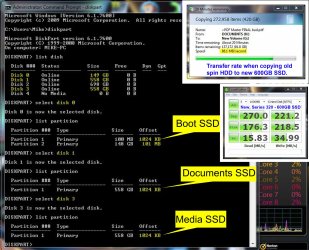
Preparation of Series-320 drives for use as "file storage" drives instead of using as "O/S installed on boot SSD. Thanks to all here and whs for your input in helping me with my new Series 320 drives. Since there were several opinions expressed on this thread, I decided to do a bit more research and try a few options --- only because whenever the documentation touted that Windows 7 would auto-align and therefore formatting was unnecessary, this statement seemed always in the context of Windows 7 being installed on a boot SSD (C-drive). However, I wasn't certain if the same applied when the SSD was to be used as only a "user file storage" drive instead of boot drive. I suspiciously reasoned, that without any interface with Windows 7 (by either formatting or installing O/S), how could the SSD know how to offset for proper alignment. I will share what I learned from my experience which might help novices (like myself) facing the same situation. First, I updated to firmware ver. 1.9.2. (Even the latest new Series320s have only old F/W 0302 installed on it). Then "initialized" SSD in Windows 7's Computer Management window. (ORB > Control Panel > Sys& Sec > Admin Tools > Computer Mgmt > Disk Mgmt). Then from my experience, two options are available to achieve both "Basic/Simple Volume" and "1024 Offset (or something divisible by 4). Opt#1: right-click unallocated SSD box in Computer Mgmt panel, select "Simple Volume" and follow the Wizard's dialog sequence and select "Quick Format" (all default values will work). Opt#2: follow the " SSD Alignment" tutorial by poster WHS, except ignore the "ACTIVE" command for Diskpart when ONLY wanting to prep the drive for "file storage" and not O/S install. Thanks whs! ie. furnished by whs: Diskpart (enter) List disk (enter) Select disk n (where n is the number that was given for your SSD in List disk)(enter) Create partition primary align=1024 (enter) Exit (enter) Since I had two drives, I tried both methods out of curiosity; they both worked for me. My numbers are reflected below in the screenshot jpg -- using the Verification procedure by whs. I also include the "data transfer rate" when I copied the old spin HDD to the new SSD. If any of the seasoned veterans see a error with any of these numbers or cares to comment, please reply. | My System Specs | | System Manufacturer/Model Number Sager NP-9280 notebook OS Windows 7 Ultimate x64 CPU Core i7-975 3.33GHz - 6.4 GT/s Motherboard Clevo D900F Memory 12GB DDR3 - 1333MHz Triple channel Graphics Card nVidia GTX280m - 1GB GDDR3 Sound Card Realtek 5.1 Surround Monitor(s) Displays 2ea - 24" Gateway FHD2400; 2ea- 26" Samsung T260 TV/Monitors Screen Resolution 1920 x 1200 (for all four) Keyboard Full + Num Pad Mouse Microsoft ARC Case Sager/Clevo D900F Cooling 3 internal fans - 7 external fans Hard Drives Intel X25-M 160GB SSD boot; 2x-Intel 320-series 600GB internal drives; 12TB total external drives w/SIIG ssUSB 3.0 dockers Other Info NLE Video Editing: Avid & Adobe Prod Premium Suite CS4. Quick or Full Format for new Intel Series-320 problems? All times are GMT -5. The time now is 11:31 AM. |  |