|
Welcome to Windows 7 Forums. Our forum is dedicated to helping you find solutions with any problems, errors or issues you are experiencing with Windows 7. The Windows 7 forum also covers news and updates and has an extensive Windows 7 tutorial section that covers a wide range of tips and tricks.
Windows 7 - HDD Un Allocated Space |
09-18-2011
|
#1 | | |
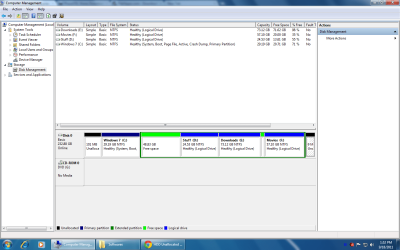
HDD Un Allocated Space Hi. I installed windows 7 on C Drive. previously it was on drive D. After a fresh install, im unable to convert the un- allocated space to a usable drive.
Please check the screen shot. The HDD also contains a lot of un allocated free spaces.
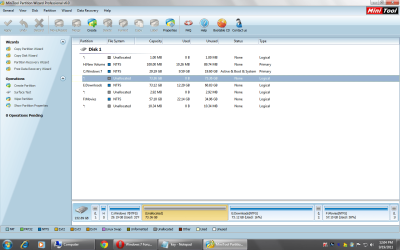
Using Partition Wizard, i tried checking whethter the un allocated drive 48.89 gb contains errors. it found that it contains systems files of the previous windows installation. But My computer shows it as complete 48.89 Gb. | My System Specs | | |
09-18-2011
|
#2 | | MS Windows 7 Ultimate SP1 64-bit |
This is Windows 7 and not eXPired. You don't need all of those small logical drives. In Windows 7, there are libraries and userprofile folders to help you organize your data.
Can't you simply add that space to the right of you C onto the C by extending the C?
Let me look back at your diskmanagment map again for further recommendations. | My System Specs | | System Manufacturer/Model Number Toshiba Satellite L305D laptop OS MS Windows 7 Ultimate SP1 64-bit CPU AMD Athlon X2 Dual-Core QL-64, 2100 Mhz, 2 Cores Motherboard TOSHIBA Portable PC (Socket M2/S1G1) Memory 4.0GB (2x2GB) DDR2 @ 333MHz 5-5-5-15 Graphics Card ATI Radeon 3100 Graphics (Toshiba) Sound Card Realtek High Definition Audio Monitor(s) Displays Generic PnP Monitor @ 1280x800 Screen Resolution 1280 x 800 Keyboard standard PS/2 Keyboard Mouse HP Wireless Optical Mobile Mouse Model FHA-3410 Hard Drives 125.03GB Corsair CSSD-V128GB2 ATA Device (IDE)
Depending upon testing, organized as 1,2, or 3 partitions with/without a 100mb system partition at the front. Internet Speed What the local pub, local coffee shop offers. Other Info Optical Drives HL-DT-ST DVDRAM GSA-T50N ATA Device
Synaptics PS/2 Port TouchPad
Speakers (Realtek High Definition Audio)
Atheros AR5007EG Wireless Network Adapter
Also have an Asus ha1002xp netbook with Win 7 Ultimate installed. |
09-18-2011
|
#3 | | Windows 7 Ultimate x64/Windows 8 Consumer Preview x64/Ubuntu 11.04 |
That doesn't look like Unallocated Space. If it's free space you might have to delete it... Partition or Volume - Delete
Then extend the C: partition. Partition or Volume - Extend
If that doesn't work, you can try shrinking it. Partition or Volume - Shrink | My System Specs | | System Manufacturer/Model Number Custom Build OS Windows 7 Ultimate x64/Windows 8 Consumer Preview x64/Ubuntu 11.04 CPU Intel Pentium Dual Core E6700 3.2GHz Motherboard ASUS P5G41T-M LX Memory Strontium 8192MB DDR3 1333Mhz Graphics Card msi GeForce N560GTX-M2D1GD5 1GB Sound Card Realtek HD Audio Monitor(s) Displays CHIMEI CMV 221D 22" Screen Resolution 1680x1050 Keyboard Microsoft Wireless Keyboard 1000 Mouse Microsoft Wireless Optical Mouse 2000 PSU SHAW Viper-1500w Gaming PSU Case Black eMaxx ATX Mini Tower Case Hard Drives Seagate Barracuda LP Green 3.5'' 2TB Internal HDD 5900RPM + WD Elements Desktop 1TB External HDD 7200RPM Internet Speed 100GB @ 4.76Mbps |
09-18-2011
|
#4 | | MS Windows 7 Ultimate SP1 64-bit |
OK.
The quickest thing is to get yourself an external USB drive of 300-500 GB in size.
Use RoboCopy commands to copy your d,e,and f over to the external drive.
As a safety measure, make a system image backup of C to the external drive using Windows Backup and Restore. That's just in case you goof.
Now whether you use Disk Management, DISKPART, or Partition Wizard your end objective is to merge all of the other space (but not C) into one and only one PRIMARY PARTITION.
Now I suggest you make that C about 60 GB in size.
The idea is that C will contain Win 7 and any programs you install.
The rest of the disk will be one Primary Partition where you will keep all of your pics, videos, music, etc. | My System Specs | | System Manufacturer/Model Number Toshiba Satellite L305D laptop OS MS Windows 7 Ultimate SP1 64-bit CPU AMD Athlon X2 Dual-Core QL-64, 2100 Mhz, 2 Cores Motherboard TOSHIBA Portable PC (Socket M2/S1G1) Memory 4.0GB (2x2GB) DDR2 @ 333MHz 5-5-5-15 Graphics Card ATI Radeon 3100 Graphics (Toshiba) Sound Card Realtek High Definition Audio Monitor(s) Displays Generic PnP Monitor @ 1280x800 Screen Resolution 1280 x 800 Keyboard standard PS/2 Keyboard Mouse HP Wireless Optical Mobile Mouse Model FHA-3410 Hard Drives 125.03GB Corsair CSSD-V128GB2 ATA Device (IDE)
Depending upon testing, organized as 1,2, or 3 partitions with/without a 100mb system partition at the front. Internet Speed What the local pub, local coffee shop offers. Other Info Optical Drives HL-DT-ST DVDRAM GSA-T50N ATA Device
Synaptics PS/2 Port TouchPad
Speakers (Realtek High Definition Audio)
Atheros AR5007EG Wireless Network Adapter
Also have an Asus ha1002xp netbook with Win 7 Ultimate installed. |
09-18-2011
|
#5 | | |
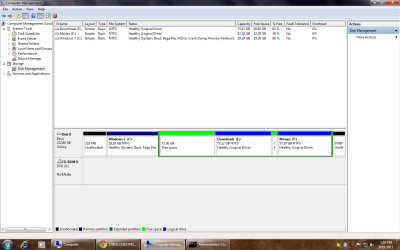
Guys. This is the latest Screenshot. 73 GB of free Space (in Green). The only option available when i right click the Green Space is New Simple Volume. However. The error is 'There is no enough space available to complete the operation'.
Forgive me for my ignorance. | My System Specs | | |
09-18-2011
|
#6 | | Windows 7 Home Premium 64bit |
There are three types of partitions: primary partitions, extended partitions and logical drives. A disk may contain up to four primary partitions (only one of which can be active), or three primary partitions and one extended partition. In the extended partition, the user can create logical drives (i.e. "simulate" several smaller-sized hard drives).
Merge space with C or E. What is unallocated at start of drive? On mine, it's the System Partition. Partition or Volume - Extend http://www.mydigitallife.info/how-to...-installation/ | My System Specs | | System Manufacturer/Model Number HP ProBook 4530s XU015UT#ABA OS Windows 7 Home Premium 64bit CPU Intel Core i3-2310M Motherboard Hewlett-Packard 167C Memory 8GB DDR3 SDRAM Graphics Card Intel HD Graphics 3000 (Sandy Bridge GT2) Sound Card Intel Cougar Point PCH High Definition Audio Monitor(s) Displays 15.6" LED LG Philips LP156WH4-TLD1 Screen Resolution 1366 x 768 Mouse Logitech M315 Case Notebook Hard Drives WDC WD3200BEKT-60PVMT0 Internet Speed 12Mbps/2Mbps |
09-18-2011
|
#7 | | MS Windows 7 Ultimate SP1 64-bit |
shaju,
We're telling you that you can't create anything until you merge some stuff together.
Be sure to read what Comp wrote. | My System Specs | | System Manufacturer/Model Number Toshiba Satellite L305D laptop OS MS Windows 7 Ultimate SP1 64-bit CPU AMD Athlon X2 Dual-Core QL-64, 2100 Mhz, 2 Cores Motherboard TOSHIBA Portable PC (Socket M2/S1G1) Memory 4.0GB (2x2GB) DDR2 @ 333MHz 5-5-5-15 Graphics Card ATI Radeon 3100 Graphics (Toshiba) Sound Card Realtek High Definition Audio Monitor(s) Displays Generic PnP Monitor @ 1280x800 Screen Resolution 1280 x 800 Keyboard standard PS/2 Keyboard Mouse HP Wireless Optical Mobile Mouse Model FHA-3410 Hard Drives 125.03GB Corsair CSSD-V128GB2 ATA Device (IDE)
Depending upon testing, organized as 1,2, or 3 partitions with/without a 100mb system partition at the front. Internet Speed What the local pub, local coffee shop offers. Other Info Optical Drives HL-DT-ST DVDRAM GSA-T50N ATA Device
Synaptics PS/2 Port TouchPad
Speakers (Realtek High Definition Audio)
Atheros AR5007EG Wireless Network Adapter
Also have an Asus ha1002xp netbook with Win 7 Ultimate installed. |
09-18-2011
|
#8 | | Vista and Windows7, sometimes Ubuntu and Fedora |

Quote: Originally Posted by shaju304 Guys. This is the latest Screenshot. 73 GB of free Space (in Green). The only option available when i right click the Green Space is New Simple Volume. However. The error is 'There is no enough space available to complete the operation'.
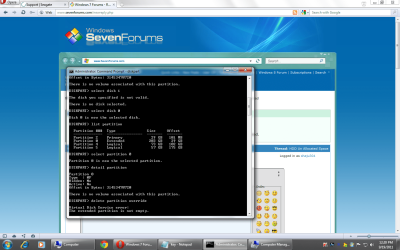
Forgive me for my ignorance. This space is still a partition. Are you sure that there is no "Delete Partition" when you right click on it to make it "unallocated". Only then you can do anything with that space.
Btw: the other posters are right. Your disk layout is a mess. There is no need to have all those little partitions. One big partition subdivided into folders is much more efficient. | My System Specs | | System Manufacturer/Model Number HP, Dell, Gateway - 2 laptops and 2 desktops OS Vista and Windows7, sometimes Ubuntu and Fedora CPU from 1.6GHz Duo to 2.5GHz Quad Monitor(s) Displays 2x HP w2207 Keyboard with trackball - no mices Mouse terrible devices, who wants them Hard Drives 5x HDD, 2x SSD, 6x Externals Internet Speed DSL 6000 |
09-18-2011
|
#9 | | |
Yup. The only option when i right click the 'Free Space is 'New simple Volume which eventually does not work;
And the un-allocated space | My System Specs | | |
09-18-2011
|
#10 | | Vista and Windows7, sometimes Ubuntu and Fedora |
| My System Specs | | System Manufacturer/Model Number HP, Dell, Gateway - 2 laptops and 2 desktops OS Vista and Windows7, sometimes Ubuntu and Fedora CPU from 1.6GHz Duo to 2.5GHz Quad Monitor(s) Displays 2x HP w2207 Keyboard with trackball - no mices Mouse terrible devices, who wants them Hard Drives 5x HDD, 2x SSD, 6x Externals Internet Speed DSL 6000 HDD Un Allocated Space problems? All times are GMT -5. The time now is 11:31 AM. |  |