Windows 7 Forums Search
Welcome to Windows 7 Forums. Our forum is dedicated to helping you find solutions with any problems, errors or issues you are experiencing with Windows 7. The Windows 7 forum also covers news and updates and has an extensive Windows 7 tutorial section that covers a wide range of tips and tricks.


Windows 7 - Windows no longer utilizes 8GB. Now only uses 4GB

 
09-19-2011   #1


Windows 7 Professional 64-bit


Windows no longer utilizes 8GB. Now only uses 4GB

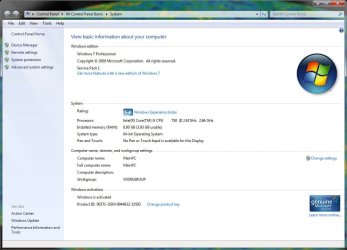
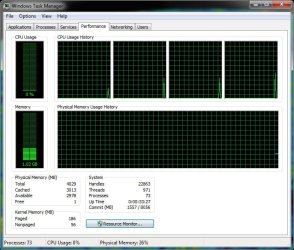
This is odd. I have had my system now for just under a year and all of a sudden, my system is not utilizing 4GB of the 8GB on board.

Steps I have taken:

* Replaced all of the RAM.
* Replaced the motherboard.
* Checked BIOS settings.

Been building my own PC's since 1993 and I have never seen this. My parts supplier is stumped. Microsoft support is useless.

System Specs:

*Intel DQ67SW Motherboard
*Intel i5 650 3.2 GHz 4MB Cache
* 4x 2GB DDR2 PC6400 SODIMM Modules
* NVidia GTX480 1.5GB Video Card
* Intel 30GB SSD Hard Drive (boot)
* Western Dig 350GB Hard Drive (apps)
* Western Dig 1TB Hard Drive (data)
* Liteon Blu Ray Player/ DVD&CD Burner
* Cisco AM10 USB Wireless Adapter

I am defintely . Any suggestions would be appreciated.

Thanks!

Attached Thumbnails
Windows no longer utilizes 8GB. Now only uses 4GB-system-info.jpg   Windows no longer utilizes 8GB. Now only uses 4GB-task-manager.jpg  
My System SpecsSystem Spec
09-19-2011   #2


Windows Server 2008 R2


Very interesting indeed. What specific motherboard, CPU, and RAM combination are in that machine specifically?
My System SpecsSystem Spec
09-19-2011   #3


Windows 7 Professional 64-bit


*Intel DQ67SW Motherboard
*Intel i5 650 3.2 GHz 4MB Cache
* 4x 2GB DDR2 PC6400 SODIMM Modules

I hope this helps.

Thank you in advance!

(PS - I tried the MSCONFIG trick - did nothing)
My System SpecsSystem Spec
.


09-19-2011   #4


Windows 7 Professional x64 SP1


The 3.93GB Usable seems to be a possible problem ... Not 100% Sure

Are you using Onboard Graphics? Clearly Not

Have you checked your BIOS for a RAM Remap as this could help
My System SpecsSystem Spec
09-19-2011   #5


Windows 7 Ultimate x64


I havent got one but read that the i5's on chip memory controler can handle 2 channels,As far as I know dual channel mode negates the fact that there 4 modules as it's installed as 2 channels of 2, Is dual channel mode enabled in the BIOS.

I'm a little confused though as you have changed the Motherboard and the RAM, i'm assuming you have re-installed the OS.

SODIMMS? Are you sure these fit in this motherboad.
My System SpecsSystem Spec
09-19-2011   #6


Windows 7 Professional 64-bit


Checked the bios, step by step. The bios is seeing all 8GB. There is not the ability to remap RAM in the BIOS. I am really stumped. I am about ready to pull out a spare HDD and do a clean install and see what happens.
My System SpecsSystem Spec
09-19-2011   #7


Windows 7 Professional 64-bit


Quote   Quote: Originally Posted by Sub Styler View Post
I havent got one but read that the i5's on chip memory controler can handle 2 channels,As far as I know dual channel mode negates the fact that there 4 modules as it's installed as 2 channels of 2, Is dual channel mode enabled in the BIOS.

I'm a little confused though as you have changed the Motherboard and the RAM, i'm assuming you have re-installed the OS.
I took the unit over to the parts supplier and we put in a new Intel DQ67SW MB, and tried with the old RAM and NEW RAM, with no joy.

I have not done a clean install yet. Way too much work to do right now to have my system down for a couple of days...

At least right now, the machine works.
My System SpecsSystem Spec
09-19-2011   #8


Windows 7 Ultimate x64


using this post will probably be of great benefit to your situation to use sysprep to reinstall the OS and keep most your files and settings.
My System SpecsSystem Spec
09-19-2011   #9


Windows 7 Professional 64 bit


On the Task Manager window (performance tab), click on 'Resource Monitor' and select the memory tab... It might help you figure it out...
My System SpecsSystem Spec
09-19-2011   #10


Windows 7 Professional x64 SP1


Also try refreshing your Windows Experience Index. I found that this got rid of my (X.YZ Usable) Label
My System SpecsSystem Spec
Reply

 Windows no longer utilizes 8GB. Now only uses 4GB problems?


Thread Tools


Similar Threads for: Windows no longer utilizes 8GB. Now only uses 4GB
Thread Forum
Details view in Explorer utilizes faint font color for most fields. Customization
Windows Fax and Scan no longer works General Discussion
Windows 7 no longer genuine?? Windows Updates & Activation
Can no longer boot into Windows Installation & Setup
WIndows 7 Will No Longer Boot Installation & Setup


All times are GMT -5. The time now is 11:32 AM.


Windows 7 Forums is an independent web site and has not been authorized,
sponsored, or otherwise approved by Microsoft Corporation.
"Windows 7" and related materials are trademarks of Microsoft Corp.
© Designer Media Ltd
  

1 2 3 4 5 6 7 8 9 10 11 12 13 14 15 16 17 18 19 20 21 22 23 24 25 26 27 28 29 30