
 |
Welcome to Windows 7 Forums. Our forum is dedicated to helping you find solutions with any problems, errors or issues you are experiencing with Windows 7. The Windows 7 forum also covers news and updates and has an extensive Windows 7 tutorial section that covers a wide range of tips and tricks.
Windows 7 - I need step-by-step instructions for new Boot/OS SSD & RAID 0 Platters |
09-23-2011
|
#1 | | Windows 7 Professional 64bit |
I need step-by-step instructions for new Boot/OS SSD & RAID 0 Platters I just received in the mail 1 new 120GB OCZ Vertex 3 SSD, 1 WD Black Caviar Drive (to match the existing 1TB WD Black Caviar drive I currently use), I also have a clean 1TB WD Caviar Blue drive I can use for what ever and an external 1TB USB 3.0 Passport for any drive imaging of file back ups etc. My rig specs are attached below. I currently have all my information on the one WD Black drive including the OS. I got these two new drives to enable a seperate SSD Boot/OS drive and to reconfigure my existing WD drive into a RAID 0 with the new drive while maintaining existing information (programs and documents) if possible. I am not anywhere near an expert, but do have some experience with hardware and configuration (I built my current rig) so a good set of instructions from an expert would be all I need. I see all the high scores for WEI and when benchmarking seperate SSD drives for OS and RAID 0 configurations that I am excited to give the new drives a try. I am sorry if this is a redundant thread, but I did look for and search for some time to find a thread I could use. I will check back often to answer any questions. Thanks! | My System Specs | | System Manufacturer/Model Number Custom OS Windows 7 Professional 64bit CPU Intel Core i7-980x Extreme Ed. 3.33Ghz CPU Motherboard ASUS Rampage III Extreme Intel X58 LGA1366 MoBo Memory OCZ Gold 2048MB PC16000 DDR3 2000MHz Triple Channel (X6) Graphics Card EVGA GeForce GTX 580 Superclocked 1536MB GDDR5 Video Card Sound Card NVIDIA High Definition Audio Monitor(s) Displays 1. Samsung SyncMaster P2570HD 2. Hanns-G HW173D Screen Resolution 1. Samsung- 1920x1080 2. Hanns-G- 1440x900 Keyboard Logitech MK700 Mouse Logitech M705 PSU ULTRA X4 1600w Modular Power Supply Case Cooler Master HAF X ATX Full Tower Black Case Cooling Corsair Hydro H50 CPU Liquid Cooler Hard Drives 1 120GB OCZ Vertex 3 SSD (OS)
1 RAID-0 (Storage)
Including-1 WD 1TB 7200rpm Caviar Black HD X 1 WD 1TB 7200rpm Caviar Blue HD Internet Speed 31.61 Mbps Download/ 2.51 Mbps Upload |
09-23-2011
|
#2 | | Windows 7 Ultimate x64 SP1, LinuxMint 9 LTS x64, Debian 6, Ubuntu 10.04 LTS x64 |
Hi Chris,
Nice new gear. Lets see if we can get your system setup and running nicely.
Firstly, a quick question: I assume you want to do a fresh, clean install of Windows 7 to your SSD? In that case, my recommendation is to: SSD
1. Unplug any existing HDD's.
2. Install the SSD drive, and then follow this tutorial to install Windows 7 to it: Clean Install Windows 7
3. Allow Windows to complete all the updates it wants.
4. Install any applications - your drive is quite large, so there is plenty of room for Office etc. and don't forget the anti-virus software of your choice. The RAID0
If I understand you correctly, you want to add an additional drive to your exitsing drive to create a RAID0 array and still preserve whats on it at the moment. Unfortunately, and I am happy to stand corrected, I do not think that is possible - in a RAID0 the data etc. is spanned across both disks, but at the moment it is written to a single platter.
My approach to this would be:
1. Copy all your data from the existing platter to the USB external drive BEFORE you install the SSD.
2. Reconnect your original HDD and install the new HDD. Boot the PC, and in the BIOS configure the RAID controller and add these two disks to the RAID.
3. Boot the computer. Once in Windows, in Disk Management, configure a simple drive, and partition as appropriate.
4. Now copy all your data back from the USB to the new RAID0.
5. If you like, you can also install applications to this RAID0 array. The Spare HDD
You can install that the same time as above. In Disk Management, you can add that as a simple volume too. It will be very useful for backups if the external USB is too slow/full etc.
You might like to consider this as a route for regular backups if you don't already have a plan for that: ROBOCOPY - Create Backup Script
Post back if you need more help. Enjoy your new kit!
Regards,
Golden
Last edited by Golden; 09-23-2011 at 07:07 AM..
Reason: clarify RAID
| My System Specs | | System Manufacturer/Model Number Golden Mk. I.3 OS Windows 7 Ultimate x64 SP1, LinuxMint 9 LTS x64, Debian 6, Ubuntu 10.04 LTS x64 CPU Intel i7 860 @ 2.80 GHz Motherboard Gigabyte P55A-UD3R Rev.1. Award BIOS F13 Memory 16GB Corsair Vengance DDR3 @ 661 MHz Dual Channel (9-9-9-24) Graphics Card EVGA NVidia GTX 560 1024MB Sound Card Realtek Integrated Monitor(s) Displays Dual Samsung SyncMaster 2494HS Screen Resolution 1920*1080 and 1920*1080 Keyboard Logitech G110 Mouse Logitech MX518 PSU Thermaltake ToughPower QFan 750W Case Thermaltake Element S VK60001W2Z Cooling Corsair H60 Water Cooling, 2*230mm and 2*80mm case fans Hard Drives 1*OCZ Vertex 2 60GB SSD;
2*Samsung F3 SpinPoint 1TB in RAID0;
2*Samsung F1 SpinPoint 1TB in RAID1;
1*Western Digital WD10EARS 1TB
1*Western Digital 500GB External USB 3.0
1*Seagate 500GB External USB 2.0 Internet Speed Not fast enough!!! |
09-23-2011
|
#3 | | Windows 7 Professional 64bit |
Thank you for the quick and precise response. Sorry if I have a lot of questions. I have heard that there may be problems with the user accounts in OS pointing to the proper files when they are on seperate drives. Is that true? Are there going to be problems with the OS not knowing where to go to find files and drivers due to a clean install? I have also heard that building a library in the newly installed OS to point to the existing files is a good way to overcome this. Do you agree? Also how exactly would you go about the backup of the existing drive? Would you take a complete image or just backup the documents. I have too large an amount of programs that I use to have to reinstall all of them (like probably 100 or more), so I think that a complete image would be best. Do you have a program you like to use and what are the steps for that program. I have DriveImage XML installed, but have never used it before. | My System Specs | | System Manufacturer/Model Number Custom OS Windows 7 Professional 64bit CPU Intel Core i7-980x Extreme Ed. 3.33Ghz CPU Motherboard ASUS Rampage III Extreme Intel X58 LGA1366 MoBo Memory OCZ Gold 2048MB PC16000 DDR3 2000MHz Triple Channel (X6) Graphics Card EVGA GeForce GTX 580 Superclocked 1536MB GDDR5 Video Card Sound Card NVIDIA High Definition Audio Monitor(s) Displays 1. Samsung SyncMaster P2570HD 2. Hanns-G HW173D Screen Resolution 1. Samsung- 1920x1080 2. Hanns-G- 1440x900 Keyboard Logitech MK700 Mouse Logitech M705 PSU ULTRA X4 1600w Modular Power Supply Case Cooler Master HAF X ATX Full Tower Black Case Cooling Corsair Hydro H50 CPU Liquid Cooler Hard Drives 1 120GB OCZ Vertex 3 SSD (OS)
1 RAID-0 (Storage)
Including-1 WD 1TB 7200rpm Caviar Black HD X 1 WD 1TB 7200rpm Caviar Blue HD Internet Speed 31.61 Mbps Download/ 2.51 Mbps Upload |
09-23-2011
|
#4 | | Windows 7 Ultimate x64 SP1, LinuxMint 9 LTS x64, Debian 6, Ubuntu 10.04 LTS x64 |
Hi Chris,
No worries with the questions - the more you ask, the better we can advise. Quote: I have heard that there may be problems with the user accounts in OS pointing to the proper files when they are on seperate drives. Is that true? If I understand you correctly, do you mean for example having MSOffice installed to your RAID0 (lets call it E: for example) and then the OS on the SSD (C  having problems "talking" to MSOffice on E:? No, I have never heard of that, and never experienced it - I have my OS on my SSD, and several applications installed on other drives (RAID0 included) and have never experienced any problems in the slightest. Did I understand your question correctly? Im unsure if I did. Quote: Are there going to be problems with the OS not knowing where to go to find files and drivers due to a clean install? Nope - during installation, Windows will download and install the appropriate drivers to get the hardware working. After that is complete, you can install specific drivers if you like - the procedure for installation is precisley the same as for a platter/spinner HDD. Quote: Also how exactly would you go about the backup of the existing drive? Would you take a complete image or just backup the documents. I have too large an amount of programs that I use to have to reinstall all of them (like probably 100 or more), so I think that a complete image would be best. Do you have a program you like to use and what are the steps for that program. I almost metioned this in my original post, but wasn't sure of the success rate. In theory, once way to preserve your setup on the existing disk is to image it, and then attempt to restore the image to the SSD - the existing OS presents a challenege though, so I'm unsure how to deal with that.. I have never attempted this, so am unsure how succesful that would be. I understand your reluctance to install the programs again, but I think its the safest route. Also......installing to a SSD is lightning fast, so you would spend considerably, and I do mean considerably, less time installing your software.
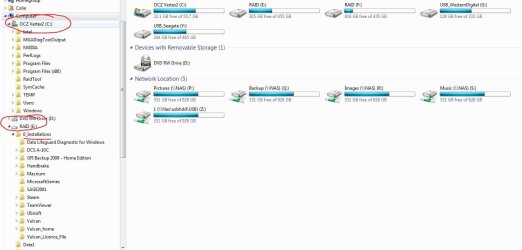
My own personal preference is just to backup the data (music, documents etc.) externally, and then clean install everything, but then again I probably do not have as many applications as you, so understand your reluctance.
Let me see if I can track down some experts in this area to offer some more advice.
Regards,
Golden | My System Specs | | System Manufacturer/Model Number Golden Mk. I.3 OS Windows 7 Ultimate x64 SP1, LinuxMint 9 LTS x64, Debian 6, Ubuntu 10.04 LTS x64 CPU Intel i7 860 @ 2.80 GHz Motherboard Gigabyte P55A-UD3R Rev.1. Award BIOS F13 Memory 16GB Corsair Vengance DDR3 @ 661 MHz Dual Channel (9-9-9-24) Graphics Card EVGA NVidia GTX 560 1024MB Sound Card Realtek Integrated Monitor(s) Displays Dual Samsung SyncMaster 2494HS Screen Resolution 1920*1080 and 1920*1080 Keyboard Logitech G110 Mouse Logitech MX518 PSU Thermaltake ToughPower QFan 750W Case Thermaltake Element S VK60001W2Z Cooling Corsair H60 Water Cooling, 2*230mm and 2*80mm case fans Hard Drives 1*OCZ Vertex 2 60GB SSD;
2*Samsung F3 SpinPoint 1TB in RAID0;
2*Samsung F1 SpinPoint 1TB in RAID1;
1*Western Digital WD10EARS 1TB
1*Western Digital 500GB External USB 3.0
1*Seagate 500GB External USB 2.0 Internet Speed Not fast enough!!! |
09-23-2011
|
#5 | | Windows7 Pro 64bit SP-1; Windows XP Pro 32bit |
Quote: I have also heard that building a library in the newly installed OS to point to the existing files is a good way to overcome this This is what you are refering to I beleive. Sevenforums tutorial > User Folders - Change Default Location
Libraries appears to be a folder with sub folders it is not. "Libraries" is a junction.
This tutorial shows how to move folders, such as "My Pictures" to a secondary HD and still maintain the junction on the main OS drive.
Hope that helps with that question at least.
Mike | My System Specs | | System Manufacturer/Model Number Hopalong/ Godzilla OS Windows7 Pro 64bit SP-1; Windows XP Pro 32bit CPU Intel Core i7-870 Lynnfield 2.93GHz LGA 1156 95W Quad-Core Motherboard ASUS P7P55D-E PRO Memory 8GB@1400MHz Crucial Ballistix DDR3-1600 4x2GB Graphics Card ASUS ENGTX460 DirectCU/2DI/1GD5 1GB 256-bit GDDR5 Sound Card VIA Onboard Monitor(s) Displays Samsung SyncMaster 941BW 19"ws Screen Resolution 1440x900 Keyboard Logitech K-320 PSU COOLER MASTER Silent Pro RS850-AMBAJ3-US 850W Modular Case COOLER MASTER HAF 932 RC-932-KKN5-GP Black Cooling Scythe "Mugen-2 Rev.B" (2 ScytheKaze-Jyuni PWM fans) Hard Drives Intel 320 120GB SSD
Western Digital Caviar Black WD7501AALS 750GB 7200 RPM SATA 3.0Gb/s
Western Digital Caviar Black WD6401AALS 640GB 7200 RPM SATA 3.0Gb/s |
09-23-2011
|
#6 | | Windows 7 Professional 64bit |
Yes, I think you understood my first question mostly. What I was considering was the fact that the user folder, say Christopher Bradley in this case would be linked to the user account in the OS and to files on the Raid0 array, and how would it know that they were over there now that I have reinstalled the OS cleanly to a new disk. How would it know where to point when I call my files from that folder without creating a library linking the new, seemingly empty folder to those data files? I don't want to write my data files to the SSD as well. They will be restored to another drive with out theOS knowing since I am just restoring a image of the original disk. Thanks,and thank you again for your assistance with the last question. I will await your response. Part of what I was thnking was that I would have some of my programs on the RAID0 array and now I understand that if I can help it would be better for all my programs to be on the SSD, at least that would fit and only data files if possible on the Raid0 array, right? The thinking is that the Raid0 array might be a bit slower, but for space sake and SSD drive longevity I should do it this way if possible. To read and write every file I open would cause serious wear on a SSD drive, if I am not mistaken. Programs will open once and stay open in memory until closed. With each program I open I could open many files with one program read/write cycle to the SSD. The numerous files I open up with that program could be read and written back to the RAID0 array disk many thousands times more often without wear to the disk. Is my thinking solid? | My System Specs | | System Manufacturer/Model Number Custom OS Windows 7 Professional 64bit CPU Intel Core i7-980x Extreme Ed. 3.33Ghz CPU Motherboard ASUS Rampage III Extreme Intel X58 LGA1366 MoBo Memory OCZ Gold 2048MB PC16000 DDR3 2000MHz Triple Channel (X6) Graphics Card EVGA GeForce GTX 580 Superclocked 1536MB GDDR5 Video Card Sound Card NVIDIA High Definition Audio Monitor(s) Displays 1. Samsung SyncMaster P2570HD 2. Hanns-G HW173D Screen Resolution 1. Samsung- 1920x1080 2. Hanns-G- 1440x900 Keyboard Logitech MK700 Mouse Logitech M705 PSU ULTRA X4 1600w Modular Power Supply Case Cooler Master HAF X ATX Full Tower Black Case Cooling Corsair Hydro H50 CPU Liquid Cooler Hard Drives 1 120GB OCZ Vertex 3 SSD (OS)
1 RAID-0 (Storage)
Including-1 WD 1TB 7200rpm Caviar Black HD X 1 WD 1TB 7200rpm Caviar Blue HD Internet Speed 31.61 Mbps Download/ 2.51 Mbps Upload |
09-23-2011
|
#7 | | Windows 7 Ultimate x64 SP1, LinuxMint 9 LTS x64, Debian 6, Ubuntu 10.04 LTS x64 |
Hi Chris, Quote: What I was considering was the fact that the user folder, say Christopher Bradley in this case would be linked to the user account in the OS and to files on the Raid0 array, and how would it know that they were over there now that I have reinstalled the OS cleanly to a new disk. How would it know where to point when I call my files from that folder without creating a library linking the new, seemingly empty folder to those data files? Sorry mate, I'm being a bit dumb and its late here. I don't quite understand what you mean above. Did Hopolong's link help you with that? Quote: Part of what I was thnking was that I would have some of my programs on the RAID0 array and now I understand that if I can help it would be better for all my programs to be on the SSD, at least that would fit and only data files if possible on the Raid0 array, right? The thinking is that the Raid0 array might be a bit slower, but for space sake and SSD drive longevity I should do it this way if possible. To read and write every file I open would cause serious wear on a SSD drive, if I am not mistaken. Programs will open once and stay open in memory until closed. With each program I open I could open many files with one program read/write cycle to the SSD. The numerous files I open up with that program could be read and written back to the RAID0 array disk many thousands times more often without wear to the disk. Is my thinking solid? Yes, your thinking is rock solid. Keep your installed applications on the SSD, and all your data files on the RAID0. If you feel space is an issue on the SSD, you can install applications to the RAID0 too - nothing special is required at all regarding any interaction between the OS on the SSD and any installations on the RAID0 - it all just works flawlessly.
By the way I meant to add a cautionary note about the RAID0 : you must be absolutely clinical in backing up (or imaging) this drive. If any one of the two platters in the RAID0 fails, then ALL the data is permanently lost.
You can use FREE Macrium Reflect to image, or the ROBOCOPY tutorial linked further above for native format backups.
Regards,
Golden | My System Specs | | System Manufacturer/Model Number Golden Mk. I.3 OS Windows 7 Ultimate x64 SP1, LinuxMint 9 LTS x64, Debian 6, Ubuntu 10.04 LTS x64 CPU Intel i7 860 @ 2.80 GHz Motherboard Gigabyte P55A-UD3R Rev.1. Award BIOS F13 Memory 16GB Corsair Vengance DDR3 @ 661 MHz Dual Channel (9-9-9-24) Graphics Card EVGA NVidia GTX 560 1024MB Sound Card Realtek Integrated Monitor(s) Displays Dual Samsung SyncMaster 2494HS Screen Resolution 1920*1080 and 1920*1080 Keyboard Logitech G110 Mouse Logitech MX518 PSU Thermaltake ToughPower QFan 750W Case Thermaltake Element S VK60001W2Z Cooling Corsair H60 Water Cooling, 2*230mm and 2*80mm case fans Hard Drives 1*OCZ Vertex 2 60GB SSD;
2*Samsung F3 SpinPoint 1TB in RAID0;
2*Samsung F1 SpinPoint 1TB in RAID1;
1*Western Digital WD10EARS 1TB
1*Western Digital 500GB External USB 3.0
1*Seagate 500GB External USB 2.0 Internet Speed Not fast enough!!! |
09-23-2011
|
#8 | | Windows 7 Professional 64bit |
Yes, Hopalong did clarify that question. Thanks for the last answer too. That clarifies all questions I have for now. The image helped a lot too. Thank you again, get some rest. | My System Specs | | System Manufacturer/Model Number Custom OS Windows 7 Professional 64bit CPU Intel Core i7-980x Extreme Ed. 3.33Ghz CPU Motherboard ASUS Rampage III Extreme Intel X58 LGA1366 MoBo Memory OCZ Gold 2048MB PC16000 DDR3 2000MHz Triple Channel (X6) Graphics Card EVGA GeForce GTX 580 Superclocked 1536MB GDDR5 Video Card Sound Card NVIDIA High Definition Audio Monitor(s) Displays 1. Samsung SyncMaster P2570HD 2. Hanns-G HW173D Screen Resolution 1. Samsung- 1920x1080 2. Hanns-G- 1440x900 Keyboard Logitech MK700 Mouse Logitech M705 PSU ULTRA X4 1600w Modular Power Supply Case Cooler Master HAF X ATX Full Tower Black Case Cooling Corsair Hydro H50 CPU Liquid Cooler Hard Drives 1 120GB OCZ Vertex 3 SSD (OS)
1 RAID-0 (Storage)
Including-1 WD 1TB 7200rpm Caviar Black HD X 1 WD 1TB 7200rpm Caviar Blue HD Internet Speed 31.61 Mbps Download/ 2.51 Mbps Upload |
09-23-2011
|
#9 | | Windows 7 Ultimate x64 SP1, LinuxMint 9 LTS x64, Debian 6, Ubuntu 10.04 LTS x64 |
No worries Chris. Post back if you have more questions.
Regards,
Golden | My System Specs | | System Manufacturer/Model Number Golden Mk. I.3 OS Windows 7 Ultimate x64 SP1, LinuxMint 9 LTS x64, Debian 6, Ubuntu 10.04 LTS x64 CPU Intel i7 860 @ 2.80 GHz Motherboard Gigabyte P55A-UD3R Rev.1. Award BIOS F13 Memory 16GB Corsair Vengance DDR3 @ 661 MHz Dual Channel (9-9-9-24) Graphics Card EVGA NVidia GTX 560 1024MB Sound Card Realtek Integrated Monitor(s) Displays Dual Samsung SyncMaster 2494HS Screen Resolution 1920*1080 and 1920*1080 Keyboard Logitech G110 Mouse Logitech MX518 PSU Thermaltake ToughPower QFan 750W Case Thermaltake Element S VK60001W2Z Cooling Corsair H60 Water Cooling, 2*230mm and 2*80mm case fans Hard Drives 1*OCZ Vertex 2 60GB SSD;
2*Samsung F3 SpinPoint 1TB in RAID0;
2*Samsung F1 SpinPoint 1TB in RAID1;
1*Western Digital WD10EARS 1TB
1*Western Digital 500GB External USB 3.0
1*Seagate 500GB External USB 2.0 Internet Speed Not fast enough!!! |
09-23-2011
|
#10 | | Windows7 Pro 64bit SP-1; Windows XP Pro 32bit |
I knew where the Libraries tutorial was but the RAID part I had no idea.
Hope you get things working as you want. 
Mike | My System Specs | | System Manufacturer/Model Number Hopalong/ Godzilla OS Windows7 Pro 64bit SP-1; Windows XP Pro 32bit CPU Intel Core i7-870 Lynnfield 2.93GHz LGA 1156 95W Quad-Core Motherboard ASUS P7P55D-E PRO Memory 8GB@1400MHz Crucial Ballistix DDR3-1600 4x2GB Graphics Card ASUS ENGTX460 DirectCU/2DI/1GD5 1GB 256-bit GDDR5 Sound Card VIA Onboard Monitor(s) Displays Samsung SyncMaster 941BW 19"ws Screen Resolution 1440x900 Keyboard Logitech K-320 PSU COOLER MASTER Silent Pro RS850-AMBAJ3-US 850W Modular Case COOLER MASTER HAF 932 RC-932-KKN5-GP Black Cooling Scythe "Mugen-2 Rev.B" (2 ScytheKaze-Jyuni PWM fans) Hard Drives Intel 320 120GB SSD
Western Digital Caviar Black WD7501AALS 750GB 7200 RPM SATA 3.0Gb/s
Western Digital Caviar Black WD6401AALS 640GB 7200 RPM SATA 3.0Gb/s I need step-by-step instructions for new Boot/OS SSD & RAID 0 Platters problems? All times are GMT -5. The time now is 11:36 AM. |  |