Hi
I have been trying to find a solution for hours.
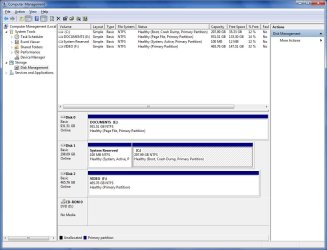
I have 3 drives on my computer:
C: 298GB for operating system/program files (no pictures/files/music/videos)
E: 1TB for my files
F: 500GB for video
I can't account for 176GB on my C:drive. Right-clicking>Properties shows there is only 35.7GB of free space.
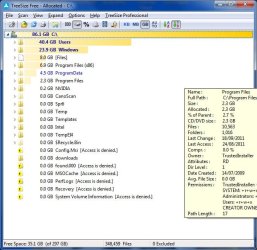
When I used TreeSize and Windirstat to analyse C Drive, both come up with 86.1GB of files but both can't find where the other 179GB is. (Windirstat identifies an Unknown folder of that size but can't tell me any more)
I have emptied the Recycle Bin; done three or four disk cleanups; deleted all restore points with no effect. I am still unable to locate or get back this missing 179GB of space.
Running Windows 7 Home Premium with SP1 / 8GB RAM / i7 860 processor
Have Norton 360 and used that numerous times to clean disks
Have "Rollback Rx" and have deleted all of my snapshots except 3
Can't do defrag on C because there isn't 15% free space. I forced a defrag (was 34% fragmented and at the end it reported 33% fragmented)
Can someone please help me get back my disk space on C drive
Thank you for any advice
I have been trying to find a solution for hours.
I have 3 drives on my computer:
C: 298GB for operating system/program files (no pictures/files/music/videos)
E: 1TB for my files
F: 500GB for video
I can't account for 176GB on my C:drive. Right-clicking>Properties shows there is only 35.7GB of free space.
When I used TreeSize and Windirstat to analyse C Drive, both come up with 86.1GB of files but both can't find where the other 179GB is. (Windirstat identifies an Unknown folder of that size but can't tell me any more)
I have emptied the Recycle Bin; done three or four disk cleanups; deleted all restore points with no effect. I am still unable to locate or get back this missing 179GB of space.
Running Windows 7 Home Premium with SP1 / 8GB RAM / i7 860 processor
Have Norton 360 and used that numerous times to clean disks
Have "Rollback Rx" and have deleted all of my snapshots except 3
Can't do defrag on C because there isn't 15% free space. I forced a defrag (was 34% fragmented and at the end it reported 33% fragmented)
Can someone please help me get back my disk space on C drive
Thank you for any advice
Last edited:
My Computer
At a glance
Windows 7 Home 64bit
- OS
- Windows 7 Home 64bit