Windows 7 Forums Search
Welcome to Windows 7 Forums. Our forum is dedicated to helping you find solutions with any problems, errors or issues you are experiencing with Windows 7. The Windows 7 forum also covers news and updates and has an extensive Windows 7 tutorial section that covers a wide range of tips and tricks.


Windows 7 - device/printers icons

 
10-03-2011   #1


Windows 7 Ultimate 64 bit


device/printers icons

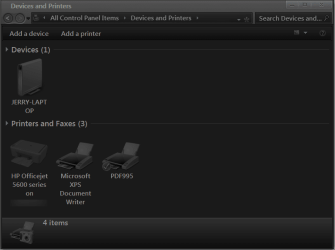
When I open the device/printers tab from the start menu it shows all my devices currently connected to my PC...so far so good. My problem is that my printer icon for my installed printer, HP all-in-one Office-jet 5610v and is all updated, shows the icon for printer the doesn't remotely come close to what my printer looks like. I have found this article from MS that supposedly has a fix for this. http://support.microsoft.com/kb/2403006

I've run this fix and it says that the fix has been applied but when I check the device/printer tab is shows the icon properly for about 1 sec and then goes back to the original non-conforming icon.

This problem occurs on all my PC's across my home network. Same result when trying to apply fix on all PC's.

My System SpecsSystem Spec
10-03-2011   #2


Windows 7 Ultimate X86 SP1


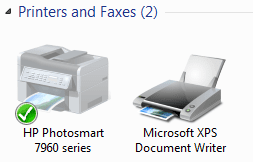
Jimbo does it look like....
Name:  devprntr.PNG
Views: 697
Size:  21.4 KB
If so I think you have the correct one. They don't use actual pictures of devices, just "realistic" icons. You can make an icon and install it I have heard. I ran the Fixit and no change.
My System SpecsSystem Spec
10-03-2011   #3


Windows 7 Ultimate 64 bit


Nope...that's what the fix turns it to which only lasts for a second, but what I end up with is this....


device/printers icons-printers.png
My System SpecsSystem Spec
.


10-03-2011   #4


Win7 Home Premium x64 SP1/Windows 8 Consumer Preview x64


Like Britton said, if you can find/make an icon you can edit the .dll these are stored in and replace it.

Danny
My System SpecsSystem Spec
10-03-2011   #5


Acer laptop W 7 Pro SP1 64 bit & Dell Desktop W 7 Pro SP1 32 bit


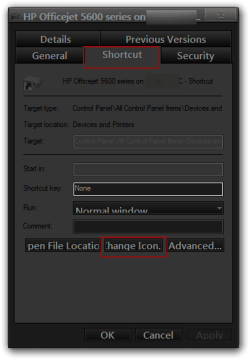
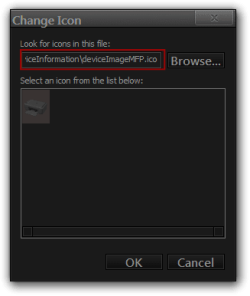
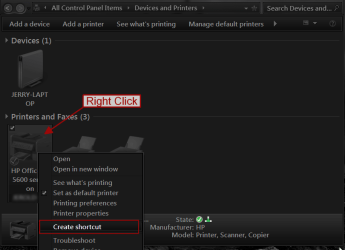
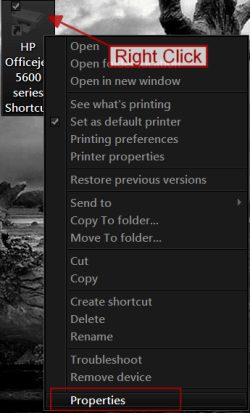
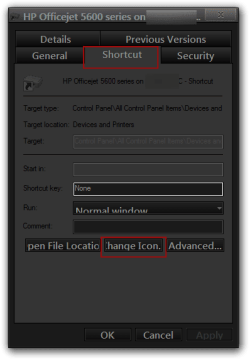
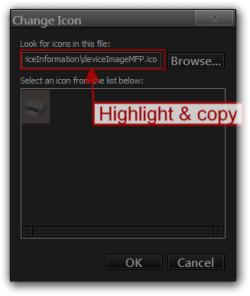
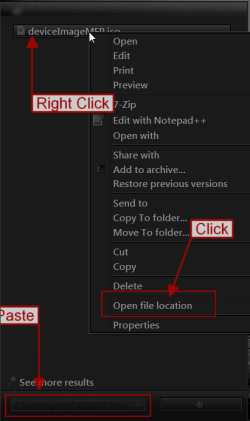
That icon most likely will not be in a .dll I have the same icon and it is at c:\users\jerry\appdata\local\microsoft\device metadata\dmrccache\en-us\6404a1aa-9dab-47c1-a0a7-090e717f9471\DeviceInformation\deviceImageMFP.ico while you are in Devices and Printers right click on the printer icon create a shortcut right click on the shortcut go to properties and click on Change Icon Button and in the address field should tell you where your icon is located at.
Jerry
device/printers icons-c.png
device/printers icons-hp-officejet-5600-series-shortcut-properties.pngdevice/printers icons-change-icon.png
My System SpecsSystem Spec
10-03-2011   #6


Microsoft Windows 7 Home Premium 64-bit 7600


Quote   Quote: Originally Posted by Britton30 View Post
Jimbo does it look like....
Attachment 177765
If so I think you have the correct one. They don't use actual pictures of devices, just "realistic" icons. You can make an icon and install it I have heard. I ran the Fixit and no change.
sorrry gary ,but they do show actual images ,not for every device but for my printer it shows a image of the model i have.

Name:  2011-10-03_2024.png
Views: 689
Size:  20.5 KB
My System SpecsSystem Spec
10-03-2011   #7


Windows 7 Ultimate X86 SP1


Quote   Quote: Originally Posted by boohbah View Post
Quote   Quote: Originally Posted by Britton30 View Post
Jimbo does it look like....
Attachment 177765
If so I think you have the correct one. They don't use actual pictures of devices, just "realistic" icons. You can make an icon and install it I have heard. I ran the Fixit and no change.
sorrry gary ,but they do show actual images ,not for every device but for my printer it shows a image of the model i have.

Attachment 177785
Oops! Maybe only newer devices have real pics, my printer is 6 years old or so.
My System SpecsSystem Spec
10-03-2011   #8


Microsoft Windows 7 Home Premium 64-bit 7600


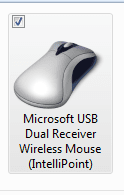
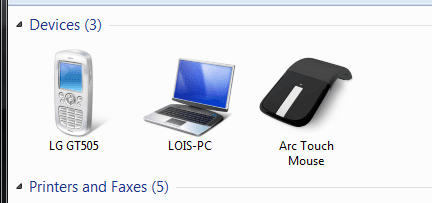
no worries gary, i was just complaining the other day that my new arc touch mouse wont show, and thats a new device. been on sale about a year now, i think.

Name:  2011-10-03_2100.png
Views: 683
Size:  11.6 KB


Hhahaha, update , i just moved the nano receiver to a different usb port and it installed the device software again, and when i checked in printers and devices , guess what is showing .
thanks for this thread.

device/printers icons-2011-10-03_2106.png
My System SpecsSystem Spec
10-03-2011   #9


Acer laptop W 7 Pro SP1 64 bit & Dell Desktop W 7 Pro SP1 32 bit


Is this the icon you had?
Name:  printer.png
Views: 690
Size:  13.3 KB
That's from my Desktop with the HP 5610 hooked to it the other 1 in my other post is from my Laptop so it's a network printer. Here is that icon if you want it. HPIcon.zip
Jerry
My System SpecsSystem Spec
10-03-2011   #10


Windows 7 Ultimate 64 bit


Does it make it difference if it's a network printer? It's the only printer I have and it is set up as the network printer.

Bongo: I tried looking in my C: folder/drive I even un-hid all files and folders and I get as far as microsoft and from there it goes to windows. In there, there is game explorer, history and temp internet files. So now I'm really confused.
My System SpecsSystem Spec
Reply

 device/printers icons problems?


Thread Tools


Similar Threads for: device/printers icons
Thread Forum
Solved Devices and Printers icons (Device Stage) General Discussion
Solved Device and Printers Hardware & Devices
No devices or printers showing in Device and printers General Discussion
Device and Printers does not see all printers Hardware & Devices
Devices and Printers - Device Stage Tutorials


All times are GMT -5. The time now is 09:20 AM.


Windows 7 Forums is an independent web site and has not been authorized,
sponsored, or otherwise approved by Microsoft Corporation.
"Windows 7" and related materials are trademarks of Microsoft Corp.
© Designer Media Ltd
  

1 2 3 4 5 6 7 8 9 10 11 12 13 14 15 16 17 18 19 20 21 22 23 24 25 26 27 28 29 30