Windows 7 Forums Search
Welcome to Windows 7 Forums. Our forum is dedicated to helping you find solutions with any problems, errors or issues you are experiencing with Windows 7. The Windows 7 forum also covers news and updates and has an extensive Windows 7 tutorial section that covers a wide range of tips and tricks.


Windows 7 - No Display ! Please Help .

 
10-05-2011   #1
Arc


windows 7 Home Premium 64 Bit SP 1


No Display ! Please Help .

I am trying to fix my friend's computer. The problem is it is not displaying anything ... even the motherboard screen, too !

As far as I know, the specs are ....

Motherboard - Asus (dont know more specifications)
Processor - AMD Athlon 64 bit
RAM - Kingston 4 GB
OS - Windows 7 Home Premium 32 bit
The age of the system is more or less 2 years.

My best guess is the motherboard is damaged . But how to be sure about it? And if not, how to get display back ?

Please help us . Thanks a lot in advance .

My System SpecsSystem Spec
10-05-2011   #2


Microsoft Windows 7 Home Premium 64-bit 7600


presumably the monitor is powered on , also check all the cables are in correctly and haven't come loose.
My System SpecsSystem Spec
10-05-2011   #3


WCP ONLY


Archie

Is it a desktop or laptop?

Are there any lights on the box (ie power, hd, etc)?

Have you tried reseting the BIOS by removing the power and holding the power button down for 1 minute?
My System SpecsSystem Spec
.


10-05-2011   #4
Arc


windows 7 Home Premium 64 Bit SP 1


Quote   Quote: Originally Posted by boohbah View Post
presumably the monitor is powered on , also check all the cables are in correctly and haven't come loose.
Julian, The monitor is powered on , the indicator is blinking . And all the cables are connected properly . It was the same situation at my friend's home .
Quote   Quote: Originally Posted by zigzag3143 View Post
Archie

Is it a desktop or laptop?

Are there any lights on the box (ie power, hd, etc)?

Have you tried reseting the BIOS by removing the power and holding the power button down for 1 minute?
Ken, it is a desktop. Lights ... in front of the case, there are two lights, one green and one red, and both are on. On the motherboard (asus M2N MX SE Plus, the same board I had previously) there is one green light, also powered on .

There is a reset button, I have tried it several times, but no result .

Is the red light to be on always ?
My System SpecsSystem Spec
10-05-2011   #5
Arc


windows 7 Home Premium 64 Bit SP 1


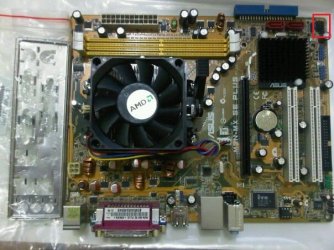
Here is a downloaded image of the board ... I have pointed the source of the red light
No Display ! Please Help .-248284_2014209110795_1110829356_2387008_1967138_n.jpg
It is plunged at the bottom most pin, and the on the cable it is written H.D.D LED .

Is it an important info to the issue ?
My System SpecsSystem Spec
10-05-2011   #6


Windows 7 x64 pro/ Windows 7 x86 Pro/ XP SP3 x86


Archan, is there a spare monitor available? You could hookup the unit to that, if the problem persists you'll know it isn't the monitor. Second, swap the memory sticks around. Third run mem diags and hd diags. Fourth, can you get into the bios? If yes, try resetting to defaults. Finally, try booting from a Windows 7 install dvd (dont worry about activation etc. right now).
My System SpecsSystem Spec
10-05-2011   #7
Arc


windows 7 Home Premium 64 Bit SP 1


Bill, I have tried the system on three different monitors ... on of my friends own, one is my old unused one, and on my working monitor .... it is the same all black everywhere

I removed both the ram sticks, cleaned those up and applied again, no result at all .

Unfortunately I cannot go for the last three advises you suggested, coz it is not displaying the motherboard screen, too !

I have applied the hard disk on my computer, it works very nice .

Should the board me replaced ?
My System SpecsSystem Spec
10-05-2011   #8


Windows 7 x64 pro/ Windows 7 x86 Pro/ XP SP3 x86


Can you get to the video card? If yes, take it out. If that gives you a beep or some beeps, the video card could be the problem. If it doesnt, and you've ruled out the monitor, memory, hard disk, then yes time to look at the cpu and mobo. Are you sure the friend hasn't fiddled with CAS latency or something?
My System SpecsSystem Spec
10-05-2011   #9
Arc


windows 7 Home Premium 64 Bit SP 1


Bill, there is no video card, just onboard graphics .

My friend is not a geek at all. She uses MS Word , Vlc, etc programs only . I am sure that she cannot make any major change in anything .

How should I check the CPU and motherboard ? And may I apply a graphics card to see if it changes anything ?
My System SpecsSystem Spec
10-05-2011   #10


Windows 7 x64 pro/ Windows 7 x86 Pro/ XP SP3 x86


If theres a way to test the video card, good. Have you checked the PSU yet?

The CPU can only be tested on another PC, so you'll need to take it to a shop I think. But mobos break faster than CPUs so it could be something say a wireless card shorted on the mobo.
My System SpecsSystem Spec
Reply

 No Display ! Please Help . problems?


Thread Tools


Similar Threads for: No Display ! Please Help .
Thread Forum
Cannot make external display my main display Graphic Cards
Display settings "display" dropdown options Graphic Cards
Power options page doesn't display a "dim the display" General Discussion
display/monitor 1024×768 display size Drivers
Display - Change Main Display Tutorials


All times are GMT -5. The time now is 09:22 AM.


Windows 7 Forums is an independent web site and has not been authorized,
sponsored, or otherwise approved by Microsoft Corporation.
"Windows 7" and related materials are trademarks of Microsoft Corp.
© Designer Media Ltd
  

1 2 3 4 5 6 7 8 9 10 11 12 13 14 15 16 17 18 19 20 21 22 23 24 25 26 27 28 29 30