|
Welcome to Windows 7 Forums. Our forum is dedicated to helping you find solutions with any problems, errors or issues you are experiencing with Windows 7. The Windows 7 forum also covers news and updates and has an extensive Windows 7 tutorial section that covers a wide range of tips and tricks.
Windows 7 - Change Unallocated to useable space |
10-05-2011
|
#1 | | |
Change Unallocated to useable space I just received a Lenovo 160GB warranty replacement drive, installed the drive and restored my most current Acronis image. The drive that was replaced was 100GB, thus the restored Acronis image was ~96GB C drive.
The attached Acronis Disk Director screen shot shows the difference between the restored C area versus the available drive space as unallocated.
From previous conversations on the forum I have a boot CD burned with Magic Partition Manager (not used thus far).
Before I boot the computer with the MPM CD would someone give me a bit of reassurance that there will be a clear MPM option to convert the currently unallocated space to allocated and then either merge the two spaces or have the currently active space increase in size subsuming that space which is currently unallocated?
Thanks,
Mark
| My System Specs | | |
10-05-2011
|
#2 | | Windows 7 x64 pro/ Windows 7 x86 Pro/ XP SP3 x86 |
mark, are you able to successfully boot into windows? maybe reboot a couple of times to check? If yes, you can definitely format the unallocated space to create a new partition or extend the existing C: partition to use that space. Just remember you have some unallocated space to the left of C: as well - to extend C: into that you'll need a 3rd party partition manager (windows cant do it natively). I don't know about MPM but if that doesn't work you can always use Partition wizard. Partition Wizard : Use the Bootable CD | My System Specs | | System Manufacturer/Model Number Too many to describe... OS Windows 7 x64 pro/ Windows 7 x86 Pro/ XP SP3 x86 |
10-05-2011
|
#3 | | Vista and Windows7, sometimes Ubuntu and Fedora |
I would stay away from the MPM. Use Disk Management. It is a lot safer. Just right click on the C partition and "Extend". Or right click on the unallocated space and create a partition.
If you want to recover the bit of space in front of C:, follow the advice of Bill2 - but I think it is not worth the risk of making a mistake for such an itty bitty amount of space. | My System Specs | | System Manufacturer/Model Number HP, Dell, Gateway - 2 laptops and 2 desktops OS Vista and Windows7, sometimes Ubuntu and Fedora CPU from 1.6GHz Duo to 2.5GHz Quad Monitor(s) Displays 2x HP w2207 Keyboard with trackball - no mices Mouse terrible devices, who wants them Hard Drives 5x HDD, 2x SSD, 6x Externals Internet Speed DSL 6000 |
10-05-2011
|
#4 | | |
Not sure how I have the CD labeled Magic Partition Manager by Mini Tool but it is Partition Wizard. After reading your message, for some reason, I decided creating a partition from the unallocated space would be a good idea and then would go on to merge the two partitions. The free PW would not do that. I then deleted the newly created partition and was able to drag the size of C to cover the entire area absent the tiny area at the left. For now I'll leave the area to left and relish my newly enlarged C.
I'm also uninstalling Acronis' Disk Director.
Thanks--
Mark | My System Specs | | |
10-06-2011
|
#5 | | |
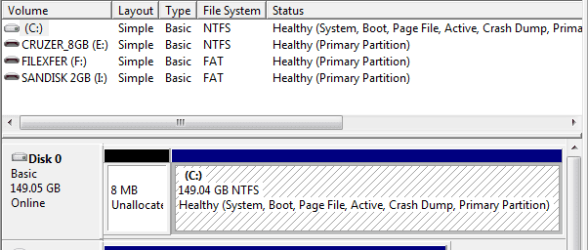
So I went back and tried to clean up the tiny unallocated space (attachment) with Partition Wizard.
Whereas the day before yesterday I was able to drag the primary partition C to the right to include and eliminate the large unallocated space resulting from a new drive (see earlier in this thread), I cannot drag the resulting C to the left to eliminate (include) the remaining, tiny space.
Since the free version of Partition Wizard does not allow one to merge, any suggestions on a method of subsuming the tiny space within C?
Mark | My System Specs | | |
10-06-2011
|
#6 | | Windows 7 Professional SP1 32-bit |
The free EASEUS Partition Master is capable of extending your C: partition in both directions to fill up all available disk space.
You can do this from within Windows and it will prompt you to reboot, perform the partition resize, then reboot again and have you back in Windows. No need for a CD to boot from - done this a couple of times without a problem
Download it here: EaseUS Partition Master Home Edition - Free software downloads and software reviews - CNET Download.com | My System Specs | | System Manufacturer/Model Number Custom-built OS Windows 7 Professional SP1 32-bit CPU Intel Core 2 Duo E6600 2.4GHz, overclocked to 2.7GHz Motherboard Asus PL5D2 Memory 3GB DDR2-667 (2x1GB + 2x512MB in dual-channel config) Graphics Card nVidia GeForce 9800 GT Sound Card on-board Realtek HD Monitor(s) Displays LG W2261 Screen Resolution 1920x1200 (DVI) Keyboard Standard Mouse Microsoft wireless optical mouse PSU Antec TruePower 2.0 Case Cooler Master Centurion Cooling various fans Hard Drives OCZ SSD Vertex Plus 60GB SATA (Firmware 3.55), 64MB cache
Hitachi HD321KJ SATA, 320GB, 7200rpm, 16MB cache Internet Speed DSL; ~700KB/sec down, ~65KB/sec up Other Info Have a laptop too :) (Compaq CQ60 also with Win7 Pro SP1 32-bit)
Drives in both systems:
C: - Windows 7 + apps. Pagefile is fixed size and located at the very end of the partition.
D: - various temp files/cache for Firefox and apps/games.
E: - videos, music, misc. storage, torrent downloads, etc. |
10-06-2011
|
#7 | | Windows 7x64 Home Premium SP1 x 2 |
Prior to any attempt moving C: to the left I would make sure you have an image of C: in case the operation fails. I'd do it as well for "neatness" but it will probably involves physical file movements. | My System Specs | | System Manufacturer/Model Number Own build (+ Recased Acer Aspire x1800) OS Windows 7x64 Home Premium SP1 x 2 CPU Intel i7 2600k Motherboard ASUS P8Z68 Deluxe Memory G.Skill Ripjaws (DDR3-1600) 2x4GB Graphics Card Nvidia GeForce GTS 450; Intel HD Graphics 3000(GT2+) Monitor(s) Displays Dell Ultrasharp IPS panel U2311H, Samsung SyncMaster P2350 Screen Resolution 1920x1080 Keyboard Logitech MK520 (wireless) Mouse Logitech MK520 PSU Seasonic M12II 520W Case Lian Li Lancool PC-K60 Cooling Case: 1x120mm, 3x140mm CPU: Hyper 212+ Hard Drives Crucial M4 128GB (0309), Seagates 1TB Barracuda ST31000528AS + Internet Speed 6-7 Mbps Other Info Audio: Logitech Z523 2.1 |
10-06-2011
|
#8 | | |
Thanks for the software recommendation.
However, to merge (using Easeus) I first have to create a partition out of the tiny unallocated space. When attempting to do so, the software says that the space is too small to create a partition.
I guess I'll just leave well enough alone.
Mark | My System Specs | | |
10-06-2011
|
#9 | | Windows 7 Professional SP1 32-bit |
There is no need to create a new partition and then merge. Simply extend your existing partition into the free space. This will work even if that space is very small - I've done it. | My System Specs | | System Manufacturer/Model Number Custom-built OS Windows 7 Professional SP1 32-bit CPU Intel Core 2 Duo E6600 2.4GHz, overclocked to 2.7GHz Motherboard Asus PL5D2 Memory 3GB DDR2-667 (2x1GB + 2x512MB in dual-channel config) Graphics Card nVidia GeForce 9800 GT Sound Card on-board Realtek HD Monitor(s) Displays LG W2261 Screen Resolution 1920x1200 (DVI) Keyboard Standard Mouse Microsoft wireless optical mouse PSU Antec TruePower 2.0 Case Cooler Master Centurion Cooling various fans Hard Drives OCZ SSD Vertex Plus 60GB SATA (Firmware 3.55), 64MB cache
Hitachi HD321KJ SATA, 320GB, 7200rpm, 16MB cache Internet Speed DSL; ~700KB/sec down, ~65KB/sec up Other Info Have a laptop too :) (Compaq CQ60 also with Win7 Pro SP1 32-bit)
Drives in both systems:
C: - Windows 7 + apps. Pagefile is fixed size and located at the very end of the partition.
D: - various temp files/cache for Firefox and apps/games.
E: - videos, music, misc. storage, torrent downloads, etc. |
10-07-2011
|
#10 | | MS Windows 7 Ultimate SP1 64-bit |

Quote: Originally Posted by markg2 Thanks for the software recommendation.
However, to merge (using Easeus) I first have to create a partition out of the tiny unallocated space. When attempting to do so, the software says that the space is too small to create a partition.
I guess I'll just leave well enough alone.
Mark Leaving well enough alone is an excellent idea. | My System Specs | | System Manufacturer/Model Number Toshiba Satellite L305D laptop OS MS Windows 7 Ultimate SP1 64-bit CPU AMD Athlon X2 Dual-Core QL-64, 2100 Mhz, 2 Cores Motherboard TOSHIBA Portable PC (Socket M2/S1G1) Memory 4.0GB (2x2GB) DDR2 @ 333MHz 5-5-5-15 Graphics Card ATI Radeon 3100 Graphics (Toshiba) Sound Card Realtek High Definition Audio Monitor(s) Displays Generic PnP Monitor @ 1280x800 Screen Resolution 1280 x 800 Keyboard standard PS/2 Keyboard Mouse HP Wireless Optical Mobile Mouse Model FHA-3410 Hard Drives 125.03GB Corsair CSSD-V128GB2 ATA Device (IDE)
Depending upon testing, organized as 1,2, or 3 partitions with/without a 100mb system partition at the front. Internet Speed What the local pub, local coffee shop offers. Other Info Optical Drives HL-DT-ST DVDRAM GSA-T50N ATA Device
Synaptics PS/2 Port TouchPad
Speakers (Realtek High Definition Audio)
Atheros AR5007EG Wireless Network Adapter
Also have an Asus ha1002xp netbook with Win 7 Ultimate installed. Change Unallocated to useable space problems? All times are GMT -5. The time now is 09:22 AM. |  |