Windows 7 Forums Search
Welcome to Windows 7 Forums. Our forum is dedicated to helping you find solutions with any problems, errors or issues you are experiencing with Windows 7. The Windows 7 forum also covers news and updates and has an extensive Windows 7 tutorial section that covers a wide range of tips and tricks.


Windows 7 - Reuse old XP PC HD as USB drive. Choose to boot from it on new PC?

 
10-12-2011   #1


Windows Home Premium 64bit


Reuse old XP PC HD as USB drive. Choose to boot from it on new PC?

My old XP PC power supply died. I want to take the HD out (from which it booted into XP) and put it in a USB external case. If I then plug this into my Windows7 PC, can I choose to boot from the USB drive, so that I can have an XP computer when I need it? This would be a real help to me since I have some old software that will not run on Windows7, and I really need to use this old software.

My System SpecsSystem Spec
10-12-2011   #2


ME/XP/Vista/Win7


My System SpecsSystem Spec
10-12-2011   #3


Windows 7 Ultimate 32 bit


No it would not not work that way..
You can install windows XP on the same hard disk on which windows 7 is but in a different partition.
If you do it this way then when you would turn on the system you would get an option to choose in which os to boot.
Moreover if you have some software's that would not work in windows 7 you can try the "Windows compatibility mode" and it might make the software's work in windows 7.
My System SpecsSystem Spec
.


10-12-2011   #4


Windows 7 Professional Academic edition, 32 bit


What about using Windows Virtual PC. I haven't use it yet under Windows 7, but I tried it on XP.
My System SpecsSystem Spec
10-12-2011   #5


Windows Home Premium 64bit


I have tried compatibility mode but it will not run at all. Another thing I tried was to install an XP virtual machine, however I don't have the original XP install CD(s), only the upgrade from Windows ME, and it tells me it's not a valid registration code, so XP won't continue to install on the virtual machine.

If I install the old HD as a second internal drive, would the new PC have the option to boot from that at startup?
My System SpecsSystem Spec
10-12-2011   #6


Windows 7 Professional SP1 32-bit


If you have Windows 7 Professional or higher, both XP Mode and a complete virtual machine containing XP with SP3 are a free download from Microsoft.
Otherwise, if you do have a valid XP key, you could try to find .iso images of XP online and use them to install it.
My System SpecsSystem Spec
10-12-2011   #7


Windows 7 Professional Academic edition, 32 bit


Using the old HD as a second internal drive may work provided everytime you want to use the old one, you have to change the old one as your primary boot and the Windows 7 disk as a secondary drive in the BIOS. This is of course if your BIOS is capable to do that, or else you may need to open everytime the case and physically change the dip switch settings on the 2 drives.
My System SpecsSystem Spec
10-12-2011   #8


Windows Home Premium 64bit


Corazon, I have Windows 7 Home Premium 64 bit only. The old HD is in my old PC right now. It originally shipped with Windows ME, but it was ready to upgrade to XP as soon as it came out. I got the XP CD's at that time and installed XP as an upgrade from ME, but it seems that it didn't ship with a valid key. When I got XP installed on a virtual machine, I couldn't get it to start until I provided a key and that's when it said it wasn't a valid key for XP. I don't know what all that is about, and I don't have any original ME cd's because that was pre-installed when I bought the old PC.
My System SpecsSystem Spec
10-12-2011   #9


Windows 7 Professional SP1 32-bit


Shouldn't you be able to do a clean install with the XP upgrade disc as long as you feed it the ME key? (I'm actually asking, I don't remember if Microsoft allowed it back then.)
My System SpecsSystem Spec
10-13-2011   #10


ME/XP/Vista/Win7


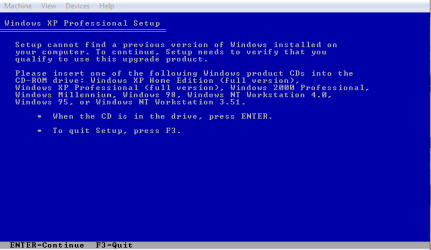
You will need to insert your Windows Millennium CD.

Reuse old XP PC HD as USB drive. Choose to boot from it on new PC?-xp-001.png
My System SpecsSystem Spec
Reply

 Reuse old XP PC HD as USB drive. Choose to boot from it on new PC? problems?


Thread Tools


Similar Threads for: Reuse old XP PC HD as USB drive. Choose to boot from it on new PC?
Thread Forum
Clean Install: Which Hard Drive do I choose? Installation & Setup
Choose a hard-drive to monitor for restore Backup and Restore
Dual boot problem, XP and 7, cannot choose between them Installation & Setup
(NeedHelpPls)Cant choose operating system at boot Installation & Setup
no c drive to choose in backup Backup and Restore


All times are GMT -5. The time now is 09:31 AM.


Windows 7 Forums is an independent web site and has not been authorized,
sponsored, or otherwise approved by Microsoft Corporation.
"Windows 7" and related materials are trademarks of Microsoft Corp.
© Designer Media Ltd
  

1 2 3 4 5 6 7 8 9 10 11 12 13 14 15 16 17 18 19 20 21 22 23 24 25 26 27 28 29 30