Windows 7 Forums Search
Welcome to Windows 7 Forums. Our forum is dedicated to helping you find solutions with any problems, errors or issues you are experiencing with Windows 7. The Windows 7 forum also covers news and updates and has an extensive Windows 7 tutorial section that covers a wide range of tips and tricks.


Windows 7 - HAF X Cooling/Airflow Query

 
10-13-2011   #1


Windows 7 Professional x64


HAF X Cooling/Airflow Query

Hey guys/gals,

I've current got an air-cooled Coolermaster HAF X case and was considering purchasing a Corsair H100 to help improve my CPU temps. I've currently got all the fans on the case set up as they were on purchase, however I was considering reversing the top fan so that it would be pulling in air from outside the case to ensure the radiator which would be mounted just below the top fan was receiving cool air. This however would mean that I'd end up with only one exhaust on the case, so I was thinking I could perhaps attach a 120mm fan to the front of the case where the 5.25in bays are so that the airflow would end up as I've illustrated below.


Does this sound like a feasible idea? I'd be grateful for any criticsms/better ideas. Thanks

My System SpecsSystem Spec
10-13-2011   #2


Windows 7 Pro x64 SP1 and Mac OS X 10.7.3


I have a Corsair 800D and I use the top 3 fans to pull in and the back fan pushes out. So in your case I would have all of the fans pushing air into your case and only have the back fan pussing out.
My System SpecsSystem Spec
10-13-2011   #3


Windows 7 Professional x64


Thanks for the suggestions guys. I was also inclined to leave the the top fans as exhausts Mike, however that's the only place the H100 Radiator can be mounted, and it wouldn't make sense to be pulling in air from the case which would already be hot, which is why I thought the only option was to have the top fans being used to pull in air.

Beta: As Mike pointed out, that would mean I'd have 4 intakes and only one exhaust, do you reckon this would be ok?
My System SpecsSystem Spec
.


10-13-2011   #4


Windows 7 X64 Professional/Windows 8


The HAF X already has excellent air flow. It also, I believe, has 120mm mounting holes where the 140mm fan is on the rear. The radiator could be mounted there. Another option is a little expensive but would work well and be almost silent. The Noctua 140mm fans have 120mm mounting holes and could be used on the rear. Conventional wisdom has usually been to generally match intake and exhaust as well as keep the air flowing in 1 direction. You can also mount the rear exhaust fan on the outside of the case if needed.
My System SpecsSystem Spec
10-13-2011   #5


Windows7 Pro 64bit SP-1; Windows XP Pro 32bit


Quote   Quote: Originally Posted by nub234 View Post
Thanks for the suggestions guys. I was also inclined to leave the the top fans as exhausts Mike, however that's the only place the H100 Radiator can be mounted, and it wouldn't make sense to be pulling in air from the case which would already be hot, which is why I thought the only option was to have the top fans being used to pull in air.

Beta: As Mike pointed out, that would mean I'd have 4 intakes and only one exhaust, do you reckon this would be ok?
Okay I found what I was missing. Holy Cow!
I thought the pump was bigger. I didn't realize how big the radiator on the new one is.

Well this will definetly go on the top and should blow out that way.

The rear case fan blowing out will help remove video card heat as it rises.
That should allow cooler air going into the H-100 radiator then out the top of the case.

My System SpecsSystem Spec
10-13-2011   #6


Windows 7 X64 Professional/Windows 8


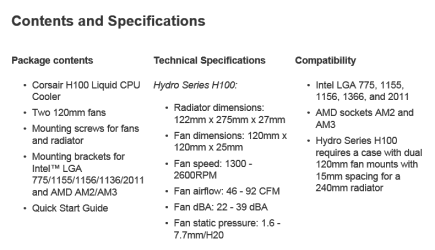
here are the specs on the H100 from the Corsair Site. Notice the last part on the bottom right. Almost seems to limit cases.

HAF X Cooling/Airflow Query-h100.png
My System SpecsSystem Spec
10-13-2011   #7


Windows 7 Pro x64 SP1 and Mac OS X 10.7.3


The diffrence between the H80 and H100 in the real world from what I have read is about 2-3 C. That is why I bought the H80.

Yes, you would have only one exaust but remember that your GPU needed air to and will push air out.
My System SpecsSystem Spec
10-13-2011   #8


Windows7 Pro 64bit SP-1; Windows XP Pro 32bit


Side door 230mm fan blows directly on the GPU.
My System SpecsSystem Spec
10-13-2011   #9


Windows 7 Ultimate X86 SP1


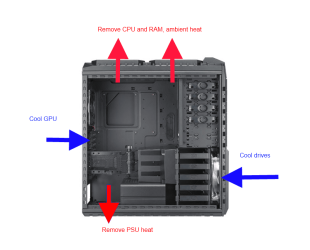
And my 2¢ worth.

HAF X Cooling/Airflow Query-haf-x.png
My System SpecsSystem Spec
Reply

 HAF X Cooling/Airflow Query problems?


Thread Tools


Similar Threads for: HAF X Cooling/Airflow Query
Thread Forum
CPU Cooling Hardware & Devices
Cooling Hardware & Devices
Solved Fan Cooling Vs Water Cooling Hardware & Devices
Cooling Hardware & Devices
cpu cooling Hardware & Devices


All times are GMT -5. The time now is 09:32 AM.


Windows 7 Forums is an independent web site and has not been authorized,
sponsored, or otherwise approved by Microsoft Corporation.
"Windows 7" and related materials are trademarks of Microsoft Corp.
© Designer Media Ltd
  

1 2 3 4 5 6 7 8 9 10 11 12 13 14 15 16 17 18 19 20 21 22 23 24 25 26 27 28 29 30