Windows 7 Forums Search
Welcome to Windows 7 Forums. Our forum is dedicated to helping you find solutions with any problems, errors or issues you are experiencing with Windows 7. The Windows 7 forum also covers news and updates and has an extensive Windows 7 tutorial section that covers a wide range of tips and tricks.


Windows 7 - Akasa InterConnect Internal Smart Card Reader

 
08-02-2009   #1


Windows 7


Akasa InterConnect Internal Smart Card Reader

I'm using Win 7 64bit and I can't get it to see the Akasa InterConnect Internal Smart Card Reader. If this isn't compatible with Win 7 64bit, does anyone please know of an Internal Card Reader that can read HDSC cards?
Thanks.


My System SpecsSystem Spec
08-02-2009   #2


Windows 7 Ultimate 32-bit & 64-bit both SP1


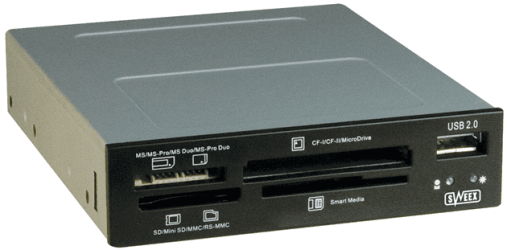
I don't know about the Akasa model, but this is what I have on my system. It works perfectly in all of my installed OSes, and can read/write SDHC cards.
Akasa InterConnect Internal Smart Card Reader-capture.png

Sweex - My Digital Life
My System SpecsSystem Spec
08-02-2009   #3


Windows 7


Thanks Dwarf, but have you used it with a 64bit OS?
My System SpecsSystem Spec
.


08-02-2009   #4


Windows 7 Ultimate 32-bit & 64-bit both SP1


It works with ALL of my OSes, both 32-bit and 64-bit.
My System SpecsSystem Spec
10-30-2009   #5


Windows 7 x64


Same issue for me with this one, anyone know if it got resolved.

I'm dual booting between Windows 7 x64 and Vista x64, Vista works fine, Windows 7 doesn't so I'm pretty sure it's not the connections.

Maybe USB drivers?

Although my external USB multi reader works.


Any ideas will be helpful.

Steve
My System SpecsSystem Spec
10-30-2009   #6


Windows 7


Akasa

Hi Steve,
1. download the file from the link attached below.
2. Unzip the file
3. Go to AK-ICR-05>Auto Play>Docs>Card Reader>Smart Card>Realtek Vista folder
4. Install the driver by running the setup.exe file


http://www.akasa.com.tw/download/sof...-05_driver.zip
My System SpecsSystem Spec
11-06-2009   #7


Windows 7 x64


Cracked it.

I noticed there was a device showing up as ehome infrared receiver (which I'm pretty sure I don't have) the list of compatible devices also showed USB Composite device (I installed the above drivers so not sure if they created this or not). Once I clicked everything is fine.

Cheers for all your help

Steve
My System SpecsSystem Spec
11-10-2009   #8


Windows 7 Pro


Many thanks Elio - just the job - my Akasa card reader was also deemed to be an eHome IR device, and after downloading the driver exactly as you wrote, and clicking on the alternative USB Hub option, magically it all worked.
My System SpecsSystem Spec
10-05-2011   #9


7x64


Two years on but never mind...This thread helped me out.

My Akasa card reader wasn't recognised by Win7x64 and, like others, I had this mysterious eHome IR device in Device Manager. Instead of downloading the Akasa driver, all I did was right click on the entry in Device Manager and asked Windows 7 to install a driver - and it did and it works!
My System SpecsSystem Spec
Reply

 Akasa InterConnect Internal Smart Card Reader problems?


Thread Tools


Similar Threads for: Akasa InterConnect Internal Smart Card Reader
Thread Forum
Smart Card Reader CCID Compatibility. Hardware & Devices
Internal smart card reader Hardware & Devices
Internal Card Reader Problem !! Drivers
Internal Card Reader Hardware & Devices
Gemplus USB Key smart Card Reader question? Drivers


All times are GMT -5. The time now is 09:33 AM.


Windows 7 Forums is an independent web site and has not been authorized,
sponsored, or otherwise approved by Microsoft Corporation.
"Windows 7" and related materials are trademarks of Microsoft Corp.
© Designer Media Ltd
  

1 2 3 4 5 6 7 8 9 10 11 12 13 14 15 16 17 18 19 20 21 22 23 24 25 26 27 28 29 30