Windows 7 Forums Search
Welcome to Windows 7 Forums. Our forum is dedicated to helping you find solutions with any problems, errors or issues you are experiencing with Windows 7. The Windows 7 forum also covers news and updates and has an extensive Windows 7 tutorial section that covers a wide range of tips and tricks.


Windows 7 - "Can't stop generic volume device because a program is still using it"

 
10-16-2011   #1


Windows 7 64 bit


"Can't stop generic volume device because a program is still using it"

I've got an external hard drive...actually this has happened on my other external hard drive too, and i've never been able to solve this problem

most of the time i can eject without a problem and make sure nothing is going to and from the external, but after copying files for a long time in one session, i get the "can't stop generic volume device because a program is still using it" message

i did research and found ways to uninstall the driver as a permanent fix to turning off the computer to unplug to using Process Explorer..granted it was the final straw last night but yeah..

Is there a permanent fix or a good, clean way to solve this problem? And an explanation to why it does this? Thanks.

My System SpecsSystem Spec
10-16-2011   #2


Win7 Home Premium x64 SP1/Windows 8 Consumer Preview x64


Hello disasterpiece91

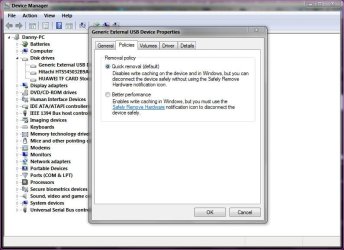
In device manager/drive/policies tab is it set to quick removal of better performance. I was having a similar problem and set it to quick removal and that sorted it.I still use the safely remove hardware to be on the safe side though.
"Can't stop generic volume device because a program is still using it"-capture.jpg

Danny
My System SpecsSystem Spec
10-16-2011   #3


Windows 7 Ultimate x64


Does that control the level of write behind caching on the disk?
My System SpecsSystem Spec
.


10-16-2011   #4


Win7 Home Premium x64 SP1/Windows 8 Consumer Preview x64


Quote   Quote: Originally Posted by Sub Styler View Post
Does that control the level of write behind caching on the disk?
Yes I believe so but overall made no difference at all in transfer speeds between that drive. Not ideal though but this became very annoying so was better than waiting all the time, at least in my case

Danny
My System SpecsSystem Spec
10-16-2011   #5


Windows 7 64 bit


Quote   Quote: Originally Posted by xxxdannyxxx View Post
Hello disasterpiece91

In device manager/drive/policies tab is it set to quick removal of better performance. I was having a similar problem and set it to quick removal and that sorted it.I still use the safely remove hardware to be on the safe side though.
Attachment 179495

Danny
i do have it set to that, but i'm still wary of unplugging it just like that..

..unless nothing bad will happen lol

but can anyone verify the uninstall driver method?
My System SpecsSystem Spec
10-16-2011   #6


MS Windows 7 Ultimate 64-bit SP1


Use Unlocker 1.9.1 to unlock any handles and free the USB HDD from the system to eject it easily.
My System SpecsSystem Spec
Reply

 "Can't stop generic volume device because a program is still using it" problems?


Thread Tools


Similar Threads for: "Can't stop generic volume device because a program is still using it"
Thread Forum
When I click "install now", it's saying "No device drivers were found" Installation & Setup
"A problem has caused the program to stop working" Crashes and Debugging
How to program "stop slouching !" message Customization
WPD filesystem volume driver(error code 10)"device can't start" Drivers
Device Manager-Generic volume Hardware & Devices


All times are GMT -5. The time now is 08:42 AM.


Windows 7 Forums is an independent web site and has not been authorized,
sponsored, or otherwise approved by Microsoft Corporation.
"Windows 7" and related materials are trademarks of Microsoft Corp.
© Designer Media Ltd
  

1 2 3 4 5 6 7 8 9 10 11 12 13 14 15 16 17 18 19 20 21 22 23 24 25 26 27 28 29 30