

- Local time
- 7:51 PM
- Messages
- 89
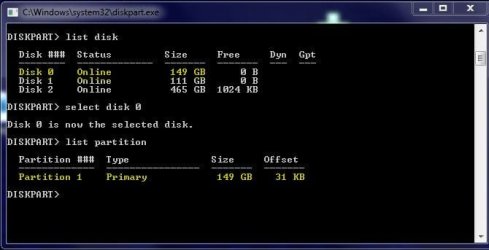
After recently doing a DiskPart check on my old standby notebook (with X25-m 160GB SSD for C-drive), I just noticed that the SSD has an offset of 31KB (not “divisible by 4”). Drats! Don't know how that happened with I upgraded to that SSD six months ago.
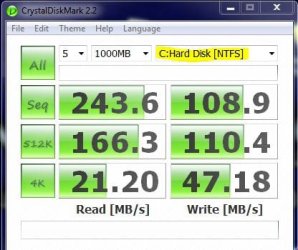
Currently with a Q6600 quad in this mis-aligned-SSD laptop, the X25m benches with Crystal at 243MB/s for sequential reads. That seems a bit slow for even an old quad-core. But I’m not sure it’s worth the bother of re-align if it does 243MB/s since I don’t use it for high performance tasks – or as long as the mis-alignment don’t significantly escalate the WRITE wear-and-tear factor (requiring/wasting more write space than necessary) and impacting the leveling function, thus shortening life-span.
What do you suggest for the easiest and SAFEST method for correcting the mis-alignment on the old notebook, or is it even worth messing with?
If so, should I do Secure Erase, then Diskpart re-align to 1024, then initialize/quick format, then clone (with my fss-Casper) the old original factory spin-HDD with W7 O/S and factory appls already installed on it. Or will the cloning from HDD merely re-re-align the SSD back to the 31KB offset again? Thanks!
Currently with a Q6600 quad in this mis-aligned-SSD laptop, the X25m benches with Crystal at 243MB/s for sequential reads. That seems a bit slow for even an old quad-core. But I’m not sure it’s worth the bother of re-align if it does 243MB/s since I don’t use it for high performance tasks – or as long as the mis-alignment don’t significantly escalate the WRITE wear-and-tear factor (requiring/wasting more write space than necessary) and impacting the leveling function, thus shortening life-span.
What do you suggest for the easiest and SAFEST method for correcting the mis-alignment on the old notebook, or is it even worth messing with?
If so, should I do Secure Erase, then Diskpart re-align to 1024, then initialize/quick format, then clone (with my fss-Casper) the old original factory spin-HDD with W7 O/S and factory appls already installed on it. Or will the cloning from HDD merely re-re-align the SSD back to the 31KB offset again? Thanks!
Attachments
My Computer
At a glance
Windows 7 Ultimate x642x - Xeon E5-2687W128GB Kingston - (2ea kits – 4x16GB)Gigabyte GTX-680 & EVGA GTX-Titan
- Computer type
- PC/Desktop
- Computer Manufacturer/Model Number
- Homemade with cube tower
- OS
- Windows 7 Ultimate x64
- CPU
- 2x - Xeon E5-2687W
- Motherboard
- ASUS Z9PE-D8 WS
- Memory
- 128GB Kingston - (2ea kits – 4x16GB)
- Graphics Card(s)
- Gigabyte GTX-680 & EVGA GTX-Titan
- Sound Card
- Realtek ALC898 8-chan audio
- Monitor(s) Displays
- 2ea - Samsung T260HD 25.5-Inch LCD HDTV / Monitors
- Screen Resolution
- 1920x1200
- Hard Drives
- 8 ea. Crucial & Samsung EVO 2TB SSDs; misc 4ea. 8TB external Seagate spinners.
- PSU
- Corsair AX-1200
- Case
- Lian-Li cube custom
- Cooling
- 2x Dynatron R-17 - CPU Air sinks (160watts TDP)
- Keyboard
- HP slimline wireless
- Mouse
- Microsoft ARC
- Internet Speed
- Faster than a speeding bullet.
- Antivirus
- Norton Security 360 - 2020

