

Alright guys/gals, I'm stuck!
Here we go.... I have a Android Phone(evo4g) and I also have a 60n1 Card Reader neither of then will read cards!
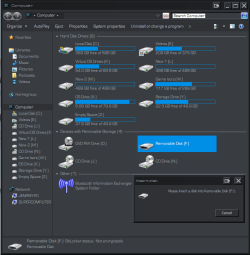
Card Reader= I put any card into it slot (sd,mirosd,sdhc,microsdhc) and it WILL show in computer as a "removable device" but if I go to open them I get "Please insert disk into Removable Disk (f " or whatever drive letter for the others.
Android Phone= Same as above but going through a usb cord.
(See pics...1&2... 1 card not inserted and 2 card inserted)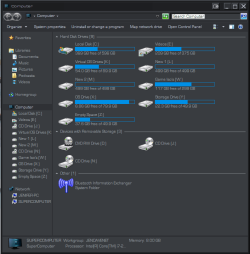
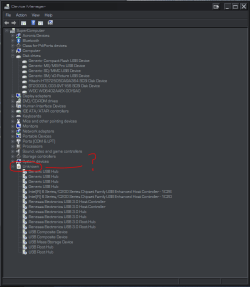
Also I noticed that in my Device Manager the drop down that should be "Universal Serial Bus Controllers" is shown as "Unknown". (See pic 3)
I have uninstalled and re-installed all of the above devices and their driver (including the Mass Storage Device drivers)
I have also run "sfc /scannow" 3+ times .. all with no errors.
Now I do know that the issue is with this Computer only, because I have tested all above Devices on my laptop that is running the same OS as this one and they all work as they should!
So If you can help me out please throw your smarts my way!!!
Pre-Thanks
Jeep
Here we go.... I have a Android Phone(evo4g) and I also have a 60n1 Card Reader neither of then will read cards!
Card Reader= I put any card into it slot (sd,mirosd,sdhc,microsdhc) and it WILL show in computer as a "removable device" but if I go to open them I get "Please insert disk into Removable Disk (f
" or whatever drive letter for the others.Android Phone= Same as above but going through a usb cord.
(See pics...1&2... 1 card not inserted and 2 card inserted)
Also I noticed that in my Device Manager the drop down that should be "Universal Serial Bus Controllers" is shown as "Unknown". (See pic 3)
I have uninstalled and re-installed all of the above devices and their driver (including the Mass Storage Device drivers)
I have also run "sfc /scannow" 3+ times .. all with no errors.
Now I do know that the issue is with this Computer only, because I have tested all above Devices on my laptop that is running the same OS as this one and they all work as they should!
So If you can help me out please throw your smarts my way!!!
Pre-Thanks
Jeep
My Computer
At a glance
Windows 7 Ultimate 64bitIntel Core i7-2600K Sandy Bridge 3.4GHz (@4.5...G.SKILL Ripjaws X Series 16GB 1600Mhz (4 x 4G...x2 EVGA GeForce GTX 760's w/ACXCoolers in SLI...
- Computer type
- PC/Desktop
- Computer Manufacturer/Model Number
- Jeepmann/Custom Built
- OS
- Windows 7 Ultimate 64bit
- CPU
- Intel Core i7-2600K Sandy Bridge 3.4GHz (@[email protected])
- Motherboard
- Asus Maximus IV Extreme LGA 1155 Intel P67
- Memory
- G.SKILL Ripjaws X Series 16GB 1600Mhz (4 x 4GB) (Stock)
- Graphics Card(s)
- x2 EVGA GeForce GTX 760's w/ACXCoolers in SLI Surround
- Sound Card
- On-Board
- Monitor(s) Displays
- 3x Acer 24" HDMI Widescreen LCD Monitor
- Screen Resolution
- 3@ 1920x1080 (5760x1080 In Surround)
- Hard Drives
- Samsung 830 128gb ssd
Western Digital Caviar Black 640GB 7200 RPM
Western Digital Caviar Black 500GB 7200 RPM
Seagate 2tb 7200 RPM
- PSU
- COOLER MASTER Silent Pro 1000W
- Case
- COOLER MASTER HAF X Black
- Cooling
- CORSAIR Hydro H70
- Keyboard
- Logitech G510
- Mouse
- Zalman M300
- Internet Speed
- 100mbps-ish Down & 5mbps-ish Up
- Other Info
- I installed the stock 140mm case fan outside of case then installed the H70+ 1 of its 120mm fans inside case. Used the 2nd 120mm from the H70 to go in the Gpu tunnel.
230mm Front,200mm side,200mm top,120mm Gpu tunnel,120mm&140mm on H70.


