leftkidney
New member
- Local time
- 2:50 PM
- Messages
- 24
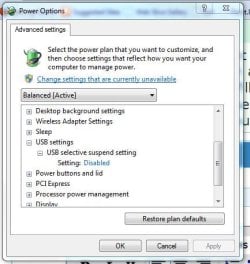
well the USB selective suspend option I have set to "never" and it dont care, it turns off the drive all the time
I can sit there and the drive will spin up and then turn off every 30-45 min, it spins up and then spins down pretty fast as if it was just work up by me and then it is going back to sleep - I cant figure out what on my computer is waking it up but I dont care I dont want it to even go to sleep in the first place
I dont want the USB drives to ever, ever, EVER! spin down no matter what I dont care about power useage or drive life, I cant effing stand this, when I boot into Linux no problems at all the drive will stay running for hours at a time but stupid effing Windows dont work
I can sit there and the drive will spin up and then turn off every 30-45 min, it spins up and then spins down pretty fast as if it was just work up by me and then it is going back to sleep - I cant figure out what on my computer is waking it up but I dont care I dont want it to even go to sleep in the first place
I dont want the USB drives to ever, ever, EVER! spin down no matter what I dont care about power useage or drive life, I cant effing stand this, when I boot into Linux no problems at all the drive will stay running for hours at a time but stupid effing Windows dont work
My Computer
At a glance
Windows 7 Ultimate - Signature EditionIntel Q6600 G0 @3.2GHz8GB DDR2660 2gb ram
- Computer Manufacturer/Model Number
- Custom Built
- OS
- Windows 7 Ultimate - Signature Edition
- CPU
- Intel Q6600 G0 @3.2GHz
- Motherboard
- ASUS P5W DH Deluxe
- Memory
- 8GB DDR2
- Graphics Card(s)
- 660 2gb ram
- Sound Card
- mobo
- Monitor(s) Displays
- Acer 19" - Poineer Elite PRO-111FD
- Screen Resolution
- 1440x900 and 1920x1080
- Hard Drives
- 12 1TB drives - all WD RE4 edition 10 in a raid setup and 2 in a NAS
3 500GB drives - 3 Seagate
1 300GB drive - Seagate - OS Drive
- PSU
- Antec True Power Quattro 850
- Case
- Antec P-182
- Cooling
- Thermalright Ultra 120 Extreme Black Edition