Runnyeye
New member
Hello everyone,
I used to have 2 monitors connected to my pc, both working fine.
Now i got 2 new monitors (LG Flatron E2240) and i tried connecting them the same way as i had my previous monitors connected.
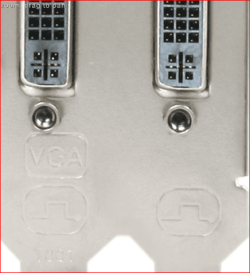
What i see is that both new monitors have a VGA-output. So i put a connector on them so i can connect them to the DVI-slots on my videocard (Radeon HD 6800).
Now i just cant seem to get a second monitor to work. It stays black, receives no signal and both windows 7 as CCC (AMD Engine Control Center latest version) do not recognize a second monitor.
Both monitors work fine if i connect them as a single monitor to my pc. Using the second slot on my videocard just doesnt seem to work.
I did install the drivers that came with the monitor, no effect.
Tried to use different resolutions on both monitors, no effect.
Tried looking for answers, but found nothing, so here i am
Hope anyone can help me and ofcourse willing to give extra info on this if needed.
Thanks allready!!!
I used to have 2 monitors connected to my pc, both working fine.
Now i got 2 new monitors (LG Flatron E2240) and i tried connecting them the same way as i had my previous monitors connected.
What i see is that both new monitors have a VGA-output. So i put a connector on them so i can connect them to the DVI-slots on my videocard (Radeon HD 6800).
Now i just cant seem to get a second monitor to work. It stays black, receives no signal and both windows 7 as CCC (AMD Engine Control Center latest version) do not recognize a second monitor.
Both monitors work fine if i connect them as a single monitor to my pc. Using the second slot on my videocard just doesnt seem to work.
I did install the drivers that came with the monitor, no effect.
Tried to use different resolutions on both monitors, no effect.
Tried looking for answers, but found nothing, so here i am
Hope anyone can help me and ofcourse willing to give extra info on this if needed.
Thanks allready!!!
My Computer
At a glance
Windows 7 Ultimate 64-bit (6.1, Build 7601)AMD Phenom(tm) II X6 1055T Processor (6 CPUs)...Kingston ValueRAM KVR1333D3N9K2/4GXFX HD 6870 1024 MB DDR5
- OS
- Windows 7 Ultimate 64-bit (6.1, Build 7601)
- CPU
- AMD Phenom(tm) II X6 1055T Processor (6 CPUs), ~2.8GHz
- Motherboard
- Asrock 870 Extreme3 | 870
- Memory
- Kingston ValueRAM KVR1333D3N9K2/4G
- Graphics Card(s)
- XFX HD 6870 1024 MB DDR5
- Monitor(s) Displays
- LG Flatron E2240
- Screen Resolution
- 1920 x 1080(p) (60.000Hz)
- Hard Drives
- SAMSUNG HD103UJ ATA Device
- Keyboard
- Logitech G15 Gaming Keyboard