Windows 7 Forums Search
Welcome to Windows 7 Forums. Our forum is dedicated to helping you find solutions with any problems, errors or issues you are experiencing with Windows 7. The Windows 7 forum also covers news and updates and has an extensive Windows 7 tutorial section that covers a wide range of tips and tricks.


Windows 7 - 7 GB ram ( 4 usable ) ? Help, please

 
11-04-2011   #1


Windows 7 Ultimate x64


7 GB ram ( 4 usable ) ? Help, please

I changed from Windows 7 Ultimate x86 to x64 and i upgraded my ram memory from 3 GB to 7 GB.
But in Control Panel i have this : 7 GB ( 4 GB usable )
Can you tell me,please, why only 4 GB, when i have 7 in total ?
Thanks in advance

Attached Images
 
My System SpecsSystem Spec
11-04-2011   #2


Microsoft Windows 7 Ultimate 32-bit 7601 Multiprocessor Free


Its quite strange as far as I know 64 bit versions support RAM upto 192 GB.
My System SpecsSystem Spec
11-04-2011   #3


Windows 7 Ultimate x64


Yes, i know. Thats why i wonder.
I use to have 3 GB DDR3 in triple channel ( 3 x 1 GB ) and i added soon 2 x 2 GB DDR3
Maybe the order they are in the RAM slots on the mobo is not okay?
Could that be the reason ?
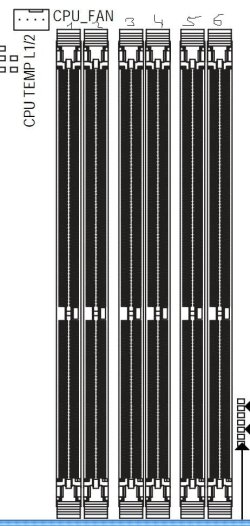
My mobo is Gigabyte GA EX58 UD5
I have 3 x 1 GB DDR3 in 2 / 4 /6 slots and the other 2 x 2 gb are in slots 5 and 3
Attached Thumbnails
7 GB ram ( 4 usable ) ? Help, please-motherboard-ram.jpg  
My System SpecsSystem Spec
.


11-04-2011   #4


Win 7 Ultimate 64-bit SP1, Win 7 Home Premium 32-bit SP1


Quote   Quote: Originally Posted by stereo View Post
Yes, i know. Thats why i wonder.
I use to have 3 GB DDR3 in triple channel ( 3 x 1 GB ) and i added soon 2 x 2 GB DDR3
Maybe the order they are in the RAM slots on the mobo is not okay?
Could that be the reason ?
My mobo is Gigabyte GA EX58 UD5
I have 3 x 1 GB DDR3 in 2 / 4 /6 slots and the other 2 x 2 gb are in slots 5 and 3
I'm not positive, but I think the sticks may all need to be the same size. I could be wrong though.
My System SpecsSystem Spec
11-04-2011   #5


WCP ONLY


Quote   Quote: Originally Posted by stereo View Post
I changed from Windows 7 Ultimate x86 to x64 and i upgraded my ram memory from 3 GB to 7 GB.
But in Control Panel i have this : 7 GB ( 4 GB usable )
Can you tell me,please, why only 4 GB, when i have 7 in total ?
Thanks in advance

Go to start>type msconfig>goto max cpu and max ram and make sure they are both unticked.
My System SpecsSystem Spec
11-04-2011   #6


Win 7 Ultimate x64


Another x58 memory problem. Lots to try here,

Asus X58 + 6/12GB memory overclocking - detecting less memory than installed - i4memory.com - different look at memory

and hope you don't end up like the two here that never didn't manage to fix it,

HUGE problem with Memory Detection
My System SpecsSystem Spec
11-04-2011   #7


Windows 7 Ultimate x64


[QUOTE=noobvious;1642199]
Quote   Quote: Originally Posted by stereo View Post

I'm not positive, but I think the sticks may all need to be the same size. I could be wrong though.
I dont think thats the problem. Anyway, thank you.
My System SpecsSystem Spec
11-04-2011   #8


Windows 7 Ultimate x64


Quote   Quote: Originally Posted by stormy13 View Post
Another x58 memory problem. Lots to try here,

Asus X58 + 6/12GB memory overclocking - detecting less memory than installed - i4memory.com - different look at memory

and hope you don't end up like the two here that never didn't manage to fix it,

HUGE problem with Memory Detection
Should i try to change the memory slots ?
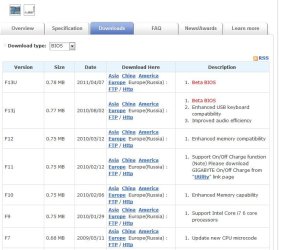
Or maybe an BIOS update ? I have now the BIOS version F9 and, as you can see in the image, BIOS vers. F10 and F12 have ENHANCED MEMORY COMPATIBILITY.
What do you think ?
Thanks a million.
Attached Thumbnails
7 GB ram ( 4 usable ) ? Help, please-bios.jpg  
My System SpecsSystem Spec
11-04-2011   #9


Windows 7 Ultimate x64 & Mac OS X 10.7.1


While matching sticks is not essential it is highly recommended.

Some ram just acts up when pared with non identical moduals.

Also its not uncommon for a issues to occure if all 4 ram slots are used. But its sometimes only mobo specific.

My System SpecsSystem Spec
11-04-2011   #10


Windows 7 Ultimate x64


Quote   Quote: Originally Posted by badger906 View Post
While matching sticks is not essential it is highly recommended.

Some ram just acts up when pared with non identical moduals.

Also its not uncommon for a issues to occure if all 4 ram slots are used. But its sometimes only mobo specific.

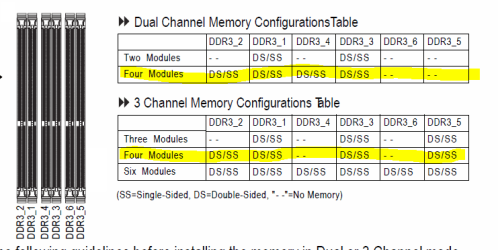
So, what would you suggest ? Should i try to change the slots ?
Here is my motherboars memory slots. How should i put them ?
What would be the best way ?
I have now 3 x 1 GB in slots 1, 3 and 5
And the 2 x 2 GB are in 4 and 6
Thanks again
Attached Thumbnails
7 GB ram ( 4 usable ) ? Help, please-memory-slots-mobo.jpg  
My System SpecsSystem Spec
Reply

 7 GB ram ( 4 usable ) ? Help, please problems?


Thread Tools


Similar Threads for: 7 GB ram ( 4 usable ) ? Help, please
Thread Forum
Solved Only 2.87 GB of Ram Usable Out of 3GB? Performance & Maintenance
4gb ram but only 3.25 usable? Hardware & Devices
16 GB ram Usable. General Discussion
4gb ram but only 3.25 usable Hardware & Devices


All times are GMT -5. The time now is 09:11 AM.


Windows 7 Forums is an independent web site and has not been authorized,
sponsored, or otherwise approved by Microsoft Corporation.
"Windows 7" and related materials are trademarks of Microsoft Corp.
© Designer Media Ltd
  

1 2 3 4 5 6 7 8 9 10 11 12 13 14 15 16 17 18 19 20 21 22 23 24 25 26 27 28 29 30