Windows 7 Forums Search
Welcome to Windows 7 Forums. Our forum is dedicated to helping you find solutions with any problems, errors or issues you are experiencing with Windows 7. The Windows 7 forum also covers news and updates and has an extensive Windows 7 tutorial section that covers a wide range of tips and tricks.


Windows 7 - Raid stopped working after restart

 
11-04-2011   #1


6_1_7600 64bit


Raid stopped working after restart

ok i restarted my computer and for some reason my raid drive reads as unformatted how do i correct this and preferably without losing the data. did a registry restore and a memory scan with no affect.

My System SpecsSystem Spec
11-04-2011   #2


Windows 7 Pro x64 -- PCLinuxOS KDE4 FullMonty 2011


Does you mother board have an option for ahci/raid? Maybe it decided to go ahci. If so change it back to raid.

My board has a habit of changing things around when I try to tweak it too much.
My System SpecsSystem Spec
11-04-2011   #3


Windows 7 Home Premium 32 bit


A very good suggestion by Hipster Doofus.

When after a gap of about four months I switched on my Desktop, Windows would not start and my RAID was lost. When I checked I found that the motherboard battery was dead and this has changed the bios settings. I changed the battery and set my BIOS to RAID and then I was back in business.
My System SpecsSystem Spec
.


11-04-2011   #4


6_1_7600 64bit


the bios look different like an update was done i am trying a very slow recovery program i found irecover i am hoping it helps other wise back into the bios to confirm as you said
My System SpecsSystem Spec
11-05-2011   #5


Windows 7 Home Premium 32 bit


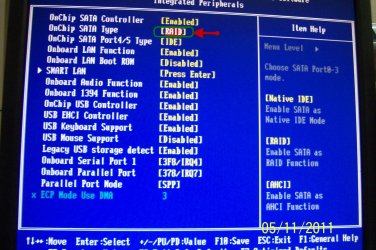
While I am not sure whther this - checking RAID selection in BIOS - would help in your case, anyone who has lost RAID all of a sudden, should always check this setting first.

In my BIOS it it is under Integrated Peripherals.

Raid stopped working after restart-biosraid.jpg
My System SpecsSystem Spec
11-05-2011   #6


Windows 7 Professional SP1 32-bit


Quote   Quote: Originally Posted by scsuperman2000 View Post
the bios look different like an update was done i am trying a very slow recovery program i found irecover i am hoping it helps other wise back into the bios to confirm as you said
That does look like your BIOS was inadvertently reset due to a dead CMOS battery. I agree with jumanji - why run a recovery if you can check the RAID setting first?
My System SpecsSystem Spec
11-05-2011   #7


6_1_7600 64bit


it was already 2 hours in by the time i got a reply just being cautious i guess if the program can fix it great otherwise i wait a day and a half to try the other way. better safe then sorry and best not to waste time invested
My System SpecsSystem Spec
11-05-2011   #8


Windows 7 Home Premium 32 bit


Yes, scsuperman2000, I do agree that since you have already started the recovery process you shouldn't break it.

My post in fact is meant for others, so that they do not straight away rush to any other process.

Sometimes we do tend to overlook simple things.
My System SpecsSystem Spec
11-07-2011   #9


6_1_7600 64bit


was able to find the bios section and it had reset i guess it did an update. wasted 4 days trying irecover wouldn't recommend it after my experience. thank you for your help with my issue. oh and all 4tb plus of data intact.
My System SpecsSystem Spec
Reply

 Raid stopped working after restart problems?


Thread Tools


Similar Threads for: Raid stopped working after restart
Thread Forum
Script to restart an application if it has stopped. General Discussion
Gigabyte RAID not working. Hardware & Devices
Solved win7-64 has stopped seeing my 9Tb GPT partition - areca 5020 raid-box Hardware & Devices
PC Stopped working Hardware & Devices
firefox restart not working Browsers & Mail


All times are GMT -5. The time now is 09:11 AM.


Windows 7 Forums is an independent web site and has not been authorized,
sponsored, or otherwise approved by Microsoft Corporation.
"Windows 7" and related materials are trademarks of Microsoft Corp.
© Designer Media Ltd
  

1 2 3 4 5 6 7 8 9 10 11 12 13 14 15 16 17 18 19 20 21 22 23 24 25 26 27 28 29 30