
 |
Welcome to Windows 7 Forums. Our forum is dedicated to helping you find solutions with any problems, errors or issues you are experiencing with Windows 7. The Windows 7 forum also covers news and updates and has an extensive Windows 7 tutorial section that covers a wide range of tips and tricks.
Windows 7 - usb not recognized in windows 7 |
11-05-2011
|
#1 | | Windows 7 Home Premium SP 1, 32-bit |
usb not recognized in windows 7 After I tried inserting my media card from my camera it has been giving me the error that the usb is not recognized by Windows. It said Windows has stopped device problem (code 43). I troubleshooted it and it didn't fix anything. I also tried using a media card reader and it wouldn't recognize that either. The only way I could get pics off my camera was by plugging it into the camera and then the comptuer. Any ideas?
| My System Specs | | System Manufacturer/Model Number Vostro 220 Mini Tower Desktop Details | Dell OS Windows 7 Home Premium SP 1, 32-bit CPU Intel(R) Core(TM)2 Duo CPU E7400 @ 2.80GHz Motherboard Dell Inc. 0P301D Memory 3.00 GB Graphics Card (1) Intel(R) G45/G43 Express Chipset (2) Intel(R) G45/G43 Sound Card (1) High Definition Audio Device (2) High Definition Audio Monitor(s) Displays Dell 22" wide E228WFP Analog flat panelq Mouse Dell optical usb mouse vostro Other Info OPTICAL READER, MOUSE,SPEAKERS, MONITOR, MODEM |
11-06-2011
|
#2 | | |
Hi PattiChatti,
I understand you have already tried this; Hardware devices are not working or are not detected in Windows
If You have or it does not work try going through this tutorial; USB Driver - General Fix for Problems[2]=Hardware%20and%20Drivers
Using a wired mouse and keyboard would have the best chances of working. | My System Specs | | System Manufacturer/Model Number Something I threw together OS Windows 7 Ultimate x64 CPU Intel Core i7-2600K Motherboard Asus P8P67 Memory 16 GB G Skill F3-10666 CL9D-4GBRL Graphics Card ATI Radeon HD 6870 Sound Card ATI Radeon HDMI / Realtek ALC892 Monitor(s) Displays 2 x 22" standard monitors / LG32LC56v TV to watch films Screen Resolution 1920 x1080 Keyboard Microsoft Comfort Curve Keyboard 2000 Mouse Hama M3110 / Logitech M305 PSU Thermaltake Toughpower Cable Management 750W Case Antec 300 Cooling Noctua NH-U12P SE2 and 5 120mm Case fans Hard Drives 2 x OCZ Vertex2 111.79GB
3 x Samsung103SJ
1 x Samsung103UJ
1 x WD3200BEVT
1 x Hitachi5K320-160 Internet Speed 16000 Other Info I have also used Fedora, Suse, Ubuntu Linux
And all other Windows from 95 to date except ME |
11-06-2011
|
#3 | | Windows 7 Home Premium SP 1, 32-bit |
I do have a wired mouse and wired keyboard.
I tried what you said and could only get so far. I had no grayed out USB's. No INFACHI.1, and none in the windows explorer. So I couldn't go any further. | My System Specs | | System Manufacturer/Model Number Vostro 220 Mini Tower Desktop Details | Dell OS Windows 7 Home Premium SP 1, 32-bit CPU Intel(R) Core(TM)2 Duo CPU E7400 @ 2.80GHz Motherboard Dell Inc. 0P301D Memory 3.00 GB Graphics Card (1) Intel(R) G45/G43 Express Chipset (2) Intel(R) G45/G43 Sound Card (1) High Definition Audio Device (2) High Definition Audio Monitor(s) Displays Dell 22" wide E228WFP Analog flat panelq Mouse Dell optical usb mouse vostro Other Info OPTICAL READER, MOUSE,SPEAKERS, MONITOR, MODEM |
11-06-2011
|
#4 | | |
If this is true and having a look at your previous posts to the forum and having seen all of the troubles you are having I think you should seriously consider re-installing windows 7 or the original Vista | My System Specs | | System Manufacturer/Model Number Something I threw together OS Windows 7 Ultimate x64 CPU Intel Core i7-2600K Motherboard Asus P8P67 Memory 16 GB G Skill F3-10666 CL9D-4GBRL Graphics Card ATI Radeon HD 6870 Sound Card ATI Radeon HDMI / Realtek ALC892 Monitor(s) Displays 2 x 22" standard monitors / LG32LC56v TV to watch films Screen Resolution 1920 x1080 Keyboard Microsoft Comfort Curve Keyboard 2000 Mouse Hama M3110 / Logitech M305 PSU Thermaltake Toughpower Cable Management 750W Case Antec 300 Cooling Noctua NH-U12P SE2 and 5 120mm Case fans Hard Drives 2 x OCZ Vertex2 111.79GB
3 x Samsung103SJ
1 x Samsung103UJ
1 x WD3200BEVT
1 x Hitachi5K320-160 Internet Speed 16000 Other Info I have also used Fedora, Suse, Ubuntu Linux
And all other Windows from 95 to date except ME |
11-07-2011
|
#5 | | Windows 7 Home Premium SP 1, 32-bit |
Oh Gosh - kill me now!!!! | My System Specs | | System Manufacturer/Model Number Vostro 220 Mini Tower Desktop Details | Dell OS Windows 7 Home Premium SP 1, 32-bit CPU Intel(R) Core(TM)2 Duo CPU E7400 @ 2.80GHz Motherboard Dell Inc. 0P301D Memory 3.00 GB Graphics Card (1) Intel(R) G45/G43 Express Chipset (2) Intel(R) G45/G43 Sound Card (1) High Definition Audio Device (2) High Definition Audio Monitor(s) Displays Dell 22" wide E228WFP Analog flat panelq Mouse Dell optical usb mouse vostro Other Info OPTICAL READER, MOUSE,SPEAKERS, MONITOR, MODEM |
11-09-2011
|
#6 | | Windows 7 Home Premium SP 1, 32-bit |
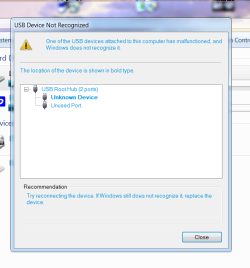
usb Here is a screenshot of the error I get on usb. There is no way I could do a clean install of windows 7, I am still trying to figure out the different settings just when i did a repair install. | My System Specs | | System Manufacturer/Model Number Vostro 220 Mini Tower Desktop Details | Dell OS Windows 7 Home Premium SP 1, 32-bit CPU Intel(R) Core(TM)2 Duo CPU E7400 @ 2.80GHz Motherboard Dell Inc. 0P301D Memory 3.00 GB Graphics Card (1) Intel(R) G45/G43 Express Chipset (2) Intel(R) G45/G43 Sound Card (1) High Definition Audio Device (2) High Definition Audio Monitor(s) Displays Dell 22" wide E228WFP Analog flat panelq Mouse Dell optical usb mouse vostro Other Info OPTICAL READER, MOUSE,SPEAKERS, MONITOR, MODEM |
11-09-2011
|
#7 | | Windows 7 Ultimate X86 SP1 |
Have you tried system Restore? You may have to do a clean install, but give this SFC /SCANNOW Command - System File Checker a try. It may not help, but won't do any harm. | My System Specs | | System Manufacturer/Model Number Brittechnologies II OS Windows 7 Ultimate X86 SP1 CPU i5-2550K differing speeds depending on the day Motherboard ASUS P8X68-V PRO/GEN3 Memory 16GB G.Skill Sniper 2133MHz, 4X4GB Graphics Card ASUS ENGTX460 DirectCU/2DI/1GD5 GeForce GTX 460 Sound Card Onboard Realtek 5-1 Monitor(s) Displays Samsung P2570HD Screen Resolution 1920x1080 Keyboard Old Dell USB From 10 yrs Ago Mouse Gigabyte m6900 wired PSU Corsair HX650W Case Inwin Dragon rider Cooling Hyper 212 EVO w/two Noctua fans @1300 RPM Hard Drives TBA Internet Speed 8-19 Mbs down, 3-4 Mbs up Comcast Cable Other Info 5 fans, LG Bluray/R/RE, ASUS DVD/R/RW |
11-10-2011
|
#8 | | |
I am sorry but if your OS really does not have an INFCACHE.1 then no USB device should work and I really do not know where to start to help you  You also mention a repair install, did it complete successfully? because if that is the case you cannot have followed the USB tutorial through word for word as it should be done.
If you have not successfully completed a repair install then you need to do that before anything else.
See this link for a repair install; Repair Install | My System Specs | | System Manufacturer/Model Number Something I threw together OS Windows 7 Ultimate x64 CPU Intel Core i7-2600K Motherboard Asus P8P67 Memory 16 GB G Skill F3-10666 CL9D-4GBRL Graphics Card ATI Radeon HD 6870 Sound Card ATI Radeon HDMI / Realtek ALC892 Monitor(s) Displays 2 x 22" standard monitors / LG32LC56v TV to watch films Screen Resolution 1920 x1080 Keyboard Microsoft Comfort Curve Keyboard 2000 Mouse Hama M3110 / Logitech M305 PSU Thermaltake Toughpower Cable Management 750W Case Antec 300 Cooling Noctua NH-U12P SE2 and 5 120mm Case fans Hard Drives 2 x OCZ Vertex2 111.79GB
3 x Samsung103SJ
1 x Samsung103UJ
1 x WD3200BEVT
1 x Hitachi5K320-160 Internet Speed 16000 Other Info I have also used Fedora, Suse, Ubuntu Linux
And all other Windows from 95 to date except ME usb not recognized in windows 7 problems? All times are GMT -5. The time now is 11:38 AM. |  |