Windows 7 Forums Search
Welcome to Windows 7 Forums. Our forum is dedicated to helping you find solutions with any problems, errors or issues you are experiencing with Windows 7. The Windows 7 forum also covers news and updates and has an extensive Windows 7 tutorial section that covers a wide range of tips and tricks.


Windows 7 - Fixing a WD My Passport Essentials SE

 
11-07-2011   #1


Windows 7 Home Premium 64bit


Fixing a WD My Passport Essentials SE

Hi guys,

I was using my laptop with my WD Passport Essentials plugged in on the couch, and when I stood up the cable along with the hard drive gently touched down the floor. The result was an small opening in the HDD, not a break, just a opening, and I can't figure out how to put it back in. Here's a screenshot.
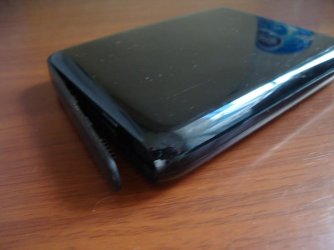
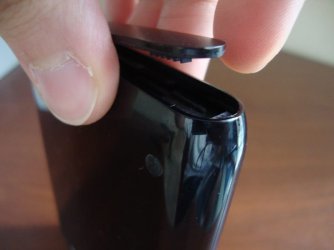
Fixing a WD My Passport Essentials SE-dsc02593.jpg

Fixing a WD My Passport Essentials SE-dsc02595.jpg

The HDD still works fine, its just that I want to be closed again. Help would be appreciated.

Thanks,
Slasher

My System SpecsSystem Spec
11-07-2011   #2


Windows 7 Home Premium 64bit


Anyone?
My System SpecsSystem Spec
11-07-2011   #3


Windows 7 Ultimate 64 bit Steve Ballmer Signature Edition


Superglue???
My System SpecsSystem Spec
.


11-07-2011   #4


Windows 7 Home Premium 64bit


Its not physically broken, it seems there is a way to shove it back into place, I just don't know how. Besides, I don't want to apply Superglue, for fear of it going into the HDD and messing it up.
My System SpecsSystem Spec
11-07-2011   #5


Windows 7 Ultimate x64


Quote   Quote: Originally Posted by Darryl Licht View Post
Superglue???
Like it, If pressing firmly doesn't do it I'd go with that!

Not soaking it all over but just 2 or 3 spots on the inside of the opening. Remember superglue take about 1min to dry on plastic, but about 0.2 seconds to bond your skin!
My System SpecsSystem Spec
11-07-2011   #6


Windows 7 Home Premium 64bit


Well I'd like to put it back in place how it was originally, I doubt WD used glue to keep it in place right?
My System SpecsSystem Spec
11-07-2011   #7


Windows 7 Pro x64 -- PCLinuxOS KDE4 FullMonty 2011


Blutac. Like plasticine but sticky.
My System SpecsSystem Spec
11-07-2011   #8


Windows 7 Home Premium 64bit


I know that lol...

Does anyone know how to place it in without the use of glue? I want to be able to rule out placing it in properly before applying glue...
My System SpecsSystem Spec
11-07-2011   #9


Windows 7 Ultimate 64 bit Steve Ballmer Signature Edition


Can you take a better closeup pic of the underside of the piece that came undone?

PS - the HDD is sealed, Superglue would never get in! Could always use a well placed sticker to hold it down???
My System SpecsSystem Spec
11-07-2011   #10


Windows 7 Home Premium 64bit


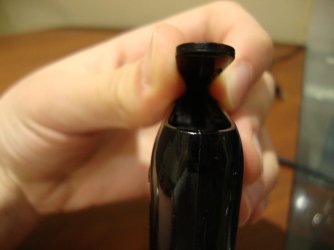
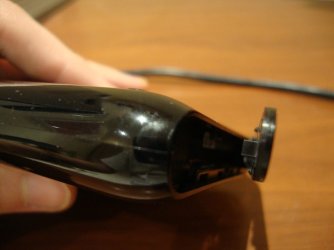
The HDD isn't completely sealed, I think. Alright here's a better pic I think.

Fixing a WD My Passport Essentials SE-dsc02659.jpg

Fixing a WD My Passport Essentials SE-dsc02660.jpg
My System SpecsSystem Spec
Reply

 Fixing a WD My Passport Essentials SE problems?


Thread Tools


Similar Threads for: Fixing a WD My Passport Essentials SE
Thread Forum
WD Passport is not showing under Computer Menu Hardware & Devices
Does anybody have the WD Passport Essential ? Hardware & Devices
External USB WD Passport Essential will not start Drivers
Why is the text on my Passport showing blue? General Discussion
Problem to connect WD Passport (USB) Hardware & Devices


All times are GMT -5. The time now is 11:41 AM.


Windows 7 Forums is an independent web site and has not been authorized,
sponsored, or otherwise approved by Microsoft Corporation.
"Windows 7" and related materials are trademarks of Microsoft Corp.
© Designer Media Ltd
  

1 2 3 4 5 6 7 8 9 10 11 12 13 14 15 16 17 18 19 20 21 22 23 24 25 26 27 28 29 30